- Joined
- Feb 16, 2022
- Messages
- 10
- Reaction score
- 2
Hi Team,
I am facing an issue in setting up Outbound caller ID. I have DIDLogic sip trunk and followed below steps to configure the outbound caller ID for my extensions, unfortunately it is not working.
Thanks in advane.
Cheers!
Linto Anto
I am facing an issue in setting up Outbound caller ID. I have DIDLogic sip trunk and followed below steps to configure the outbound caller ID for my extensions, unfortunately it is not working.
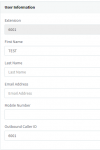
- Edit the extensions to set their respective “Outbound Caller ID” in “General” tab > “User Information” section: (PIC1)
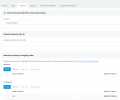
- Edit trunk A (SIP Trunk or PSTN gateway) and in the “Caller ID” tab > “Outbound” section click “Add” to create these rules: (PIC2)
Thanks in advane.
Cheers!
Linto Anto