Solved outbound calls are not working

Status
Not open for further replies.

Jack4ever

SOHO User
Joined
Aug 26, 2020
Messages
36
Reaction score
3
I am running ver 16.0.6.641 hosted by 3CX - I have SIP trunk account at WEEPEE (Belgium)
I have been searching like crazy to make outbound calls working. (inbound is working fine)
Everything else is working fine.(phone app, internal calls, video, etc)
I ordered a (paid)ticket at 3CX - but after 7 mails that 3CX employe closed the ticket as solved :confused:
I can't blame him - I am a newbie and that can be frustrating.

when I make an outbound call I get the message "the call could not be established, call the administrator"
I did the firewall check - no errors.
An employee of WEEPEE told me the settings of my SIP trunk are ok.
The outbound rules should be ok also ???

I want to upload an event log or something - without exposing vulnerable data - what can I do to give more information.

I hope somebody can help me.
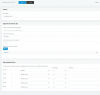
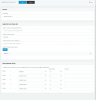
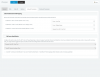
Schermafbeelding 2020-08-31 om 21.37.45.pngSchermafbeelding 2020-08-31 om 21.37.06.png
 
Do you have any other outgoing rules that are higher in the list of outgoing rules? These rules are processed from the top down so if you have a malformed rule above this one, that might be the cause of the outbound call failure.

To make this rule as simple as possible, could you try removing the "Calls to Numbers with a length of" so the only criteria is "Calls from extension(s)". Then make a call from extension 00, 01 or 02 since they are the extensions specified.

Do you have enough credit with your SIP trunk provider? When testing SIP trunk providers that allow free accounts for incoming calls, I've found that testing incoming calls is fine but when I attempt to make an outgoing call, because I have no credit, the call is not completed.
 
Did you try to make an outgoing call from one of the 3 extensions granted in your rule ?
 
I removed the length of the number as Stacey advised.
I have not other outbound rules running and I am trying to make a call on extension 00
Not working...
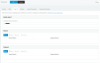
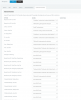
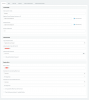
I added the settings of the SIP trunk
and yes I have enough credit to make phone calls on Weepee
 

Attachments

  • Schermafbeelding 2020-08-31 om 23.15.49.png
    Schermafbeelding 2020-08-31 om 23.15.49.png
    84.8 KB · Views: 174
  • Schermafbeelding 2020-08-31 om 23.19.33.png
    Schermafbeelding 2020-08-31 om 23.19.33.png
    50.2 KB · Views: 153
  • Schermafbeelding 2020-08-31 om 23.19.39.png
    Schermafbeelding 2020-08-31 om 23.19.39.png
    73.8 KB · Views: 116
  • Schermafbeelding 2020-08-31 om 23.19.46.png
    Schermafbeelding 2020-08-31 om 23.19.46.png
    81.9 KB · Views: 119
  • Schermafbeelding 2020-08-31 om 23.19.53.png
    Schermafbeelding 2020-08-31 om 23.19.53.png
    148.3 KB · Views: 127
  • Schermafbeelding 2020-08-31 om 23.19.18.png
    Schermafbeelding 2020-08-31 om 23.19.18.png
    84.8 KB · Views: 120
  • Schermafbeelding 2020-08-31 om 23.19.26.png
    Schermafbeelding 2020-08-31 om 23.19.26.png
    24.7 KB · Views: 117
In "Trunk Details" > "Registrar/Server/Gateway Hostname or IP" has a "." after the domain name. Could you try removing that "." and see how you get on?
 
In "Trunk Details" > "Registrar/Server/Gateway Hostname or IP" has a "." after the domain name. Could you try removing that "." and see how you get on?
I was so happy you found a mistake ... but nothing changed.
I refreshed the sip trunk registration and restarted 3CX but still not working.
thanks anyway Stacey
 
I tried adding a SIP Trunk using the template from Country: BE, Select provider in your country: WeePee an found the following default config:

Capture.PNG

I'm not sure if it would make a difference, but could you try removing the Outbound Proxy?

If that doesn't work, maybe removing the SIP Trunk all together and adding it again making sure you have all the latest updates applied and your username and password are correct.

Does your SIP Trunk show that it's registered (green dot in the SIP Trunk list)?
 
I tried adding a SIP Trunk using the template from Country: BE, Select provider in your country: WeePee an found the following default config:

View attachment 17762

I'm not sure if it would make a difference, but could you try removing the Outbound Proxy?

If that doesn't work, maybe removing the SIP Trunk all together and adding it again making sure you have all the latest updates applied and your username and password are correct.

Does your SIP Trunk show that it's registered (green dot in the SIP Trunk list)?

I have done the steps that you described.
The green light is working ... it looks good.
But still the same problem.
 
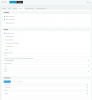
When you place a call, then check the 3CX Activity log, what does it show for that call? Can it "find" an outbound rule, is the call sent to your provider?
 
When you place a call, then check the 3CX Activity log, what does it show for that call? Can it "find" an outbound rule, is the call sent to your provider?

I only see something happening in the "event log" - in activity log I see nothing appearing of my outbound phone call .
It keep saying "The call could not be established , contact administrator.

In Weepee (my SIP trunk provider) I see in 'outbound calls' tab only the fee that I pay every day for the phone number.
 

Attachments

  • Schermafbeelding 2020-09-01 om 07.15.39.png
    Schermafbeelding 2020-09-01 om 07.15.39.png
    53 KB · Views: 94
in your screen copy noticed this
1598943742214.png

Did you set logs in verbose mode to increase details level?
 
Problem solved !
I got a message from Weepee .
He told me that this account was used in the past with another SNOM device.
I just had to push "RESET USER-AGENT beveiliging (security) "
Now it is working ...OMG. I spend hours and hours to find this.
 
  • Like
Reactions: Stacey and AWS2P
Well done, thanks for sharing solution
 
  • Like
Reactions: Jack4ever
Hi Jack,

if you were getting a 503 from your provider, then you need to contact them directly with a timestamp and call details.

The provider was rejecting your call. 3CX Support will need a packet capture before they proceed with further investigation, and this would probably be the first thing they would reply back with - to contact the provider and get their feedback.
 
The outbound calls should have shown in the Activity Log (all calls that 3CX processes do, verbose or not), and you would have seen the rejection message from your provider, indicating that you should contact them, for a resolution.
 
Hi Jack,

if you were getting a 503 from your provider, then you need to contact them directly with a timestamp and call details.

The provider was rejecting your call. 3CX Support will need a packet capture before they proceed with further investigation, and this would probably be the first thing they would reply back with - to contact the provider and get their feedback.
as I already replied in previous post the problem is solved
 
I'm pleased to hear you got it sorted!
 
Status
Not open for further replies.

Latest Posts

Forum statistics

Threads
111,962
Messages
589,986
Members
164,867
Latest member
swegner