Outbound/Outgoing call drops in 15 seconds mark

Sidey

Premier Customer
Joined
Jan 24, 2023
Messages
12
Reaction score
1
Hello,

I have been using 3CX v20 for few months without any issue. However, there was an auto update day before yesterday and now outgoing calls are not functioning properly. The call drops exactly on 15-16 seconds mark.

Incoming calls, calls from extension to extension works fine. So what could be the issue? This is happening only after the new update. I even had to re-configure the SIP trunk with the update as it didn't work after the new update. The new version is (Version 20.0 Update 4 (Build 487 Release)).
 
As a first step, is your firewall check passing?

As a 2nd step you could do a capture from the PBX during an outgoing call and see if you are receiving an acknowledgement from the provider during the outgoing call.
 
As a first step, is your firewall check passing?

As a 2nd step you could do a capture from the PBX during an outgoing call and see if you are receiving an acknowledgement from the provider during the outgoing call.


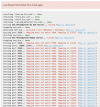
here is the logs (attached) from verbose, regarding the firewall checkup, I will be able to do it a bit later because as a customer service provider I cannot let the service stop at the moment. Based on this logs, could you please check if it can be figured out. I see that
Code:
Call(C:156): Max call duration is set to 10800 sec
which seems to be odd.
 
You can see if the firewall check has pased from the dashboard. Has it passed? The log files only showed 3 seconds of activity.

You can also do a capture from within the PBX without disrupting the services of the PBX.
 
You can see if the firewall check has pased from the dashboard. Has it passed? The log files only showed 3 seconds of activity.

You can also do a capture from within the PBX without disrupting the services of the PBX.
it seems the firewall check has failed. How do I fix this. My network guy said the port forwarding and everything is done on network side.

1733748642511.png
 
Port forwarding may be done, but your firewall is modifying the source port of the PBX. Disable any source port remapping, and also disable SIP ALG!

Clicking on one of those links on the right will take you to the document explaining what the firewall check does and you can use this to configure your firewall accordingly.

https://www.3cx.com/docs/firewall-checker/
 
So I have done everything that can be done on Firewall side, the engineer said everything from network side is totally fine but still on 3CX firewall checks fail as well as the out going call drops exactly on 15 seconds mark.

I now believe this has something to do with the recent update. Because this update forced me to remove the existing trunk and add reconfigure it again because after update I was not receiving the calls. It kept saying "3CX doesn't reach the number you are trying to call" but as soon as I reconfigured the main trunk it started working. To conclude, this has something to do with the latest update.
 
The firewallcheck hasnt something todo with the update, its only firewall related. What kind of firewall you are using? Can you post some screens?
 
We named the firewall checker document very specifically

1733833511233.png

If the PBX doesnt receive the information it wants, its going to show you the middle finger and tell you to go away.

COMPUTERS ARE DUMB, THEY DONT DO WHAT YOU WANT THEM TO DO. THEY DO WHAT YOU TELL THEM TO DO.

And for this particular reason, AI will not take over the world.
 
  • Haha
Reactions: bitn2
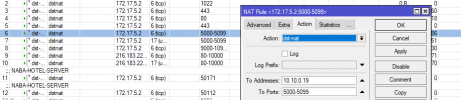
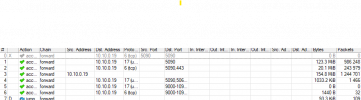
I am using a routerboard..
 

Attachments

  • nat.png
    nat.png
    18.6 KB · Views: 5
  • nat2.png
    nat2.png
    33.7 KB · Views: 5
  • nat3.png
    nat3.png
    19.9 KB · Views: 5
There is one more thing I need an answer, until the latest update, no changes were made on any thing even on network side or 3CX side. It was working perfectly without a single issue.. All the incoming and outgoing calls had no issues at all. So why all of a sudden it could be an issue with firewall after this latest update?
 
I did everything in the shared manual. but still, it didn't work. So, I had to uninstall and downgrade to v20 without the latest builds, and guess what? It's working fine. Outgoing calls no longer drops after 15 seconds. As I assumed, it has something to do with the latest builds. Because there were no changes on Network/Firewall as it only stopped working after the 3CX system was updated.
 

Latest Posts

Forum statistics

Threads
111,962
Messages
589,980
Members
164,866
Latest member
swseabolt