Outbound Rule Clarification

Status
Not open for further replies.

JCubio

Free User
Joined
Oct 7, 2019
Messages
134
Reaction score
13
Hi All,

Can someone please verify if our outbound rule should work as intended?

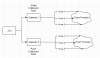
We have 2 grandstream fxo gateway and each gateway is connected to 3 lines of the same provider
1. Grandstream 1 - connected to 3 Globe Lines
2. Grandstream 2 - connected to 3 PLDT Lines

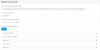
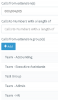
Now since Phillipines mobile number have different prefixes in each provider, ex. Globe starts with ( 0905,0906,0916, etc.) I have lump all prefixes for one provider into 1 outbound rule. (Please see screenshot).

1602594357161.png
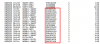
It was working fine (or so I thought) but lately, we have received the call records and in the record I see numbers being called from another provider.

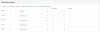
This is the record we received from our Globe account. And these numbers should dialed using the PLDT line.
1602594817612.png

Please advise

Thank you
 
as your rules are based on same extensions and rules are read from top to bottom, then first criteria matching rule stop reading others rules so it is always the one from globe which is used
 
Hi Sir @aws2p,

But the rules do not have redundant prefixes.

Ex. 0951 is in the PLDT rule so that call should be made using the PLDT line. But for some reason, it used the GLobe Line that's why it reflects in our bill.
 
As said rules are read from top to bottom so first matching criteria is your extensions no more, so rule from pldt is never used.
for test change rule order, move pldt rule before globe and you'll see globe won't be used anymore
 
As said rules are read from top to bottom so first matching criteria is your extensions no more, so rule from pldt is never used.

Hi Sir,

Why would calls starting with 0951 will use the Globe Outbound rule when it doesn't match?
Should it jump down to PLDT outbound rule where it matched?

Are you saying that the call will match either the extension or the prefix? not extension and prefix?
 
Hi,

Perhaps if you show us a screenshot of what is inside each rule it may be more clear
 
Perhaps if you show us a screenshot of what is inside each rule it may be more clear
Hi Sir,
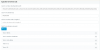
here's our setup
1. GLOBE
1602599432684.png
1602599509565.png
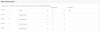
2. PLDT
1602599457611.png
1602599529827.png
 
While the rules would appear to be correct, place a call and check the 3CX Activity Log to confirm the route taken. You could try breaking the list into two, or more rules, each, dealing with only a few prefixes. As the PLDT rule is prefixing with 323, would all numbers dialled, not show with that prefix, in the call records from that provider?
 
Hi Sir @leejor,

The 323 is to make sure that the call will be routed in the Grandstream's 3rd port. Because that line is the only PLDT line where mobile call is enabled.
 
Got it.
I would confirm , in the Activity Log, the route a call is taking (one you suspect is using the wrong rule). As suggested earlier, change the order, and see if the rule used, changes. Create a rule, just for one prefix that seems to using the wrong rule, place it above the other rules and confirm it is being used. Then put the PLDT rule above, and the new rule below. Which is used?

Just trying to see if it a rule problem, or, perhaps a gateway issue.
 
Last edited:
Hi Sir @leejor,

I already checked the grandstream physically to see if I put the cables in the wrong gateway.
Also, I did a test call without touching the rule order. It's working fine though.

I will still monitor it during busy hours.

If the issue remains, I'll try to divide the rule list as you advised.
 
Also, you added 3 extensions (000,004,005) and 5 extension groups.

If those 3 extensions are already members of those groups, you do not need to add them separately.


1602657368866.png
 
  • Like
Reactions: JCubio
Also, you added 3 extensions (000,004,005) and 5 extension groups.
Hi Sir,
Those extensions does not belong to any of the group
 
Ok then look at the Activity Log, and see what rule it went out from.

This should be the most important thing to check. You can enable Verbose logging to get more details
 
  • Like
Reactions: leejor and JCubio
Ok then look at the Activity Log, and see what rule it went out from.

This should be the most important thing to check. You can enable Verbose logging to get more details
I will try this during busy hours sir. I already tested it and works fine but no other calls are active when I test it.
I suspect that it jumps to the other line when other lines are busy but I have to see it myself in the activity log.
 
I suspect that it jumps to the other line when other lines are busy but I have to see it myself in the activity log.
If the gateway is set to allow calls to "roll over" to another outgoing line, when the chosen line is busy, then you'll have to modify the gateway options, if possible. You originally stated that each gateway was connected to 3 lines each, and each going to a different provider. So a call destined for one gateway, could only go out on the providers lines working on that gateway.
 
You originally stated that each gateway was connected to 3 lines each, and each going to a different provider. So a call destined for one gateway, could only go out on the providers lines working on that gateway.
This is what what our analog lines looks like sir. And base on the rule and prefix, it should go to an specific gateway and it doesnt matter which line it will use.
1602690562898.png
I need check the verbose log since the gateways are connected to the 3CX via SBC. Maybe the SBC is messing it.
 
I'm not certain that PSTN Gateways, behind a 3CX SBC is actually supported. That aside, check the Activity Log. It should not even have to be set to verbose, to see which outbound rule is being used.
 
  • Like
Reactions: JCubio
Status
Not open for further replies.

Latest Posts

Forum statistics

Threads
111,964
Messages
590,008
Members
164,870
Latest member
nizammoktar