Outbound webclient call rings Fanvil deskphone.

Status
Not open for further replies.

pgariepy

Bronze Partner
Basic Certified
Joined
Sep 2, 2022
Messages
12
Reaction score
1
So I have a strange issue on an aws lightsail hosted instance I setup a demo server for a customer to try they love it accept for most of their users they want to make calls from the webapp or softphone from their computers and have the deskphone as a backup. So far so good on inbound however they found a weird glitch they have a webclient open and make a call outbound to a cell or land line and their Fanvil x4 deskphone rings. I think this is a result of the click to call functionality somehow kicking in when it should not. At my office I have an instance but polycom650 phones and this does not happen.

Does anyone know how to make the deskphone be quiet on outbound dials from the webclient or softphone?
 
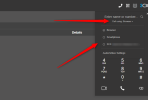
Is your 3CX Web Client, have you selected the ip phone in CSTA mode?
 
Thanks for the reply I found a few references to that but I was not able to find anywhere to set that or change anything in the webclient. That seems like it may be the issue but im not sure how to change it.
 
This can be found in the Web Client as per below screenshot:

2022-11-02_16h49_15.png
 
Thanks I will give it a try, I have another issue now after trying different settings they can no longer login with that extension. logging into the webclient just causes the screen to blink ever heard of that?
 
I would suggest that you clear your browser and try again.
 
Did that even went to another computer and my computer in the office with the same result.
 
Can you please provide a screenshot of the "blink" web client?
 
by blink i mean it just flashes the screen back to the login.. Ill see if I can spin up a video demo.
 
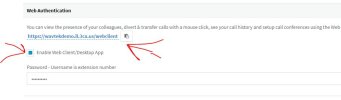
So I verified the web client is enabled,

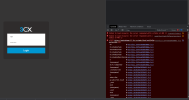
and here is a vid of what it does.

spun up a vm fired up google cleared it out, restarted it and when you log in with the correct creds it just blinks.
 

Attachments

  • 3cx.JPG
    3cx.JPG
    30.8 KB · Views: 4
Can you please clarify if you are using a Linux Desktop?
 
the vm used for video testing was a linux system, the same results are seen with chrome, Firefox and Edge on windows 10, windows 11 and ubuntu 20.04 Both computers in my customers office and the 2 in my office as well as the VM I used for the video all exhibit the same issue.
 
Linux desktop is not tested neither supported for the 3CX Clients. If you replicate this in a Windows machine using Chrome, open the developer mode and try to access the web client is there any error?
 
This indicates that the extension is not authorized to PBX. Have you checked the blacklist? Also try to regenerate credentials and send a new Welcome email and check again.
 
Blacklist was clean, Not worth additional work for a demo, I deleted the extension made a new one then reset the phone and re-added. Everything works fine now. Something must have gone wrong when it was provisioned or one of the settings I tried really broke it good.

Thanks for your help though. I'm going to just chalk it up to a first time setup learning experience.
 
  • Like
Reactions: TheodorosG_3CX
Status
Not open for further replies.

Forum statistics

Threads
111,974
Messages
590,081
Members
164,899
Latest member
mazet