Outgoing calls are always anonymous

Status
Not open for further replies.

Gr24managedservice

Bronze Partner
Basic Certified
Joined
Apr 4, 2022
Messages
17
Reaction score
4
Hello,

we have installed a new 3CX Hosted Phone system for our customer. Only two extensions for now. The outgoing calls keep being displayed as "anonymous" and i don't know why since all my settings seem to be correct (i compared it to another phone system and i can't see any difference). Outbound Caller ID is set. SIP Trunk Outbound Parameters also seems to be correct:

2022-04-04 12_08_59-3CX Phone System Management Console.png

Maybe someone else has or had the same problem?

Thanks for your help.

Best,

Marcus
 
Hi Marcus,

Which provider are you using? Is it a supported one? What you can do is check the activity log of the PBX for the outbound Invite to the provider and see what the PBX is sending.
If the PBX is sending the correct caller ID then the next step is speaking with your provider to see where the issue is.
 
The logs you posted are not relevant I'm afraid. Try setting the logging level to verbose and then try to make another another call. Filter by call and look for an INVITE message from the PBX towards the provider.
That will show you exactly what is being sent to the provider
 
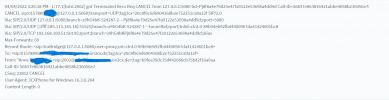
So i changed it to verbose and made another call - came through but as anonymous. Here's the log for the call:

3CX CALL!.png
 
as a test, set a manual phone number in your countries format, and make sure there are no dashes, letters, or special characters. It looks like it might be sending the customers name rather than the phone number according to the logs.

We ran into this issue when we tried to send our business name in the phone number field, it used to work, but our country changed routing rules.
 
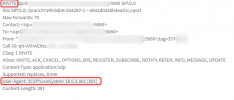
It seems you are looking at the wrong place. You posted a Cancel message from the 3CX Phone for Windows.
You are looking for an Invite message from the PBX. The user agent should be 3CXPhonesystem
1649082637616.png
 
  • Like
Reactions: FridayIT
Have you tried putting your "main" number into the outbound rule? Do you have (full PSTN) DID numbers, set against the extensions for outbound caller ID?
 
Hey guys,

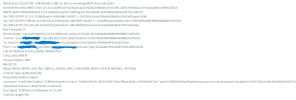
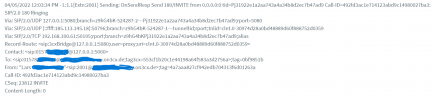
thanks for your help and patience. I'm new to 3CX and VoIP and still learning a lot. following two new screens with "invite". That's a outgoing call from the 3CX softphone ext. 2001 to an external mobile phone no.01578xxxxxx (the call came through, but as anonymous as described before). I can unfortunately only find "3CXPhone for Windows 16.3.0.264" as User:
INVITE 1.png
INVITE 2.png


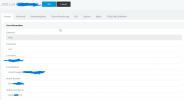
@FridayIT Phone Number is set correctly, without any digits, spaces or wrong letters/special characters. Please see the extension screenshot here:
2001 User Phone Number.png

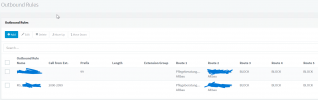
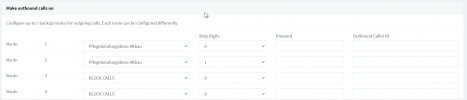
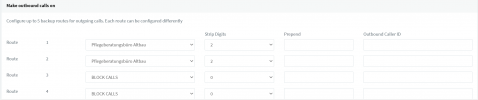
@leejor i have implemented two outbound rules as followed:

Outbound Rules.png

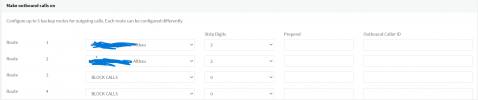
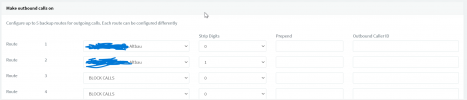
The oubound number-fields are empty though:

Outbound Rule 1.png
Outbound Rule 2.png

Hope these screenshots help you guys further out.

Just waiting until the working hours are done at my customers office, so i'm not disturbing anything.

Thanks!
 

Attachments

  • Outbound Rule 2.png
    Outbound Rule 2.png
    42.5 KB · Views: 9
  • Outbound Rule 1.png
    Outbound Rule 1.png
    39.4 KB · Views: 10
I would try putting a number into the outbound caller ID field, in the outbound rules, to see if you can, at least, get that working. It may be that the number you are using, in the outbound caller ID for the extension(s), is not accepted by your provider, as the format is incorrect, or, it may be that the outbound settings, for the trunk, are not set to use that caller ID. If you put something in the outbound rules, then it will override any other number. You might want to confirm with your provider exactly what format they expect.
 
  • Like
Reactions: FridayIT
Tried the following:

- set the outbound number in the outbound caller ID field
- changed the digits, numbers and tried different variants

Didn't worked out yet, but i will try one more thing from the providers side - maybe that'll help!

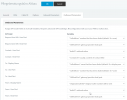
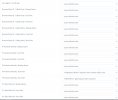
Also, could it depend on those SIP outbound parameters? (i didn't touch anything there yet, it's default):

SIP Trunk Outbound Parameter 1.png
SIP Trunk Outbound Parameter 2.png

As always, many thanks!
 
Those parameters can make a big difference depending on where your provider takes the caller ID. Normally, they do not require any changes if you are using a supported provider.

Who is you provider? Others using that specific provider may have some advice. Is it a 3CX supported provider, or are you using the Generic template?

I keep seeing "3cxBridge" in the posted logs? Does the call involve a 3CX Bridge trunk?
 
At this point I would recommend contacting your provider and asking them in which SIP header do they want to receive the caller ID and in which number format. Both maybe important. Once you know what the provider wants to see then you can make any adjustments if necessary.
 
Good morning,

@leejor i am apparently not using a supported provider. I'm using Purtel as our provider.

We have used the sipgate template to install the SIP-Trunk, maybe there's the problem. Maybe there have to be made some adjustments? Maybe we have to make some small changes as you can see here? https://www.3cx.com/blog/docs/voip-provider-template/

@YiannisH_3CX I also contacted our provider and asked them what is requested. They answered me this:


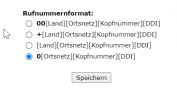
"The phone number format is transferred via "sip.swa.telkodata.de."

Before that i also tried to manually change the following settings in the online portal of our provider:

2022-04-07 12_42_23-Mailbox.png
I tried every different combination in our phone system with those number formats, but i didn't help.. I would say the "00" format should be used anyways. That's also what we use in our intern phone system.

Our provider told me this morning that "it depends on the settings of the phons system. Depending on which format the phone system uses, we have to adjust it in our providers online portal"

I have also found the following setting in our providers online portal:

2022-04-12 08_58_50-Fax.png

The *****1790 is our main trunk no., but also the direct DiD to a extension. Maybe that setting has to be changed from Tel to Trunk? Currently waiting on a answer from their side regarding this.

Thanks as always guys!
 
Their answer was not of much help. Just make sure to use the same number format in both sides. If you are dialing with "0" then have that selected in the providers portal as well. Regarding the other settings that really depends on the provider.
You could always switch to a supported provider to avoid the back and forth and trying to guess what the correct settings are.
 
We have already tried this. 00 as standard set in the providers portal and dialing outbound calls with "00" - didn't help or work. Therefore i guess it's relating to the not supported provider issue.

The next time i will use sipgate or easybell, this will probably prevent small issues (i also have the problem that the 3CX Android Apps don't ring on their phone)

Thanks anyways! I appreciate the help.
 
  • Like
Reactions: YiannisH_3CX
Status
Not open for further replies.

Forum statistics

Threads
111,993
Messages
590,175
Members
164,931
Latest member
admintest