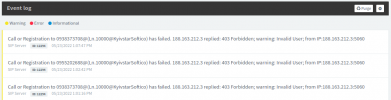
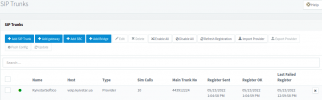
Hi
SIP provider learned captured log and said me that I have incorrect field
from
I have +380443912224
Need 443912224
So I changed in MS user work number and now can call from 3CX-Android-app
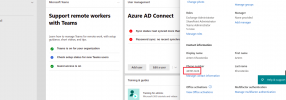
But still no from MS Teams, because somewhat added "+" to my work number in MS Teams
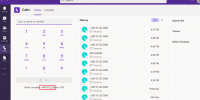
Like you can see on video when MS Teams is opening
from withot "+"
and after moment with "+"
vieo4.mp4
What can be reason? Dial Plans in MS Teams, but they was pushed from 3CX to Teams via Powershell.
# Note: office phone number should start with a '+' and have from 2 to 15 digits
# If it's invalid please correct it in the Microsoft365 user settings
Set-CsPhoneNumberAssignment -Identity
[email protected] -EnterpriseVoiceEnabled $true
Set-CsPhoneNumberAssignment -Identity
[email protected] -PhoneNumber "443912224;ext=100" -PhoneNumberType DirectRouting
Set-CsPhoneNumberAssignment -Identity
[email protected] -EnterpriseVoiceEnabled $true
Set-CsPhoneNumberAssignment -Identity
[email protected] -PhoneNumber "443912224;ext=101" -PhoneNumberType DirectRouting
$users_ids = @("
[email protected]","
[email protected]")
New-CsBatchPolicyAssignmentOperation -PolicyType TenantDialPlan -PolicyName "3CX Dial Plan" -Identity $users_ids -OperationName "Batch assign dial plan"
New-CsBatchPolicyAssignmentOperation -PolicyType OnlineVoiceRoutingPolicy -PolicyName "3CX Voice Route Policy" -Identity $users_ids -OperationName "Batch assign voice routing"
New-CsBatchPolicyAssignmentOperation -PolicyType TeamsCallingPolicy -PolicyName "3CX Calling Policy" -Identity $users_ids -OperationName "Batch assign calling policy"
Install-Module -Name MicrosoftTeams
Connect-MicrosoftTeams
New-CsOnlinePSTNGateway -Fqdn sbc.softico.ua -Enabled $true -SipSignalingPort 5062 -MaxConcurrentSessions 100 -ForwardCallHistory $true -ForwardPai $true
Set-CsOnlinePstnUsage -Identity Global -Usage @{add="3CX PSTN Usage"}
Set-CsOnlinePstnUsage -Identity Global -Usage @{remove="All"}
New-CsOnlineVoiceRoute -Identity "3CX Voice Route" -NumberPattern "^((\+\d+)|(\d{2,5})|(\*0\d)|(\*1\d)|(\*1\d\d{3})|(\*20\*)|(\*20\*\d{3})|(\*3[0-4])|(\*4\d{3})|(\*62)|(\*63)|(\*9\d{3})|(\*9\d{3})|((\+)?\d+\*\*\d+)|(\*64[1-2])|(\*5(\+)?\d+)|(\*68\d)|(\*777)$|(\*888))$" -OnlinePstnGatewayList sbc.softico.ua -OnlinePstnUsages "3CX PSTN Usage" -Priority 1
Set-CsOnlineVoiceRoute -Identity "3CX Voice Route" -NumberPattern "^((\+\d+)|(\d{2,5})|(\*0\d)|(\*1\d)|(\*1\d\d{3})|(\*20\*)|(\*20\*\d{3})|(\*3[0-4])|(\*4\d{3})|(\*62)|(\*63)|(\*9\d{3})|(\*9\d{3})|((\+)?\d+\*\*\d+)|(\*64[1-2])|(\*5(\+)?\d+)|(\*68\d)|(\*777)$|(\*888))$" -OnlinePstnGatewayList sbc.softico.ua -OnlinePstnUsages "3CX PSTN Usage" -Priority 1
New-CsOnlineVoiceRoutingPolicy "3CX Voice Route Policy" -OnlinePstnUsages "3CX PSTN Usage"
New-CsTeamsCallingPolicy -Identity "3CX Calling Policy" -AllowVoicemail "AlwaysDisabled"
New-CsTenantDialPlan -Identity "3CX Dial Plan" -Description "3CX via Direct Routing"
$TCXExt = New-CsVoiceNormalizationRule -Parent Global -Name "3CX Internal" -Description "Dialing 3 Digit Extension" -Pattern '^(\d{3})$' -Translation '$1' -IsInternalExtension $false -InMemory
Set-CsTenantDialPlan -Identity "3CX Dial Plan" -NormalizationRules @{add=$TCXExt}
$TCXUnPartAny = New-CsVoiceNormalizationRule -Parent Global -Name "3CX DialCode Unpark Any" -Description "DialCode Unpark Any" -Pattern '^(\*1\d)$' -Translation '$1' -IsInternalExtension $false -InMemory
$TCXUnPartExt = New-CsVoiceNormalizationRule -Parent Global -Name "3CX DialCode Unpark Ext" -Description "DialCode Unpark Extension" -Pattern '^(\*1\d\d{3})$' -Translation '$1' -IsInternalExtension $false -InMemory
$TCXPickUpAny = New-CsVoiceNormalizationRule -Parent Global -Name "3CX DialCode PickUP Any" -Description "DialCode Pickup Any" -Pattern '^(\*20\*)$' -Translation '$1' -IsInternalExtension $false -InMemory
$TCXPickUpExt = New-CsVoiceNormalizationRule -Parent Global -Name "3CX DialCode PickUP Ext" -Description "DialCode Pickup Any" -Pattern '^(\*20\*\d{3})$' -Translation '$1' -IsInternalExtension $false -InMemory
$TCXProfileChange = New-CsVoiceNormalizationRule -Parent Global -Name "3CX DialCode Profile" -Description "DialCode Profile" -Pattern '^(\*3[0-4])$' -Translation '$1' -IsInternalExtension $false -InMemory
$TCXVboxOfUser = New-CsVoiceNormalizationRule -Parent Global -Name "3CX DialCode Vbox Call" -Description "DialCode Vbox of User" -Pattern '^(\*4\d{3})$' -Translation '$1' -IsInternalExtension $false -InMemory
$TCXQueueIn = New-CsVoiceNormalizationRule -Parent Global -Name "3CX DialCode Queue In" -Description "DialCode Queue LogIn" -Pattern '^(\*62)$' -Translation '$1' -IsInternalExtension $false -InMemory
$TCXQueueOut = New-CsVoiceNormalizationRule -Parent Global -Name "3CX DialCode Queue Out" -Description "DialCode Queue LogOut" -Pattern '^(\*63)$' -Translation '$1' -IsInternalExtension $false -InMemory
$TCXPaging = New-CsVoiceNormalizationRule -Parent Global -Name "3CX DialCode Paging" -Description "DialCode Page Ext" -Pattern '^(\*9\d{3})$' -Translation '$1' -IsInternalExtension $false -InMemory
$TCXBilling = New-CsVoiceNormalizationRule -Parent Global -Name "3CX DialCode Billing" -Description "DialCode Billing" -Pattern '^((\+)?\d+\*\*\d+)$' -Translation '$1' -IsInternalExtension $false -InMemory
$TCX3cxStatus = New-CsVoiceNormalizationRule -Parent Global -Name "3CX DialCode Office" -Description "DialCode Office" -Pattern '^(\*64[0-2])$' -Translation '$1' -IsInternalExtension $false -InMemory
$TCXCallerID = New-CsVoiceNormalizationRule -Parent Global -Name "3CX DialCode CallerID" -Description "DialCode Hide CallerID" -Pattern '^(\*5(\+)?\d+)$' -Translation '$1' -IsInternalExtension $false -InMemory
$TCXHotel = New-CsVoiceNormalizationRule -Parent Global -Name "3CX DialCode Hotel" -Description "DialCode Made Codes" -Pattern '^(\*68\d)$' -Translation '$1' -IsInternalExtension $false -InMemory
$TCXEchoTest = New-CsVoiceNormalizationRule -Parent Global -Name "3CX DialCode Echo" -Description "DialCode Echo Test" -Pattern '^(\*777)$' -Translation '$1' -IsInternalExtension $false -InMemory
$TCXCallTest = New-CsVoiceNormalizationRule -Parent Global -Name "3CX DialCode Call" -Description "DialCode Call Test" -Pattern '^(\*888)$' -Translation '$1' -IsInternalExtension $false -InMemory
Set-CsTenantDialPlan -Identity "3CX Dial Plan" -NormalizationRules @{add=$TCXUnPartAny}
Set-CsTenantDialPlan -Identity "3CX Dial Plan" -NormalizationRules @{add=$TCXUnPartExt}
Set-CsTenantDialPlan -Identity "3CX Dial Plan" -NormalizationRules @{add=$TCXPickUpAny}
Set-CsTenantDialPlan -Identity "3CX Dial Plan" -NormalizationRules @{add=$TCXPickUpExt}
Set-CsTenantDialPlan -Identity "3CX Dial Plan" -NormalizationRules @{add=$TCXProfileChange}
Set-CsTenantDialPlan -Identity "3CX Dial Plan" -NormalizationRules @{add=$TCXVboxOfUser}
Set-CsTenantDialPlan -Identity "3CX Dial Plan" -NormalizationRules @{add=$TCXQueueIn}
Set-CsTenantDialPlan -Identity "3CX Dial Plan" -NormalizationRules @{add=$TCXQueueOut}
Set-CsTenantDialPlan -Identity "3CX Dial Plan" -NormalizationRules @{add=$TCXPaging}
Set-CsTenantDialPlan -Identity "3CX Dial Plan" -NormalizationRules @{add=$TCXBilling}
Set-CsTenantDialPlan -Identity "3CX Dial Plan" -NormalizationRules @{add=$TCX3cxStatus}
Set-CsTenantDialPlan -Identity "3CX Dial Plan" -NormalizationRules @{add=$TCXCallerID}
Set-CsTenantDialPlan -Identity "3CX Dial Plan" -NormalizationRules @{add=$TCXHotel}
Set-CsTenantDialPlan -Identity "3CX Dial Plan" -NormalizationRules @{add=$TCXEchoTest}
Set-CsTenantDialPlan -Identity "3CX Dial Plan" -NormalizationRules @{add=$TCXCallTest}