Outgoing calls per day and sip trunk

Status
Not open for further replies.

Tomas Raska

Forum User
Joined
Aug 18, 2017
Messages
99
Reaction score
10
Hello, becaus we have more SIP trunks, I need report, where I can see this information:
For every SIP trunk, per day, quantity of incomming calls - outgoing calls, or better per hour.

How I can this create?
Exist any tool, where I can make my own report?

Trunk report show me only incomming calls, and only for in report defined time range

Thank you
 
Hello @Tomas Raska,

At present our report columns can't be edited, meaning that the Trunk report you ran will only give you the trunk number and total number of calls.
 
I think total number of incomming calls.
 
@Tomas Raska,

You're correct, I meant the total number of incoming calls.

Depending on how your PBX is set up, you could run a Call Report per set of extensions which will give you more details with regards to the info you want. This may be inaccurate if you have multiple SIP routes set per outbound rule. If you only have 1, it could give you a more accurate estimation (but that is what it would be).
 
Yes, we have more outbound rules, this is not solution.
Solution for me is for example Report - Outgoing calls on SIP Trunks, with SIP Trunk field, then I can make in Excel Pivot Table. And second Report - Incoming calls on SIP Trunks, it will also be helpful.

Is it possible, that 3cx add this reports? In near future?

We are blind now
 
It is likely that your SIP Trunk provider can provide you with the outgoing / incoming call information you're looking for too.

It's unlikely that any reports will be updated in the near future as the focus is currently elsewhere.
 
I encourage you to take a look at the optional CDR files 3CX can create. In the CDR there are two columns From_Type and To_Type that may make it possible to determine whether the call was inbound vs outbound. You can also get the information you need by evaluating the data (for example the number of digits dialed). You would need to parse these files and put the data into a database. From there, you can write the needed report using your preferred reporting tool (Examples: Power BI, SQL Reporting Services, Crystal Reports, or even Excel).

To configure 3CX to generate the CDR files select: Settings --> CDR.

If parsing the CDR files and putting the data in SQL or MySQL is more than you want to deal with yourself, you may want to consider looking at our 3CX Exporter tool that can automate the entire process.
 
I encourage you to take a look at the optional CDR files 3CX can create. In the CDR there are two columns From_Type and To_Type that may make it possible to determine whether the call was inbound vs outbound. You can also get the information you need by evaluating the data (for example the number of digits dialed). You would need to parse these files and put the data into a database. From there, you can write the needed report using your preferred reporting tool (Examples: Power BI, SQL Reporting Services, Crystal Reports, or even Excel).

To configure 3CX to generate the CDR files select: Settings --> CDR.

If parsing the CDR files and putting the data in SQL or MySQL is more than you want to deal with yourself, you may want to consider looking at our 3CX Exporter tool that can automate the entire process.
Thank you, but I think in CDR again missing information, which SIP Trunk.
Even after a few years, 3cx lacks basic functionality. This is not my first problem.
 
@Tomas Raska
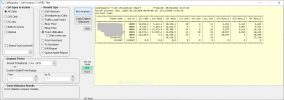
This is the sort of thing CallSequitur can do using CDRs. So although it's not yet a 'built-in' function of 3CX, it's possibly the quickest & easiest way to get the information you need right now. You can read the CallSequitur documentation and find downloads here. Trunk reporting will get you information like this:
1612884458466.png
 
Status
Not open for further replies.