OVH on-Premise after upgrade to V18 update 9 server error

Status
Not open for further replies.

petxi79

Gold Partner
Advanced Certified
Joined
Mar 15, 2019
Messages
19
Reaction score
36
Hello,

we have 5 servers hosted in OVH that after upgrade to V18 u9 have gotten a server error and we cannot access to Admin Console.
We have detected that port 5001 has been added to FQDN

Any other partner with 3CX in OVH have similar issue?

Thanks in advance,
Jaume Frias
Vertical Ibérica
 
All our instances are in OVH and can confirm I've not had this issue with my U9 installs.
 
Yes, we had five instances fail upgrade and cause full outages across 50+ sites. We had to manually restart services using sudo 3CXStopServices && sudo 3CXStartServices from the command line.
 
  • Like
Reactions: petxi79
Actually, I've had 2 instances now where I've had to restart services to get PBX going on OVH.

Tried to install U9 but it failed with:

Code:
Hit:1 http://repo.3cx.com/debian/1809 buster InRelease
Hit:2 http://repo.3cx.com/debian-security/1809 buster InRelease
Hit:3 http://repo.3cx.com/3cx buster-testing InRelease
Hit:4 http://repo.3cx.com/3cx buster InRelease
Reading package lists...
W: --force-yes is deprecated, use one of the options starting with --allow instead.
E: dpkg was interrupted, you must manually run 'sudo dpkg --configure -a' to correct the problem. 
Rollback to 18.0.9.20
18.0.8.939...
Hit:1 http://repo.3cx.com/debian/1809 buster InRelease
Hit:2 http://repo.3cx.com/debian-security/1809 buster InRelease
Hit:3 http://repo.3cx.com/3cx buster-testing InRelease
Hit:4 http://repo.3cx.com/3cx buster InRelease
Reading package lists...
W: --force-yes is deprecated, use one of the options starting with --allow instead.
E: dpkg was interrupted, you must manually run 'sudo dpkg --configure -a' to correct the problem.

had to run
Code:
sudo dpkg --configure -a
and it upgraded to U9.
 
Last edited:
  • Love
Reactions: tronic
Hello Team

Yes unfortunately sometimes these issues occur. Really nothing to do with the iso per se. Mostly related to an interruption in dpkg. This is why the tool suggests --configure -a in order to check and fix inconsistencies in the packages.

Of course, we can check to see where the update failed and see what we can do to improve.

We will need logs to understand what happened on these instances.
Can you please collect the following logs:

Bash:
/var/log/dpkg.log
/var/log/apt/term.log
/var/log/syslog
/var/log/postgresql
/var/lib/3cxpbx/Instance1/Data/Logs/
/var/lib/3cxpbx/Data/Logs/
+ the output of journal -xe

Lets agree that any time you have a failure, send a support ticket and add this info.

Added a bash script that collects all these logs for you. A directory called collected_logs is created and copies the specified log files into it. + captures the output of journal -xe and saves it to a file within the same directory.


Bash:
#!/bin/bash

output_dir="collected_logs"
mkdir -p "$output_dir"

log_files=(
    "/var/log/dpkg.log"
    "/var/log/apt/term.log"
)

log_directories=(
    "/var/log/syslog"
    "/var/log/postgresql"
    "/var/lib/3cxpbx/Instance1/Data/Logs/"
    "/var/lib/3cxpbx/Data/Logs/"
)

# Copy log files to the output directory
for log_file in "${log_files[@]}"; do
    if [ -e "$log_file" ]; then
        cp "$log_file" "$output_dir/"
    else
        echo "File not found: $log_file"
    fi
done

# Recursively copy contents of log directories to the output directory
for log_dir in "${log_directories[@]}"; do
    if [ -e "$log_dir" ]; then
        cp -r "$log_dir" "$output_dir/"
    else
        echo "Directory not found: $log_dir"
    fi
done

# journalctl 
journalctl -xe > "$output_dir/journalctl_output.txt"

echo "Logs collected successfully. Check the '$output_dir' directory."

1. nano collect_logs.sh and paste script

2. Run chmod to make an exe
Bash:
chmod +x collect_logs.sh

3. execute
Bash:
./collect_logs.sh

You should end up with this

1702404533680.png

Package everything and send over for investigation. Upload them somewhere and send me link in pm to download. Or if you have support contracts, open a support request and send us this information.

At your disposal on this one
 
Hello Team

Yes unfortunately sometimes these issues occur. Really nothing to do with the iso per se. Mostly related to an interruption in dpkg. This is why the tool suggests --configure -a in order to check and fix inconsistencies in the packages.

Of course, we can check to see where the update failed and see what we can do to improve.

We will need logs to understand what happened on these instances.
Can you please collect the following logs:

Bash:
/var/log/dpkg.log
/var/log/apt/term.log
/var/log/syslog
/var/log/postgresql
/var/lib/3cxpbx/Instance1/Data/Logs/
/var/lib/3cxpbx/Data/Logs/
+ the output of journal -xe

Lets agree that any time you have a failure, send a support ticket and add this info.

Added a bash script that collects all these logs for you. A directory called collected_logs is created and copies the specified log files into it. + captures the output of journal -xe and saves it to a file within the same directory.


Bash:
#!/bin/bash

output_dir="collected_logs"
mkdir -p "$output_dir"

log_files=(
    "/var/log/dpkg.log"
    "/var/log/apt/term.log"
)

log_directories=(
    "/var/log/syslog"
    "/var/log/postgresql"
    "/var/lib/3cxpbx/Instance1/Data/Logs/"
    "/var/lib/3cxpbx/Data/Logs/"
)

# Copy log files to the output directory
for log_file in "${log_files[@]}"; do
    if [ -e "$log_file" ]; then
        cp "$log_file" "$output_dir/"
    else
        echo "File not found: $log_file"
    fi
done

# Recursively copy contents of log directories to the output directory
for log_dir in "${log_directories[@]}"; do
    if [ -e "$log_dir" ]; then
        cp -r "$log_dir" "$output_dir/"
    else
        echo "Directory not found: $log_dir"
    fi
done

# journalctl
journalctl -xe > "$output_dir/journalctl_output.txt"

echo "Logs collected successfully. Check the '$output_dir' directory."

1. nano collect_logs.sh and paste script

2. Run chmod to make an exe
Bash:
chmod +x collect_logs.sh

3. execute
Bash:
./collect_logs.sh

You should end up with this

View attachment 38654

Package everything and send over for investigation. Upload them somewhere and send me link in pm to download. Or if you have support contracts, open a support request and send us this information.

At your disposal on this one
Hi Nikolas

not sure if the logs are any good to you at this point but i've uploaded 2 customer logs on support ticket 1419783
 
  • Like
Reactions: nikolascx
hi @kieferschild
We received them - thank you for doing this. They are being checked with Priority.
At your disposal
 
Actually, I've had 2 instances now where I've had to restart services to get PBX going on OVH.

Tried to install U9 but it failed with:

Code:
Hit:1 http://repo.3cx.com/debian/1809 buster InRelease
Hit:2 http://repo.3cx.com/debian-security/1809 buster InRelease
Hit:3 http://repo.3cx.com/3cx buster-testing InRelease
Hit:4 http://repo.3cx.com/3cx buster InRelease
Reading package lists...
W: --force-yes is deprecated, use one of the options starting with --allow instead.
E: dpkg was interrupted, you must manually run 'sudo dpkg --configure -a' to correct the problem.
Rollback to 18.0.9.20
18.0.8.939...
Hit:1 http://repo.3cx.com/debian/1809 buster InRelease
Hit:2 http://repo.3cx.com/debian-security/1809 buster InRelease
Hit:3 http://repo.3cx.com/3cx buster-testing InRelease
Hit:4 http://repo.3cx.com/3cx buster InRelease
Reading package lists...
W: --force-yes is deprecated, use one of the options starting with --allow instead.
E: dpkg was interrupted, you must manually run 'sudo dpkg --configure -a' to correct the problem.

had to run
Code:
sudo dpkg --configure -a
and it upgraded to U9.
I had a similar issue with multiple instances failing to upgrade from 18.0.8.939 to 18.0.9.20 all running on light sail.

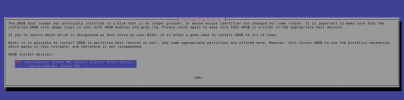
I rolled most of them back to 18.0.8.939 but one i couldn't, running "sudo dpkg --configure -a" made it update and now is working. You can see what came up when i ran it attached as pic. Then the error below

Reading database ... 52837 files and directories currently installed.)
Preparing to unpack .../3cxpbx_18.0.9.20_amd64.deb ...
Removed /etc/systemd/system/sysinit.target.wants/3CXFirewall.service.
Removed /etc/systemd/system/3CXQueueManager01.service.
Removed /etc/systemd/system/3CXMediaServer.service.
Removed /etc/systemd/system/3CXPhoneSystem01.service.
Removed /etc/systemd/system/3CXCallFlow01.service.
Removed /etc/systemd/system/3CXSystemService01.service.
Removed /etc/systemd/system/3CXEventNotificationManager.service.
Removed /etc/systemd/system/3CXIVR01.service.
Removed /etc/systemd/system/3CXCfgServ01.service.
Removed /etc/systemd/system/multi-user.target.wants/3CXQueueManager01.service.
Removed /etc/systemd/system/multi-user.target.wants/3CXMediaServer.service.
Removed /etc/systemd/system/multi-user.target.wants/3CXPhoneSystem01.service.
Removed /etc/systemd/system/multi-user.target.wants/3CXCallFlow01.service.
Removed /etc/systemd/system/multi-user.target.wants/3CXSystemService01.service.
Removed /etc/systemd/system/multi-user.target.wants/3CXEventNotificationManager.service.
Removed /etc/systemd/system/multi-user.target.wants/3CXIVR01.service.
Removed /etc/systemd/system/multi-user.target.wants/3CXCfgServ01.service.
Removed /etc/systemd/system/multi-user.target.wants/3CXAudioProvider01.service.
Removed /etc/systemd/system/multi-user.target.wants/3CXGatewayService.service.
Removed /etc/systemd/system/multi-user.target.wants/3CXPhoneSystemMC01.service.
Removed /etc/systemd/system/3CXAudioProvider01.service.
Removed /etc/systemd/system/3CXGatewayService.service.
Removed /etc/systemd/system/3CXPhoneSystemMC01.service.
Unpacking 3cxpbx (18.0.9.20) over (18.0.8.939) ...
Setting up grub-pc (2.06-3~deb10u4) ...
debconf: unable to initialize frontend: Dialog
debconf: (Dialog frontend will not work on a dumb terminal, an emacs shell buffer, or without a controlling terminal.)
debconf: falling back to frontend: Readline
Configuring grub-pc
-------------------

The GRUB boot loader was previously installed to a disk that is no longer
present, or whose unique identifier has changed for some reason. It is important
to make sure that the installed GRUB core image stays in sync with GRUB modules
and grub.cfg. Please check again to make sure that GRUB is written to the
appropriate boot devices.

If you're unsure which drive is designated as boot drive by your BIOS, it is
often a good idea to install GRUB to all of them.

Note: it is possible to install GRUB to partition boot records as well, and some
appropriate partitions are offered here. However, this forces GRUB to use the
blocklist mechanism, which makes it less reliable, and therefore is not
recommended.

1. /dev/nvme0n1 (64424 MB; Amazon Elastic Block Store) 3. none of the above
2. - /dev/nvme0n1p1 (64423 MB; /)

(Enter the items you want to select, separated by spaces.)

GRUB install devices:
 

Attachments

  • 3cx error.png
    3cx error.png
    100.5 KB · Views: 6
Hi there,

I understand this is a problem but also keep in mind, that this is not happening for everyone. So we need to tackle this on a case by case basis. However, this is an interesting one. Let's break this down.

My opinion goes like this:
  1. 1 or 2 years ago you installed 3CX on OVH
  2. Time passed. You are happily running 3CX.
  3. In this time, can we/you be 100 % sure that nothing changed in the OS? The answer is No because you are not the sole maintainer of a cloud hosting instance and time passed.
  4. Now 3CX presents a U9 script that updates on the majority of instances, but fails in yours.
  5. It also fails specifically because of GRUB - the Grand Unified Bootloader was installed on a disk that is no longer available (Quite a serious issue to be something related from our script) - or the GRUB identifier has changed. (Which implies that it was moved)
The below is a complete list of all the issues that can cause this problem.
  1. Change in Disk Configuration:
    • If you've made changes to your system's disk configuration, such as removing a disk or changing its partition structure, the unique identifiers for the disks or partitions may have changed.
  2. Disk Failure:
    • If the disk on which GRUB was originally installed has failed or is no longer accessible, GRUB won't be able to find its components.
  3. BIOS/UEFI Changes:
    • Changes in BIOS/UEFI settings, such as the boot order or disk configuration, might affect GRUB's ability to locate the necessary components.
  4. Operating System Updates:
    • System updates, particularly those related to the kernel or GRUB itself, can sometimes lead to inconsistencies between the GRUB core image, modules, and configuration files.
  5. Reinstalling or Changing Operating Systems:
    • Installing a new operating system or reinstalling the existing one might overwrite or modify the GRUB configuration.
  6. Disk Renaming or Reordering:
    • If the disk naming or order changes (e.g., from /dev/sda to /dev/sdb), GRUB may not be able to find the correct disk.
  7. Incomplete GRUB Installation:
    • If there were issues during the initial GRUB installation, such as interrupted installations or incomplete configurations, it can lead to synchronization problems.
So if something from the above points happened here, the default update script will not work. I can also honestly see these things happening over the lifetime of a hosted linux image - And I doubt you as a client will be informed of this. For example, the hoster can handle disk failure without even informing you. You just see a 2 minute downtime reported on the site. You cannot always know exactly why that downtime occurred.

Thankfully, Linux gives you a solution to fix this. So yes, let us be prepared to run sudo dpkg --configure -a.

Conclusion: It is impossible to make 1 upgrade script, that upgrades all the machines in the world, in all the environments they are installed on, catering for all the operating and cloud hosting changes that could have been made during this time.

So let us be prepared to keep an eye on these issues and of course always welcome to report them here. We will always look into each issue and together learn on ways to improve.

Thanks for reporting.
 
Just for others that have the same, issue. This happens for any light sail install that you have taken a snapshot and then restored from a snapshot. When you do a spec upgrade etc. Upgrades to version 20 went fine after this too.
 
Last edited:
Status
Not open for further replies.

Forum statistics

Threads
111,973
Messages
590,079
Members
164,898
Latest member
grahamaskew