'Page Not Found' with Zoho One Integration

Status
Not open for further replies.

Reece Cawthorn

Platinum Partner
Advanced Certified
Joined
Mar 5, 2021
Messages
58
Reaction score
15
Hello,

I hope you're all well!

I am currently encountering a strange issue with Zoho One that I hope some may be able to shed a light on.

I have successfully integrated 3CX with a prospective customer's Zoho One instance and this facilitates a number of integration features without issue (inc. Call Journaling, Chat Journaling, Contact Name on Call/Chat, Contact Name in Missed Calls, Voicemails, etc.).

Strangely, however, when I attempt to launch the CRM Contact Page (either automatically or by clicking one of the 'CRM' links within the Web Client), I am directed to a new tab reading 'Page Not Found'.

This is strange as I know the 3CX system can identify the caller based on Contact Information saved within Zoho One, however, this will not launch when prompted.

Once the call/chat is ended, the information automatically uploads onto the Contact within Zoho One, as per the expected behaviour.

I have conducted packet captures, support info generations, etc. to identify the issue but, so far, have had no joy.

Has anyone encountered this before? Or could anyone advise amendments to resolve?

I look forward to hearing from you!

All the best,

Reece
 
Hello Reece,

The integration provided by 3CX is for Zoho CRM, and not Zoho One. I'm not an expert in Zoho, but I have the feeling that Zoho One is a set of products, and then maybe you don't have the CRM enabled?
 
Hi Ernesto,

Thank you for replying!

To clarify, Zoho One is the overarching programme with additional applications (inc. CRM, Recruit, etc.) included within.

The integration with 3CX occurs directly with Zoho CRM through Zoho One as this is where the customer's contact information is stored.

As I say, strangely, all other elements of the integration work as expected and the integration does link inbound caller ID (3CX) to Contact (Zoho).

The only issue is that, when prompted, the integration does not launch the customer's contact page within Zoho!

Any suggestions would be greatly appreciated.

All the best,

Reece
 
Hi Ernesto,

Thank you for replying!

To clarify, Zoho One is the overarching programme with additional applications (inc. CRM, Recruit, etc.) included within.

The integration with 3CX occurs directly with Zoho CRM through Zoho One as this is where the customer's contact information is stored.

As I say, strangely, all other elements of the integration work as expected and the integration does link inbound caller ID (3CX) to Contact (Zoho).

The only issue is that, when prompted, the integration does not launch the customer's contact page within Zoho!

Any suggestions would be greatly appreciated.

All the best,

Reece


Could you please outline the steps you followed to complete your integration, step by step?
Additionally, please provide the URL you used to access the 'not found' page.
 
Hi Guillaume,

This navigates me to a Zoho CRM info page (below):

1723554833960.png

All the best,

Reece
 
Click on 'Access Zoho CRM' at the top right, ensure you have access to contacts in Zoho CRM, and then try the URL again to see if it displays your contact with the URL.
Otherwise, please send me an example of the URL you see when you open a contact record through your web browser.
The URL should look like this:

https://[DOMAIN]/crm/EntityInfo.do?module=Contacts&id=485651000003513001
 
Hi Guillame,

I think this may be the root of the issue.

When I amend the URL to 'crm.zoho.eu' the contact opens, as expected.

Please can you advise how I could amend this within the integration template to resolve the issue moving forward?

Thank you for your assistance on this so far.

All the best,

Reece
 
Hi Guillame,

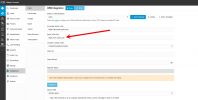
Further to this, I have amended the 'Zoho CRM URL' within the 'Integration' settings and this now operates without issue.

Thank you for your assistance with this, it is greatly appreciated!

All the best,

Reece
 
[...]

I think this may be the root of the issue.

When I amend the URL to 'crm.zoho.eu' the contact opens, as expected.

Please can you advise how I could amend this within the integration template to resolve the issue moving forward?

[...]


Great! Yes, that's exactly what I thought! This is precisely why Ernesto specified "Zoho CRM" instead of "Zoho One."

1723555373657.png
 
Hi Guillame,

Further to this, I have amended the 'Zoho CRM URL' within the 'Integration' settings and this now operates without issue.

Thank you for your assistance with this, it is greatly appreciated!

All the best,

Reece


I'm happy to help!

As a way to reward me (even though I haven't done much), I have a favor to ask of you. :-)
Have you heard of "serial reciprocity / paying it forward"?
Now it's your turn to help someone in the 3CX forum!
Find a question from someone that you can answer, and respond to it.
Even if you're not sure of the answer, no worries, just give it a try :-)

This way, the good deed will keep on going!
It's not a rule, but if you want to reward our good deed, this is the most gratifying way to do it! :D
 
Status
Not open for further replies.

Members Online Now

Forum statistics

Threads
111,852
Messages
589,385
Members
164,691
Latest member
Daz1964