


- Joined
- Mar 28, 2023
- Messages
- 16
- Reaction score
- 10
Hi all,
This is a combination between a (suspected) bug report and a request for someone to perhaps let me know if I am doing something wrong, or perhaps a workaround for anyone who else might be struggling with it...
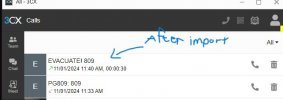
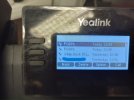
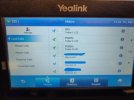
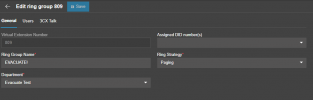
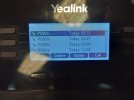
Today I set up a ring group (809) which pages all the phones in our org with "EVACUATE!!" as its CID. The first challenge that we ran into was that the receiving end of the page did not show the ID as mentioned previously, but instead displayed "PG809:" [Attached, displayed as such on 3CX app and various Yealink phones]. I tried adding 809 or PG809: to the company phonebook to display correctly, though the phonebook would not accept anything that was not an actual number.
I ended up having to export the phonebook .csv, using a dummy number, and then edit it, and then import it to the PBX again. When paging, it now shows correctly, though the PG809: entry is no longer visible in the 3CX GUI.
I haven't tested this with paging multicast, as it's disabled on our network due to the sheer amount of cameras floating around the building.
Thoughts? Was there a simpler way to execute the phones showing the ring group's name?
This is a combination between a (suspected) bug report and a request for someone to perhaps let me know if I am doing something wrong, or perhaps a workaround for anyone who else might be struggling with it...
Today I set up a ring group (809) which pages all the phones in our org with "EVACUATE!!" as its CID. The first challenge that we ran into was that the receiving end of the page did not show the ID as mentioned previously, but instead displayed "PG809:" [Attached, displayed as such on 3CX app and various Yealink phones]. I tried adding 809 or PG809: to the company phonebook to display correctly, though the phonebook would not accept anything that was not an actual number.
I ended up having to export the phonebook .csv, using a dummy number, and then edit it, and then import it to the PBX again. When paging, it now shows correctly, though the PG809: entry is no longer visible in the 3CX GUI.
I haven't tested this with paging multicast, as it's disabled on our network due to the sheer amount of cameras floating around the building.
Thoughts? Was there a simpler way to execute the phones showing the ring group's name?
Attachments
-
 WhatsApp Image 2024-11-01 at 11.44.21 AM.jpeg25.7 KB · Views: 8
 -
 WhatsApp Image 2024-11-01 at 11.35.16 AM.jpeg142.9 KB · Views: 8
 -
 WhatsApp Image 2024-11-01 at 11.35.16 AM (2).jpeg249.3 KB · Views: 8
 -
 Screenshot 2024-11-01 114535.png3.1 KB · Views: 8
 -
 Screenshot 2024-11-01 113720.png15.5 KB · Views: 8
 -
 WhatsApp Image 2024-11-01 at 11.35.16 AM (1).jpeg91.1 KB · Views: 8


