• We do not provide troubleshooting help for unsupported phones. Please try with a supported phone.
  • V20 Update 10 Alpha 2 Learn more

Unsupported Panasonic tgp500

Status
Not open for further replies.

Heath

Customer
Advanced Certified
Joined
Aug 12, 2017
Messages
287
Reaction score
3
I'm trying to provision and program Panasonic KC-TGP500 Phone.. I found this link that 3cx provides
https://www.3cx.com/sip-phones/panasonic-tgp500/

I followed everything in step 1 and step 2. In step 3,, Item 3When I go into the management portal and choose add phone, its not listed in the available models, as it says per the website instructions, it should be... What am I missing here
 

Panasonic KX-TGP500B01 (deprecated with 15.5)​

Now it is not supported. You need to configure it manually via the phone interface.
 
So is that website that is in 3cx web no longer valid??? If it’s not supported why do they still list it
 
I picked up one (real cheap), a few years ago, with a couple of handsets. Provisioned it manually.. If you do decide to go that route, I can get into the GUI and go over the settings for you.
 
Some guides are only kept for legacy reasons, but are not listed.
You will also notice there is no template for it in your 3CX system.

The device is no longer supported, we recommend you get something from this list:
https://www.3cx.com/sip-phones/
 
I picked up one (real cheap), a few years ago, with a couple of handsets. Provisioned it manually.. If you do decide to go that route, I can get into the GUI and go over the settings for you.
We've been looking at setting one of these up and would really appreciate the settings.
 
So generally if you can't setup a device manually, then you shouldn't. Getting the settings without knowing the why is just setting yourself up for failure when it breaks and then you have to come back here and ask someone to *hopefully* fix it. So either use a supported device, pay someone to setup unsupported devices who will be there when you need them, or spend a Saturday figuring it out (and document)
 
So... I'm hoping that the phone is on the same network as your 3CX server as i have not set up one of these using STUN. I assume you have assigned the device a static IP, and have all of the Network settings the way they should be.

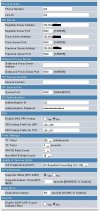
Here is a screen shot of one line, that I put in. The IP that I crossed out is the same in all 3 fields, it's the 3CX
server IP.
Panasonic.jpg

Of course there are a lot of other setiings including a matrix to choose which extension appears on each of multiple handsets.
 
Status
Not open for further replies.

Forum statistics

Threads
112,147
Messages
590,959
Members
165,167
Latest member
Finatra.us