Password Reset - Resets the Phone Authentication and Web Phone Password

OpenApproach

Silver Partner
Joined
Mar 4, 2020
Messages
2
Reaction score
1
I am not sure if this is a bug but I noticed especially with our Yealink IP Phones, if you click on reset password under a user/extension, it also changes the password on the IP Phone tab of the phone as well as the IP Phone Web login, this doesn't reflect down to the phone and it becomes unregistered and the only way to get into the phone is to factory reset it and reconfigure again. Can anyone confirm whether or not this is a bug or are we missing something?
 
As long as the phones got the provisioning link in and can communicate with server then it will pull down the config.
 
I am not sure if this is a bug but I noticed especially with our Yealink IP Phones, if you click on reset password under a user/extension, it also changes the password on the IP Phone tab of the phone as well as the IP Phone Web login, this doesn't reflect down to the phone and it becomes unregistered and the only way to get into the phone is to factory reset it and reconfigure again. Can anyone confirm whether or not this is a bug or are we missing something?
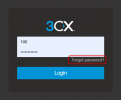
The best way is for the user themselves to click on Forgot Password in the login page. This way it will not reset any other passwords. It will only reset the web login password.

1739285544921.png
 
  • Like
Reactions: GregG_3CX
Hi

This is the intended behavior, we are resetting after all so all credentials need to change (Auth ID, Password, Web Console Password as well as webclient password) however we do immediately reprovision your phone when the password is reset so it should not have become unregistered. I can confirm that modern supported Yealink phones on a 3CX-generated FQDN do not suffer from the issue you have described (ie. T43U) as they will reprovision within moments of resetting the user.

The question is, why are your phones failing to reprovision? Certificate issues perhaps? Old firmware? This is something you might need to look into.
 
Thank you all, this is good information. Alot of our clients are using older Yealink models. It is also an issue that some of them do have outdated Firmware on the phones on some of them. Since we have upgraded them to v20, I have been in the process to make some updated fundamental changes as well as ensure every aspect down to the clients is updated to the newest version. I am guessing at this point we should see some of this resolve after we have alot of this in place. Again thank you for the quick turn around and response.
 
  • Like
Reactions: NicholasP_3CX

Latest Posts

Forum statistics

Threads
111,963
Messages
589,998
Members
164,868
Latest member
swegner