


- Joined
- Dec 9, 2022
- Messages
- 25
- Reaction score
- 6
We’re running into a limitation that feels like it should be an easy fix if both the 3CX and Paxton teams were to collaborate.
At the moment, the system works, but each Paxton entry panel cannot have its own extension. This is because Paxton sets the Authentication ID at a site level, while the Extension Number and Password are configured per panel. As a result, all calls present the same CLI, so users have no way to tell whether the call is coming from the front door, back door, or roller shutter.
Paxton’s own comms panels can manage multiple monitors/panels, so suggesting the customer purchase an additional comms panel for every new entry point feels unnecessary.
I appreciate that this is ultimately a Paxton limitation, and I understand that these devices are not fully supported on your system, but it really seems like this is something that could be resolved with a bit of collaboration between both teams. A quick conversation at a technical level could make this work seamlessly.
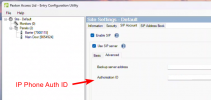
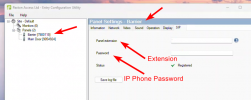
At the moment, the system works, but each Paxton entry panel cannot have its own extension. This is because Paxton sets the Authentication ID at a site level, while the Extension Number and Password are configured per panel. As a result, all calls present the same CLI, so users have no way to tell whether the call is coming from the front door, back door, or roller shutter.
Paxton’s own comms panels can manage multiple monitors/panels, so suggesting the customer purchase an additional comms panel for every new entry point feels unnecessary.
I appreciate that this is ultimately a Paxton limitation, and I understand that these devices are not fully supported on your system, but it really seems like this is something that could be resolved with a bit of collaboration between both teams. A quick conversation at a technical level could make this work seamlessly.


