• We do not provide troubleshooting help for unsupported phones. Please try with a supported phone.
  • V20 Update 10 Alpha Learn more

Paxton / 3CX SIP Integration – Limitation with Multiple Entry Panels

UncleSoup

Silver Partner
Advanced Certified
Joined
Dec 9, 2022
Messages
25
Reaction score
6
We’re running into a limitation that feels like it should be an easy fix if both the 3CX and Paxton teams were to collaborate.

At the moment, the system works, but each Paxton entry panel cannot have its own extension. This is because Paxton sets the Authentication ID at a site level, while the Extension Number and Password are configured per panel. As a result, all calls present the same CLI, so users have no way to tell whether the call is coming from the front door, back door, or roller shutter.

Paxton’s own comms panels can manage multiple monitors/panels, so suggesting the customer purchase an additional comms panel for every new entry point feels unnecessary.

I appreciate that this is ultimately a Paxton limitation, and I understand that these devices are not fully supported on your system, but it really seems like this is something that could be resolved with a bit of collaboration between both teams. A quick conversation at a technical level could make this work seamlessly.
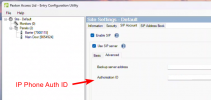
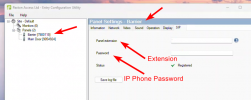
1770636729098.png

1770636657541.png
 
Hi @UncleSoup

It's really NOT as simple as one might think it is. Forcing a bunch of extensions to use the same authentication ID is really a bad idea (identification and security reasons are just 2 items), and the fact that it's NOT seen practically anywhere else is testament to that. Believe me when I tell you that there's nothing "quick" about overcoming that, except getting the vendor to do things the correct way.

The correct place to address this issue is with the vendor, ultimately.
 
  • Like
Reactions: UncleSoup
Hi @UncleSoup

It's really NOT as simple as one might think it is. Forcing a bunch of extensions to use the same authentication ID is really a bad idea (identification and security reasons are just 2 items), and the fact that it's NOT seen practically anywhere else is testament to that. Believe me when I tell you that there's nothing "quick" about overcoming that, except getting the vendor to do things the correct way.

The correct place to address this issue is with the vendor, ultimately.

Oh I completely agree, I should be able to set this at Panel level, but unless someone above my position and above the people I talk to in their support take, it's not something that is going to get any a traction.

Yeah, maybe not quick, but seems like a quick win for both companies, 3CX one of the top VoIP systems and Paxton a leading door access system.

I know it's not a 3CX issues and the limitation is within the Paxton configuration, but hoping that getting a conversation started and logged somewhere.
 
Actually, it IS possible!!!

But it's DANGEROUS to have multiple devices with the AuthID - so BE AWARE!!!

For each of your devices (door, shutter, whatever):
Go to the extension number, go to the IP Phone tab, add an ip phone, select "I will configure the phone myself", and go through the process and create the ip phone. Then you can adjust the AuthID to whatever you need.

KEEP IT SAFE - this is ALL ON YOU!
 
Actually, it IS possible!!!

But it's DANGEROUS to have multiple devices with the AuthID - so BE AWARE!!!

For each of your devices (door, shutter, whatever):
Go to the extension number, go to the IP Phone tab, add an ip phone, select "I will configure the phone myself", and go through the process and create the ip phone. Then you can adjust the AuthID to whatever you need.

KEEP IT SAFE - this is ALL ON YOU!
Yeah, I'm pretty sure I did try this and it didn't work, but ultimately not a solution, as you say an unsecure work around.
 

Members Online Now

Forum statistics

Threads
111,831
Messages
589,277
Members
164,660
Latest member
RJenkinsROCK