Under Review Personal contact name not being displayed

Status
Not open for further replies.

daedel

Bronze Partner
Advanced Certified
Joined
Jul 15, 2021
Messages
14
Reaction score
0
Hello,

I am adding a contact as Personal Contact in 3CX app. However, unless I add it to the company phonework (so it's visible to everybody) the contact name is not being displayed when calling.

Is this the way it works? Only company contacts will display names when calling to 3cx Apps?

Thanks in advance!
 
Hi @daedel,

When you say the 3CX App, do you mean the Desktop App (v18), the Windows App, the Chrome Browser Extension (v16) etc?

What version of the PBX are you running?
 
Thanks for the quick response! PBX Version is 18 and I am working with Desktop App v18 as well.
 
I've made another check and found out in the 3CX Mobile APP the name is displayed, but it's not on the Desktop App for Windows (v18) as stated before.
 
Hi @daedel,

What is the exact version number of the 3CX Desktop App that you're running? You can check this from Add / Remove Programs.

Can you send me a screenshot from the desktop app showing what is happening, perhaps have the webclient contacts window in the background and blur out anything essential.
 
Exact version number is 18.3.33.
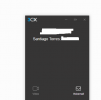
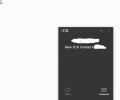
I send you two screenshots of the mentioned behaviour. When I have the contact (Santiago Torres) in Personal, calling from the contact's number makes 3CX to create a new Contact (integration with Hubspot) and the name isn't displayed (3CX new Contact appears). When I have the contact in 3CX Directory, the call displays the name. When this happens, the new Contact from CRM is not triggered, too.

I've noticed the same happens in the webclient, but not on the mobile app, that shows the name correctly.

PS: I've post the examples of what's happening on my own 3CX, but the complaint came from one of our customers and is experiencing the same problem.
 

Attachments

  • prueba 2.png
    prueba 2.png
    6.7 KB · Views: 8
  • prueba 1.png
    prueba 1.png
    8.4 KB · Views: 8
HI @daedel,

As a test, can you create a public contact (non private) and call it Public Contact, make the number any number you've never called from before. From the extension in the Web Client / Desktop App, add a private contact, call it Private Contact, same number as before.

When you call, what is being displayed?
 
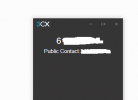
I've just run the test. Public contact was displayed on the desktop app.
Then I removed the public contact and left private contact on the desktop app. No name on the app, but the name appeared on the mobile 3cx app (Private contact)
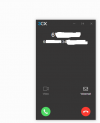
Attached two screenshots with results.
 

Attachments

  • prueba 4.png
    prueba 4.png
    9.8 KB · Views: 7
  • prueba 3.png
    prueba 3.png
    5.2 KB · Views: 7
Checking the Mobile App I've found something interesting. When the contact is Public (i.e., in Company Phonebook) the name appears at the beginning of the call, in the format Name: Number dialed. When the contact is Private (Personal), then you've got number calling:number called:name. So name comes first or last depending on the contact being private or public?
 
Hi @daedel,

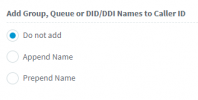
If you added the Public / Private contacts and under Contacts >> Options >> set Add Group, Queue or DID/DDI Names to Caller ID to Do not add, you should see Public Contact: Private Contact. Are you able to see that?

1631109793256.png
 
Yes! Now the name is displayed correctly!

However, in my particular 3CX (integration active with Hubspot) if I try this with my own number, creates a new 3CX contact all the time. If i call from numbers that never called before, as suggested, the name is being displayed.

Any explanation for this? Thank you for the excellent support!!
 
Hi @daedel,

Can you check your 3CX contacts to see if 'New 3CX contact' is a contact associated to your number?

Also check your Hubspot integration to see if the contact 'New 3CX contact' is there?

If yes, remove the contact from Hubspot, and the 3CX public / private contacts, then restart 3CX System Service.

Wait 10 minutes. Check if when you call in it still says "New 3CX contact"
 
Hi again,

After many, many calls from lots of different numbers, I can tell you that if you choose to append or prepend the name of a personal (private) contact that doesn't exist as a public contact the name won't appear on the desktop app. The only way it works is as suggested by your team, selecting Do not Add option: for me it's good but not for my customer who need the queues/inbound rules names to be shown.
As stated before, if I look at the missing call log in the 3CX app for mobile, the name appears in it (as it does in the push notification when the call is active).
I don't know if you have been able to replicate the problem.
Hope you can find a solution...
 
Hi @daedel,

Let's start again, from the beginning so that we don't confuse anything.

  1. Delete your number as a contact both publicly and privately.
  2. Disable contact creation in Hubspot.
  3. From Contacts, disable Prepend / Append, this is only for Rules, Groups and DIDs.
  4. Now when you call in, you should only see your number. Nothing else, correct?
  5. Add yourself as a private contact. Call again, what do you see?
  6. Add yourself as a public contact, test once more, what do you see?
  7. Re-enable contact creation in Hubspot. Call in again, what do you see?
 
I call in without contact created: just my number displayed.
I call in with private contact created: just my number displayed.
I call in with public contact created: the name appeared.
If I re enable Hubspot, then I get a New 3CX Contact, the name it creates by default.

I do insist in the fact that in the 3CX mobile app, you can see the name displayed in push notifications and in missed calls. It's in the desktop app where it doesn't appear.
 
Could you perhaps test the following:

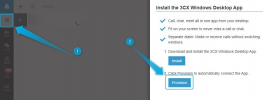
First, make sure that you can reproduce the issue with a call by confirming that the private contact does not appear in the 3CX Desktop app but does appear on the 3CX Mobile App, then, launch the 3CX Webclient for that same xact extension and re-provision the 3CX Desktop App:

1631532759865.png

Make the same exact call again, does the 3CX Desktop app still not show the contact?
 
Status
Not open for further replies.

Forum statistics

Threads
111,986
Messages
590,148
Members
164,917
Latest member
Oliver Hastedt