Phantom Internal Calls

Status
Not open for further replies.

TLCtech

Customer
Joined
Oct 12, 2020
Messages
263
Reaction score
29
  • CX Version: 18.0 Update 1 (Build 237)
  • Server OS: Debian GNU/Linux 10 (buster),4.19.0-18-cloud-amd64
  • 3cx hosted
  • Provisioning Method: Only using softphones
  • Trunk Provider: Call Centric
  • Has the Firewall Checker passed: YES
  • Are custom Phone Templates being used: NO

So this is a weird one.

The last few weeks, our phone system seems to have come alive. It has been using one extension in particular to call other extensions incessantly all night. This was first reported to me about 2 weeks ago when our receptionist messaged me, saying she got a report from another user that the receptionist extension (00) was calling her (18) all night. I couldn't really see anything in the logs that told me what was going on, so I told her to let me know if it happened again.

This morning, the receptionist (00) said her extension was in use, on a call with another extension (11). It was before office hours turned on our phones, and 11 was cleaning around the office before she had to sit and take calls. I looked at 11, and there is a call every 5-20 min from 6pm to 8:35 am. Each call left a roughly 2 min voicemail that was complete silence, Each and every one. I asked 11 if she picked any of the calls up, and said she picked up a couple, but most were silence. She mentioned one had an automated messages saying we had "reached the limits on your subscription" but said there wasn't anything identifying what subscription or any directions on what to do. I'm not entirely sure it is related, but I cant discount it.

With the "subscription" in mind, I checked with our sip, just to make sure, and no calls were registered to or from our number at those times.

Another related issue is that another ext had something similar happen where their ext showed on a call when they weren't, and couldn't take a transfer. I don't know when this was, but presumably recently.

I have scanned the logs. Im still not great at reading exactly what is going on yet, truth be told. I see where the call is made from one ext to the other, and it going to voicemail. Other than that I really cant see what is going on. I have one of the calls from the log copied out, and have removed personal identifying information (it shows internal IPs for exts but I can remove those too).

Has anyone else come across this? I searched and found one other similar case, but it involved hard phones. Since we dont have those yet, I didnt find it applicable. Im also happy to post the edited log here, or in a DM if someone has the bandwidth to take a look. It is only one call, the last call before it stopped for the day, but I can pull more.
 
I just got a report from another extension that they too were receiving calls last weekend in the same fashion.
 
Is your hosted image compromised? Does a reboot clear any issues?

Do you have toll free numbers that are getting dialed for fraud?
 
I dont see anything in the image that shows its compromised but Im not sure anything would actually show. 3cx is hosting this. Any idea where I would look for threats?

I cant see any toll free calls being made in the last 2 weeks. And no outbound calls being made outside business hours at all either. This is, for the most part, one ext calling others all night long.

Ill give it a reboot tonight and see if that stops it. I had to restart all services yesterday because one service stopped working, but that didnt help anything as the latest calls happened last night,
 
That's odd, do any of the extensions have week passwords? Maybe a regeneration of the extensions?

If it was compromised you would likely see outbound call attempts, see anything like 011 calls?
 
Oh they all have weak passwords. Its been a struggle of mine. I think I may take this opportunity to change them.

No 011 calls. Nothing but local calls honestly
 
Last edited:
  • Like
Reactions: Kevin@voxtelesys
I had the user change their password. Immediately after the change, her ext showed "disconnected waiting for network" and it showed leaving a VM with another extension.
 
I see where the call is made from one ext to the other, and it going to voicemail. Other than that I really cant see what is going on.
If you can see the call being made then you should be able to see the originating IP, and, if it is an internal, or external IP. I would suspect direct SIP calls, or, perhaps, as you've admitted to using weak passwords, a hack of your extensions.
 
If you can see the call being made then you should be able to see the originating IP, and, if it is an internal, or external IP. I would suspect direct SIP calls, or, perhaps, as you've admitted to using weak passwords, a hack of your extensions.
Password was changed and it still happened. It happened immediately after the change. The IP that shows isnt one in the office, if that makes sense. The calls are coming from the extension 00. sip:[email protected]:(port number)/UDP. Im not seeing any local IP addresses.
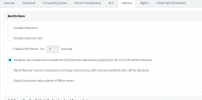
Direct SIP calls are new to me. The only directions I can find on how to set these up are HERE but the directions are outdated. Ive never knowingly set these up either.
 
I found this setting in the ext in question. Looks like direct sip calls are blocked?
1637801877240.png
 
After EOD, I reboot the server.

So at this point:
The user has changed their password
That user did a full virus scan on their terminal with 0 results. They also shut their machine down for the day
Ive rebooted the server and everything is back up and running.
Ive also asked users to email me if they experience any of the symptoms listed.

Ill be keeping an eye on it this weekend. Thanks for the help thus far. Ill keep this updated as I go. Have a great holiday.
 
Hi @TLCtech ,

When you say the users are using the softphones, do you mean the new Desktop App?
If this is the case, then it *may* be this symptom:
https://www.3cx.com/community/threa...alls-by-themselves-to-other-extensions.85524/

A new version of the Desktop App was released along with V18 U2 Beta:
https://downloads.3cx.com/downloads/v180/beta/templates/clients/3CXDesktopApp-18.7.7.msi

Maybe try installing this version for 00, generally on the extensions that seem to be the 'originating' extensions and see how it goes.
 
Hi @TLCtech ,

When you say the users are using the softphones, do you mean the new Desktop App?
If this is the case, then it *may* be this symptom:
https://www.3cx.com/community/threa...alls-by-themselves-to-other-extensions.85524/

A new version of the Desktop App was released along with V18 U2 Beta:
https://downloads.3cx.com/downloads/v180/beta/templates/clients/3CXDesktopApp-18.7.7.msi

Maybe try installing this version for 00, generally on the extensions that seem to be the 'originating' extensions and see how it goes.
Thank you so much. I must not have used the right keywords. I completely missed this. I will be installing this tomorrow morning.
 
  • Like
Reactions: NickD_3CX
That seems to have fixed it! Thanks!
 
  • Like
Reactions: NickD_3CX
Status
Not open for further replies.

Forum statistics

Threads
111,974
Messages
590,083
Members
164,901
Latest member
Silent_Guru