• We do not provide troubleshooting help for unsupported phones. Please try with a supported phone.
  • V20 Update 10 Alpha 2 Learn more

Phone not registering. _ V16

Status
Not open for further replies.

Bruce Smith

Premier Customer
Basic Certified
Joined
Mar 28, 2020
Messages
75
Reaction score
19
Hi I have a issue with 3 phones not wanting to register to 3cx they where working yesterday with no issues. This morning they have decided to no to work done the normal stuff reboot the phone tell it to reprovision, and checked details in the phone.

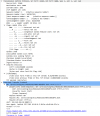
I'm no wire shark god, but this is what i see.

1629368556366.png

Get
1629368626298.png


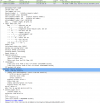
HTTP reply

1629368736011.png

its saying 404 to this file
http://192.168.158.10:5000/provisioning/mszu70odw1w83/805ec0d5dbf6.boot
this file does not exist.
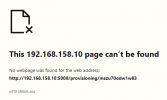
1629368863672.png

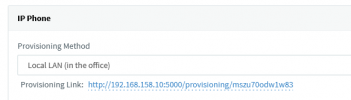
But that's the provision link

1629368922370.png


What am i missing?

Thanks for any help.
 
Hi @VasilisV_3CX
Yes there all Yealink, the phones have been provisioned and have been working fine up until last night when the team decided to go home, the phone have been working for over 2 weeks.

What would cause them to to need reprovisioning ? and also stop them from getting there config again?
 
Hi Bruce,

I'm not sure why you ended up troubleshooting provisioning here. Presumably the phones were already provisioned since they were working fine but then they stopped working, so let's leave provisioning aside for a moment.

Please tell us more so we can gain a better understanding:
  1. Checked the blacklist yet? Maybe the ended up there for some reason
  2. Tell us how you established they are not registering
  3. Are the PBX and phones deployed locally on the same LAN, or remote (STUN/SBC/VPN)?
  4. What version is the PBX
  5. Were you using custom templates or the default ones we provide?
  6. Has anything changed on your network that would prevent them from reaching your PBX?
This should give us enough data to assist in troubleshooting
 
Hi @JohnS_3CX

  1. Checked the blacklist yet? Maybe the ended up there for some reason
The Lan is on the black List
  1. Tell us how you established they are not registering
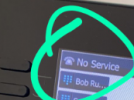
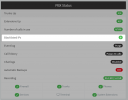
The phone keeps trying to register and fails from the web interface screen.
1629378518849.png
  1. Are the PBX and phones deployed locally on the same LAN, or remote (STUN/SBC/VPN)?
The PBX is in the Data Centre and there is a VPN connecting the the site to the Data centre
  1. What version is the PBX
V16 .0.8.9
  1. Were you using custom templates or the default ones we provide?
Using the Default template provided
  1. Has anything changed on your network that would prevent them from reaching your PBX?
No changes have been made to the network.
 
Hi Bruce,

Thanks for the update a couple of things that stand out immediately are the following

a) if the whole LAN is in the 3CX blacklist like you said, then nothing will be able to register. Please check this first from here, and remove any IPs that were blacklisted
1629379157314.png

b) you said there is a VPN connecting the phones with the PBX. This should not be a problem if the VPN is working correctly, but you need to make sure that neither the phones nor the PBX are aware of the VPN. To them it should appear as if they are on the same flat LAN. This might become an even bigger problem if you have two LAN cards on the PBX..


A little note regarding provisioning: Just to put your mind at ease, so long as the .cfg file gets transferred you are good. Not all the files you see the phone requesting are needed for successful provisioning. We do not provide those at all so no need to worry about it for now.
1629376386663.png
 
Sorry was in the middle of a support call when replying, the LAN is not on the back list.
 
Ok that's great! The next part is to learn whether the phone can reach the PBX to register, and what the PBX replies back to the phone.

For that I would recommend to

1. run a capture on the PBX so we can see if a REGISTER comes in

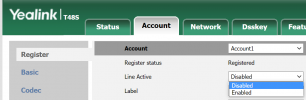
2. disable the account on the phone, and Apply
1629382334670.png
3. Open a 2nd tab, and start a capture on the phone so we can see if it sends a REGISTER (Settings>Configuration>Pcap)
4. go to the 1st tab and enable the account and hit apply

The phone should now make an attempt to register, and our two captures should "catch" the act. You can stop the captures after a minute or so and then analyze them:

- Did the phone send a register to the correct IP and port? (seen on phone capture)
- Did the PBX receive that register? (seen on PBX capture)

I think this method should give you the answers you are looking for, and hopefully it will lead us to why the problem occurred in the first place.
 
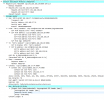
request from phone

1629388079177.png

The server is not receiving requests via UDP, if i change the transport protocol to TCP the phones connects.
 
Hi Bruce,

This is a very interesting find. I'd say that's a clear sign your network configuration or VPN is not allowing traffic to pass as you may have originally thought.

Remember what I mentioned earlier, that the VPN should basically be transparent to the devices, ie. they should think they are on the same LAN and not be aware of any VPN.

Well, on a plain LAN UDP traffic would be able to pass unimpeded. But yours only works in TCP (ie. it requires handshake for connection establishment before application data is sent) which means you should start looking in the direction of your network setup.
 
Status
Not open for further replies.

Forum statistics

Threads
112,149
Messages
590,965
Members
165,170
Latest member
SupportRock