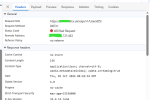
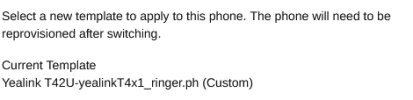
Solved Phones[0].interface: invalid value when attempting to switch template

Alphabetic

3CX MVP
Silver Partner
Advanced Certified
Joined
Jul 1, 2016
Messages
6,638
Reaction score
2,640
Version 20.0 Update 10 (Build 1277 - AI 1.6.10)

Yealink T42U 108.87.0.26 - Router Phone

Hello

I've attempted to switch the phone template to a custom one but get the error:
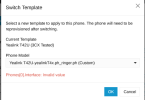
1790839416684.png

I only added 1 line to set minimum ringer volume.

Edit:

Im unable to swap to custom template even if I make no changes to the default.
 
Last edited:
Solution
I deleted the phone and added it back and Im now able to switch templates and the payload is the correct interface FQDN.

So one to note for anyone else who does a restore via CLI when switching FQDNs.. best to remove/add the phones to remove whatever residual records exist.
If instead of export create a copy, make changes and sync the already provisioned device?
 
Do you add additional lines or adjust values to the existing?
Can you share an example?
 
Do you add additional lines or adjust values to the existing?
Can you share an example?
Hi Theo

all I did, was "create copy" of "yealinkT4x.ph.xml" then try to switch it on my phone.
 

Attachments

Just tested in multiple PBX and could not replicate.
I created a copy and then selected to switch template without making any change to the template which works perfectly.
Check the error is dev mode in your browser as well.
 
Just tested in multiple PBX and could not replicate.
I created a copy and then selected to switch template without making any change to the template which works perfectly.
Check the error is dev mode in your browser as well.
Not entirely sure what im looking at if im honest..

1790843285287.png

Can I send you support link to try yourself?
 
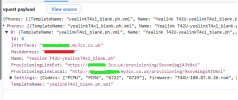
I think I found the problem.

1790843790702.png

This PBX was backup/restored via CLI and the interface URL and local link are the old FQDN.

Is there a way i can change this?
 
I deleted the phone and added it back and Im now able to switch templates and the payload is the correct interface FQDN.

So one to note for anyone else who does a restore via CLI when switching FQDNs.. best to remove/add the phones to remove whatever residual records exist.
 
Solution
Yes correct as changing the FQDN requires that phones are factory reset and reprovision since this is restored from the backup file.
 
Yes correct as changing the FQDN requires that phones are factory reset and reprovision since this is restored from the backup file.
The phones were factory reset after the restore, but they were never deleted/added and this is what was needed.

Another question, if i may off the back of this.

Im switching templates on the phone but the field isnt being updated from the connection column - when does this supposed to update?

1790846744507.png

1790846756054.png
 
In the connection this is local or behind an SBC?
 
And what is not updated in the connection?
Only the template is changed but the connection remain the same correct?
 
So, correct me if im wrong. But, my expectation is that the currently applied template would be named in blue in the connection column.
 
It is not very clear, what you mean blue in connection?
Now what you see? Did you also selected the device and pressed to reprovision?
 
I just mean this info here

1790847532876.png
 

Latest Posts

Forum statistics

Threads
112,157
Messages
591,031
Members
165,195
Latest member
Megan Heavey