Phones are ringing outside of office hours?

Status
Not open for further replies.

IAJack

Forum User
Joined
Jun 24, 2019
Messages
14
Reaction score
0
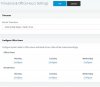
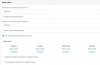
I have office hours set on a DID in inbound rules but the extensions still ring outside of office hours? Last week I deleted the office hours and re-added them and it worked fine and there was no rining outside of those hours. Now here on Monday morning they ext's are rining before 8 am?
11123
 
Make sure the system is using default office hrs, dial *64 on a handset
 
  • Like
Reactions: IAJack
Dial *64 on a phone, you will get a message saying the system is using default hours - then you can hangup
 
  • Like
Reactions: IAJack
I need to set office ours here?

11124
 
I get a busy signal when I dial *64
 
your last message screenshoot this the default used by the system or you can override them as per your first screenshot

You can force the system in and out of office hrs , to override the office hrs.

Dailling *64, forces the system to use the configure office hours
 
Last edited:

Video for 15.5, settings are the same for 16
 
No prompt is played when I dial *64
 
So my system is not following the office hours that I set in the DID. Do I need to set system-wide office hours? According to the video that was posted I could just set office hours in the DID only?
 
Hi IAJack,

The previous posts were referring to the dial code "Force 3CX Phone System to IN or OUT of office" which is probably not set by default in your system if you get a busy signal.

11130

Firstly ensure that the timezone is correct in your PBX settings, and the operating system, and the real time clock of the machine.

Then, set the business hours you want, but also have a destination for the calls outside business hours.

Yes you can have global office hours and yes you can define exceptions in order for a DID or Trunk to have different office hours than global
 
Status
Not open for further replies.

Forum statistics

Threads
111,928
Messages
589,778
Members
164,800
Latest member
JensVoss