Solved Phones go to DND every night and the user has to manually take them out of DND

Status
Not open for further replies.

ZCSFT

Bronze Partner
Advanced Certified
Joined
Jan 18, 2022
Messages
22
Reaction score
1
I am having an issue where one of our one specific set of phones in one of our 3CX Instances are going into DND every night and the users are having to take them out of DND every morning. I have run into this issue before and so far all my research and troubleshooting hasn't turned up an answer.

Has anyone else run into this?

3CX Environment Info
Version: 16
Phones: Yealink T46S
Firmware: 66.86.0.5
 
Hi @ZCollins-SFT

Based on your description, I can assume a few things and also suggest a few points to check

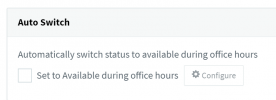
a) Your extensions have Autoswitch enabled, under their Forwarding Rules (this is necessary for them to go to DND automatically)
1642578557093.png

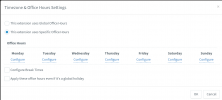
b) You might also have office hours override under each specific extension (under the Configure button) and this will ignore your Global Office Hours
1642578667477.png

c) You have Global Office Hours setup, but they are not set up correctly (ie. the opening hours are not at the correct time). Found under Settings

d) Possibly, the system has the wrong time, and even though you might have all the above setup correctly, it does not make the extensions available

e) If you are using custom / outdated phone templates, they phones are not switching back to available when the PBX tells them to.

I think this should be enough to get you started, please investigate the points above and let us know if this helps you or if you find anything additional you want to share

PS: You are on V16 - I very highly recommend to upgrade to V18 as soon as possible as your current version is close to end of life. Read this blog post to get informed about what will change: https://www.3cx.com/blog/news/v16-web-meeting-eol/
 
Hi @ZCollins-SFT

Based on your description, I can assume a few things and also suggest a few points to check

a) Your extensions have Autoswitch enabled, under their Forwarding Rules (this is necessary for them to go to DND automatically)
View attachment 27224

b) You might also have office hours override under each specific extension (under the Configure button) and this will ignore your Global Office Hours
View attachment 27227

c) You have Global Office Hours setup, but they are not set up correctly (ie. the opening hours are not at the correct time). Found under Settings

d) Possibly, the system has the wrong time, and even though you might have all the above setup correctly, it does not make the extensions available

e) If you are using custom / outdated phone templates, they phones are not switching back to available when the PBX tells them to.

I think this should be enough to get you started, please investigate the points above and let us know if this helps you or if you find anything additional you want to share

PS: You are on V16 - I very highly recommend to upgrade to V18 as soon as possible as your current version is close to end of life. Read this blog post to get informed about what will change: https://www.3cx.com/blog/news/v16-web-meeting-eol/
Hello @JohnS_3CX,

I will take a look at these and let you know!
Thanks!
 
Hi @ZCollins-SFT

Based on your description, I can assume a few things and also suggest a few points to check

a) Your extensions have Autoswitch enabled, under their Forwarding Rules (this is necessary for them to go to DND automatically)
View attachment 27224

b) You might also have office hours override under each specific extension (under the Configure button) and this will ignore your Global Office Hours
View attachment 27227

c) You have Global Office Hours setup, but they are not set up correctly (ie. the opening hours are not at the correct time). Found under Settings

d) Possibly, the system has the wrong time, and even though you might have all the above setup correctly, it does not make the extensions available

e) If you are using custom / outdated phone templates, they phones are not switching back to available when the PBX tells them to.

I think this should be enough to get you started, please investigate the points above and let us know if this helps you or if you find anything additional you want to share

PS: You are on V16 - I very highly recommend to upgrade to V18 as soon as possible as your current version is close to end of life. Read this blog post to get informed about what will change: https://www.3cx.com/blog/news/v16-web-meeting-eol/


Hello @JohnS_3CX

It was the Auto Switch! I didn't realize that was a thing, its schedule was different from the Inbound Rule schedule which caused the issue.

Thanks!
 
You are welcome, I'm glad to hear you found it :)
 
  • Like
Reactions: ZCSFT
Status
Not open for further replies.

Members Online Now

Forum statistics

Threads
111,831
Messages
589,277
Members
164,660
Latest member
RJenkinsROCK