Phones no longer listed in admin portal

Status
Not open for further replies.

acouture

Forum User
Basic Certified
Joined
Sep 16, 2020
Messages
4
Reaction score
0
Hi all, similar to https://www.3cx.com/community/threads/phones-no-appearing-in-list.64340/ , all my phones are no longer showing in the admin portal (as root).

This is on two distinct installations.

On one I have a single physical phone. (Yealink 23G)

On the other I have 5 phones, Granstream GXP 2160 and 4 Grandstream GXP 1630

Note that all phones are working perfectly to receive and make calls, no issues there.

Just they won't show in the admin portal.

I tried to re-register one but it says that MAC address is already registered, so the system know about it..

Version is 16.0.641
 
What is your set up? Where is your 3CX in relation to your phones? What is your network topology and what switches are you using?

Could your switches or server OS be blocking multicast?
 
Clear your browser cache, try another browser

Logout of 3cx and log back in
 
  • Like
Reactions: JohnS_3CX
Both 3CX are hosted in AWS LightSail.

Phones are provisioned via Direct SIP (STUN-Remote).

They always showed until latest update ( 16.0.641 )
 
Ensure you are using the latest version of these browsers only

- Chrome
- Edge
- Firefox

If you were already using one of the above required browsers, then simply empty it's cache and reload the page. You can try using an Incognito window first (as a test)
 
  • Like
Reactions: acouture
Clear your browser cache, try another browser

Logout of 3cx and log back in

Tried that, no differences, also tried from Safari, Chrome, Edge (Chrome), Private Browsing...
 
Ensure you are using the latest version of these browsers only

- Chrome
- Edge
- Firefox

If you were already using one of the above required browsers, then simply empty it's cache and reload the page. You can try using an Incognito window first (as a test)
Ok, seem that Incognito mode of Chrome on my Mac did work... so strange.. I thought I had tried before ...
 
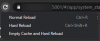
No worries. Enable the console on chrome (F12 on a PC) then right-click the refresh button of your browser and select Empty Cache Hard Reload

1600256782988.png
 
  • Like
Reactions: acouture
Don't use Safari on 3CX please this is not a supported browser and frequently problem is here.
In your case already happened to other, just refresh cache is the only way to follow to retrieve your phones displayed
 
  • Like
Reactions: acouture
Try with Firefox version 80 or 78 ESR (68 ESR won't work) or try the latest version of Chrome as 3CX have changed the browser requirements with their latest update.
 
For clarification, Chrome/Edge/Firefox are only a solution on non-iOS/iPadOS devices as I believe Apple requires all "web browser apps" to use Webkit as the rendering engine. I get that the issue might be with Safari/Webkit, but not being able to administer the system via an iPhone/iPad is a big impediment.
 
Try with Firefox version 80 or 78 ESR (68 ESR won't work) or try the latest version of Chrome as 3CX have changed the browser requirements with their latest update.
Just a clarification on this point: The latest browser versions increased their security requirements, the 3CX update follows those requirements so that the PBX will not fall behind from what Chrome/Firefox requires as a minimum of any given website.
 
Status
Not open for further replies.

Latest Posts

Forum statistics

Threads
111,962
Messages
589,995
Members
164,867
Latest member
swegner