• We do not provide troubleshooting help for unsupported phones. Please try with a supported phone.
  • V20 Update 10 Alpha 2 Learn more

Phones revert to new

Status
Not open for further replies.

tohoken

Premier Customer
Basic Certified
Joined
Feb 26, 2021
Messages
15
Reaction score
4
Using Yealink T54W with firmware 96.86.0.23. After provisioning, when the phone is disconnected from the network the management console changes to "New" again. The user still shows that the phone is provisioned to them and when I plug the phone back in to the network the "New" status goes away and show assigned to the correct user. Once the phone is disconnected, it goes back to "New" again. This status changes takes about 1.5 minutes. Any ideas? Running 3CX 16.0.8.9

Thanks,

Ken
 
  • 3CX Version, Enterprise Annual 16.0.8.9
  • Server OS, Windows Server 2019
  • Is the 3CX Server Hosted and where? On premise
  • IP Phone Make/Model/Firmware - Yealink T54W 96.86.0.23
  • Provisioning Method: Local / VPN / STUN / SBC - Local (On same LAN network segment)
  • Trunk Provider or Gateway Make/Model - Flowroute
  • Has the Firewall Checker passed: YES / NO - YES
  • Are custom Phone Templates being used: YES / NO - No
The connection is not unstable. This is only happening to the latest phones we received. We connect them and they show firmware 96.85.0.5. From the console, the Firmware button is greyed out so we have to upgrade them from the phone UI to 96.86.0.23. The phones and the server are on the same VLAN. The phones are not unregistering since as soon as we plug them in they show the correctly provisioned user.

Thanks,

Ken
 
John,
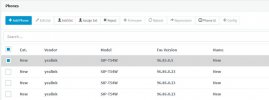
Here is a screenshot of my console. The first phone in the list I just plugged in and it shows that when selected the firmware button is greyed out. The next 3 phones have all been provisioned and the phones unplugged from the network in order for end user delivery. As you can see, they are in bold showing new.
 

Attachments

  • Console.JPG
    Console.JPG
    39.3 KB · Views: 8
Ken is this what you were seeing in the Phones page?
View attachment 22907
- Specifically the entry in bold
- NOT on registered extensions, those should show the correct IP
Yes, that is how it shows. I attached a screenshot in a previous post. That is what shows when I disconnect the power to the phone. I do not unprovision it, it just goes to a NEW state. However, if I go to the user and look at provisioned phones, the correct phone still shows and when I power on the phone again, it immediately shows the correct provisioned state.
 
Sorry if the comment sounded a bit confusing Ken, that was mean for a different post - my mistake!

I've removed it now. So on to the firmware, If you followed Yealink's upgrade procedure then the upgrade should be alright.

As for why the phones become unregistered, that still remains a bit of a mystery.

- One way I can think of that could shed some light, is to run a port capture on your switch (if it allows that).

- You then wait until the phone becomes unregistered, and once it does you then go and look at the packet capture of the port the phone was connected to.

- Normally a phone will register with a duration of 120 sec., and will then refresh the registration before the expiry (ie. at around 60-80 sec.)

- If the PBX does not see the refresh in time, and the 120 sec. are up, it then shows unregistered (appears as "new" like you described).

- A similar capture can run on the PBX side too and then used for comparison: ie. a registration captured on the phone should also end up being captured on the PBX. If not, you then know that you probably have a networking issue. Note: It may also appear but then get blocked by the Windows Firewall before it reaches 3CX.

You did say they are all on the same VLAN so I assume your network has some additional config beyond what a plain flat network layout would have. IF by any chance the network equipment is causing the traffic from the phone to not reach the PBX, then you would see the exact same problem you describe. Clearly it works at first, but what happens within the next 2 mins remains unknown unless you analyze the traffic as I mentioned above

To conclude, ensure you completely disable the Windows firewall, remove any antivirus or 3rd party software that you may have installed on the server, and as a final step run the packet capture to see what happens to the traffic.
 
Status
Not open for further replies.

Forum statistics

Threads
112,148
Messages
590,963
Members
165,169
Latest member
Isaac415