Phones show duplicated

Status
Not open for further replies.

Gianni_en

Free User
Joined
Nov 21, 2021
Messages
14
Reaction score
2
3cx on premise on a data center - no firewall hardware, win server 2019 only and ports on windows firewall opened as v18 freshly installed did.

3 IP phones yealink T46S on a remote lan - provisioned as Direct SIP (remote STUN) , under a common vodafone station router.

till few months ago, all was running fine.

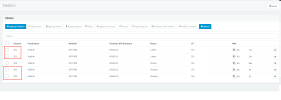
now only 1 phone can works at a time, the others show "no service" on display and they look "doubled" on 3cx manager consol.

if i power off all of them, and i start to attach the first one, it get correctly provisioned, but than the others go in troubles when i attach them.

3cx 2 doubles.png
 
3cx on premise on a data center - no firewall hardware, win server 2019 only and ports on windows firewall opened as v18 freshly installed did.

3 IP phones on a remote lan, under a vodafone station router.

till few months ago, all was running fine.

now only 1 phone can works at a time, the others show "no service" on display and they look "doubled" on 3cx manager consol.

if i power off all of them, and i start to attach the first one, it get correctly provisioned, but than the others go in troubles when i attach them.


View attachment 26013
You're using STUN. Have you set different SIP and RTP ports for each phones? Also, you need to set those ports as forwarded to the phones from the remote firewall.

Using an SBC is probably easier.
 
thanx for reply, no i didn't, i never did in the past years.so i have to set a fix IP for the IP phones, and forward the ports on the router ? there is a guide to which ports to open and how to duplicate them?

i have only 3 IP phones.

why on android 3cx app do they works correctly instead ?
 
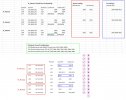
I am not sure, if i set properly the port forwarding.

it works, but this is correct config i made for my 3 IP phones ?

i also opened on 3cx Server Firewall the ports:


3cx Port Forwarding example.jpg
 
Everything appears correct

You do not have to change any firewall settings on the 3cx server
 
  • Like
Reactions: ChrisC_3CX
I am not sure, if i set properly the port forwarding.
From your screenshot it looks just fine.

it works, but this is correct config i made for my 3 IP phones ?
Just to confirm, has the issue gone now? Is everything fine? If not, do bear in mind that the phones will have to provision to take the new config containing the unique SIP ports and RTP port ranges. Rebooting them should force them to re-0provision, but, if you want to be sure, just add a new BLF key or something so that you can tell if they managed to re-provision or not.

i also opened on 3cx Server Firewall the ports:
As @Saqqara mentioned this is not needed, provided of course that you have already configured all 3CX required ports mentioned here: https://www.3cx.com/docs/ports/
 
  • Like
Reactions: Evolute IT
Status
Not open for further replies.

Members Online Now

No members online now.

Forum statistics

Threads
111,832
Messages
589,286
Members
164,662
Latest member
DejanMDS