Solved Phones showing "Please hang up" message

Status
Not open for further replies.

Zaffar Rasheed

Customer
Joined
Dec 5, 2018
Messages
26
Reaction score
0
Hi
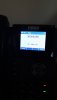
We are using 3cx + Patton smartnode 4.4, wing fanvil phones, past some days not able to call outside. phones showing please hang up message please find the attached image.
 

Attachments

  • phone message.jpg
    phone message.jpg
    43.6 KB · Views: 46
More information required here.

There is no such device as a Patton 4.4, do you mean 4114 ? and if so are you talking JO/FXO, I guess so since you are using IP phones.

What are you doing when you get this hangup message ? as much info as possible please.
 
Hi
Yes its 4114 FXO with ip phones fanvil brand.

Local extension calls working fine, but when we call outside we are getting this message
 
Smartnode configured as per this, and there is no additional service running.


Getting connected through serial cable and command line would be difficult because of the place access. Can we get something through web page of smartnode?
 
If you can get to the smartnodes web page you should also be able to telnet to it from your pc.
 
No, but you can telnet via local IP of the Patton.
 
Look at the 3CX Activity Log for one of the calls, what message/condition happens when 3CX attempts to pass the call onto the gateway?

Have you confirmed (using an analogue phone), that all phone lines, going into the gateway are working?
 
Sorry for the long delay in reply:
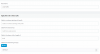
There was some issue in outbound rules it is corrected now, phones are working but sometimes it still shows Hangup Message and Internal server error I am posting outbound rule here. @eddv123 you still need the debug message?

@leejor it does not show any kind of such errors but in event list when the internal server error comes it shows 503 error service not available
 

Attachments

  • outbound.PNG
    outbound.PNG
    10.5 KB · Views: 18
Just to add following

logs from the Patton:

970-01-06T05:44:05 : LOGINFO : Warm start.
2019-05-19T10:57:00 : LOGINFO : Time: set clock from 1970-01-09T01:45:29 to 2019-05-19T10:57:00
2019-05-19T10:58:36 : LOGINFO : 4 DSP channels available
2019-05-19T10:59:27 : LOGINFO : Link up on interface ethernet 0 0 0
2019-05-19T10:59:28 : LOGINFO : Link up on interface IF_IP_LAN
2019-05-19T10:59:33 : LOGINFO : Warm start.
2019-05-19T11:47:30 : LOGINFO : 4 DSP channels available
2019-05-19T11:48:01 : LOGWARNING : Errors in configuration of router 'switch' ('show call-router switch reload' for details)
2019-05-19T11:48:24 : LOGINFO : Link up on interface ethernet 0 0 0
2019-05-19T11:48:24 : LOGINFO : Link up on interface IF_IP_LAN
2019-05-19T11:48:29 : LOGWARNING : Config: Line 19: SN4114/JO/EUI(ic-voice)[0]#sntp-client
2019-05-19T11:48:29 : LOGWARNING : Config: % ^ Keyword mismatch
2019-05-19T11:48:29 : LOGWARNING : Config: Line 21: SN4114/JO/EUI(ic-voice)[0]#sntp-client server primary pool.ntp.org
2019-05-19T11:48:29 : LOGWARNING : Config: % ^ Keyword mismatch
2019-05-19T11:48:29 : LOGWARNING : Config: Line 228: SN4114/JO/EUI(prt-eth)[0/0]#port ethernet 0 1
2019-05-19T11:48:29 : LOGWARNING : Config: % Ethernet port does not exist
2019-05-19T11:48:31 : LOGINFO : Warm start.
2019-05-19T12:05:13 : LOGINFO : 4 DSP channels available
2019-05-19T12:05:44 : LOGWARNING : Errors in configuration of router 'switch' ('show call-router switch reload' for details)
2019-05-19T12:06:07 : LOGINFO : Link up on interface ethernet 0 0 0
2019-05-19T12:06:07 : LOGINFO : Link up on interface IF_IP_LAN
2019-05-19T12:06:12 : LOGWARNING : Config: Line 19: SN4114/JO/EUI(ic-voice)[0]#sntp-client
2019-05-19T12:06:12 : LOGWARNING : Config: % ^ Keyword mismatch
2019-05-19T12:06:12 : LOGWARNING : Config: Line 21: SN4114/JO/EUI(ic-voice)[0]#sntp-client server primary pool.ntp.org
2019-05-19T12:06:12 : LOGWARNING : Config: % ^ Keyword mismatch
2019-05-19T12:06:12 : LOGWARNING : Config: Line 228: SN4114/JO/EUI(prt-eth)[0/0]#port ethernet 0 1
2019-05-19T12:06:12 : LOGWARNING : Config: % Ethernet port does not exist
2019-05-19T12:06:14 : LOGINFO : Warm start.
2019-05-22T11:51:43 : LOGINFO : 4 DSP channels available
2019-05-22T11:52:14 : LOGWARNING : Errors in configuration of router 'switch' ('show call-router switch reload' for details)
2019-05-22T11:52:36 : LOGINFO : Link up on interface ethernet 0 0 0
2019-05-22T11:52:37 : LOGINFO : Link up on interface IF_IP_LAN
2019-05-22T11:52:41 : LOGWARNING : Config: Line 19: SN4114/JO/EUI(ic-voice)[0]#sntp-client
2019-05-22T11:52:41 : LOGWARNING : Config: % ^ Keyword mismatch
2019-05-22T11:52:41 : LOGWARNING : Config: Line 21: SN4114/JO/EUI(ic-voice)[0]#sntp-client server primary pool.ntp.org
2019-05-22T11:52:41 : LOGWARNING : Config: % ^ Keyword mismatch
2019-05-22T11:52:41 : LOGWARNING : Config: Line 228: SN4114/JO/EUI(prt-eth)[0/0]#port ethernet 0 1
2019-05-22T11:52:41 : LOGWARNING : Config: % Ethernet port does not exist
2019-05-22T11:52:43 : LOGINFO : Warm start.
2019-06-02T19:11:55 : LOGINFO : 4 DSP channels available
2019-06-02T19:12:26 : LOGWARNING : Errors in configuration of router 'switch' ('show call-router switch reload' for details)
2019-06-02T19:12:47 : LOGINFO : Link up on interface ethernet 0 0 0
2019-06-02T19:12:48 : LOGINFO : Link up on interface IF_IP_LAN
2019-06-02T19:12:52 : LOGWARNING : Config: Line 19: SN4114/JO/EUI(ic-voice)[0]#sntp-client
2019-06-02T19:12:52 : LOGWARNING : Config: % ^ Keyword mismatch
2019-06-02T19:12:52 : LOGWARNING : Config: Line 21: SN4114/JO/EUI(ic-voice)[0]#sntp-client server primary pool.ntp.org
2019-06-02T19:12:52 : LOGWARNING : Config: % ^ Keyword mismatch
2019-06-02T19:12:52 : LOGWARNING : Config: Line 228: SN4114/JO/EUI(prt-eth)[0/0]#port ethernet 0 1
2019-06-02T19:12:53 : LOGWARNING : Config: % Ethernet port does not exist
2019-06-02T19:12:55 : LOGINFO : Warm start.
 
If you want to post the logging please follow this video as an example (but in FXO format):

Or: https://www.patton.com/support/kb_art.asp?art=446&p=128

enable
show running‐config
debug call‐router
debug call‐control
debug ccfxo signaling
debug context sip‐gateway signaling detail 5
debug context sip‐gateway transport detail 5
debug context sip‐gateway error

I will take a look then, thanks.
 
You may want to consider being a bit more specific in your outbound rules. At the moment they appear to be quite generic, which, in the past, I've seen cause problems.
 
HI please attach debug report,

hi leejor can you help me with the outbound rule: below is our scenario of calling

Local calls number digits for mobile and land line will be : 8 (eg: 17540008 / 37799500)
Country code is : +973
extensions are : 3 digits configured (eg: 103, 104)

Just to add when the hangup message comes then 3cx event shows

SIP Server/Call Manager ID: 12294
Call or Registration to 36771213@(Ln.10000@Patton Analog FXO) has failed. 192.168.15.23 replied: 503 Service Unavailable; from IP:192.168.15.23:5060
 

Attachments

Some of the lines have not taken, I advise when inputting you simply tab and auto-complete the commands, for example "debug cc(tab)" will give you the options to auto-complete and thus get the command right first time:

192.168.15.23#debug ccfxo signaling
% ^ End of line expected
192.168.15.23#debug ccfxo signaling
% ^ End of line expected

As for the trace, there are no calls in it, just registration attempt information, please enter "no debug all" on the CLI of the Patton, re-input the commands (you don't need the show running-config command" to show the settings) and retry the number when the correct debug commands have been configured.
 
Here is a link to outbound rule examples.
https://www.3cx.com/blog/voip-howto/outbound-rules-a-complete-example/

In your case, if you do not use an access digit, you generally have to consider 4 types of calls... local, national, and international, and then any "special" numbers, with fewer digits than a local number. Local numbers may have to use a rule that uses digit length, national and international can usually be "sorted" with the access prefix required by your provider. Emergency, or others that don't fall into the other 3 categories may require their own rule(s), but emergency numbers, can be defined elsewhere in 3CX and then don't require one

On your gateway have you confirmed (using a phone on the rear connections) that the phone lines are working (there is dialtone each)?.
 
Some of the lines have not taken, I advise when inputting you simply tab and auto-complete the commands, for example "debug cc(tab)" will give you the options to auto-complete and thus get the command right first time:

192.168.15.23#debug ccfxo signaling
% ^ End of line expected
192.168.15.23#debug ccfxo signaling
% ^ End of line expected

As for the trace, there are no calls in it, just registration attempt information, please enter "no debug all" on the CLI of the Patton, re-input the commands (you don't need the show running-config command" to show the settings) and retry the number when the correct debug commands have been configured.

Please find the attached file. unfortunately, error is not turned up now
 

Attachments

Here is a link to outbound rule examples.
https://www.3cx.com/blog/voip-howto/outbound-rules-a-complete-example/

In your case, if you do not use an access digit, you generally have to consider 4 types of calls... local, national, and international, and then any "special" numbers, with fewer digits than a local number. Local numbers may have to use a rule that uses digit length, national and international can usually be "sorted" with the access prefix required by your provider. Emergency, or others that don't fall into the other 3 categories may require their own rule(s), but emergency numbers, can be defined elsewhere in 3CX and then don't require one

On your gateway have you confirmed (using a phone on the rear connections) that the phone lines are working (there is dial tone each)?.

Can I use the following rules in my case
1. Local Calls:
Calls to Numbers with a length of : 3-8

2. Local Calls with +973
Calls to Numbers with a length of : 8-12

3. International Calls
Calls to Numbers with a length of : 12-16

On your gateway have you confirmed (using a phone on the rear connections) that the phone lines are working (there is dial tone each)?.
This issue not happening every time if I call 3 times 1 or 2 times it shows please hangup, but other times it went through.
 
Do local call lenths vary, or are they all 8 digits? (with the exception of some special numbers? If special numbers are all 3 digits, then rules can be created just for those. National calls should have a set digit length, but require preceding digits. The preceding digits must be considered in the digit length by the rules. Same with international calls, required prefix, but number of digits will vary.

On your gateway have you confirmed (using a phone on the rear connections) that the phone lines are working (there is dial tone each)?.
This issue not happening every time if I call 3 times 1 or 2 times it shows please hangup, but other times it went through.

If one PSTN line is not connected (open somewhere), it is possible that the outgoing call is attempting to use that line on occasion, which might explain why it happens only at times
 
Do local call lenths vary, or are they all 8 digits? (with the exception of some special numbers? If special numbers are all 3 digits, then rules can be created just for those. National calls should have a set digit length, but require preceding digits. The preceding digits must be considered in the digit length by the rules. Same with international calls, required prefix, but number of digits will vary.


If one PSTN line is not connected (open somewhere), it is possible that the outgoing call is attempting to use that line on occasion, which might explain why it happens only at times

Local calls yes all will be 8, but if someone tries to use international format then it will be 00973 37799500 total 13 digits

National and International can you please suggest the rules, I couldn't get you.

"If one PSTN line is not connected (open somewhere), it is possible that the outgoing call is attempting to use that line on occasion, which might explain why it happens only at times: "

Actually all the phones are securely kept not open, but still it shows please hangup
 
Yes I can see that you don't have any issues in this call - you will need to retake when you do (FYI the attached will take you through the commands as well) you want to follow "Analogue Gateways (FXO) – Connected to BT lines":

Once done and captured send it over.
 

Attachments

Status
Not open for further replies.

Forum statistics

Threads
112,313
Messages
591,840
Members
165,457
Latest member
devo.it