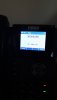
Solved Phones showing "Please hang up" message

Status
Not open for further replies.
"If one PSTN line is not connected (open somewhere), it is possible that the outgoing call is attempting to use that line on occasion, which might explain why it happens only at times: "

Actually all the phones are securely kept not open, but still it shows please hangup

What I mean is the if one of the PSTN phone lines has gone open (become disconnexted) from your gateway, this will cause an issue. It may be worth checking each one

National and International can you please suggest the rules, I couldn't get you.

Some regions require a different prefix when calling outside the country (international), as opposed to inside the country. . If you must use 00 for all long distance calls no matter national, or international, then you will have to make do with one rule for all non-local calls. If users insist in dialling local calls with a prefix and country code included, then, again, one rule. Many try to limit international access to only those extensions that require it and block all others by restricting calls using the international prefix.
 
Last edited:
What I mean is the if one of the PSTN phone lines has gone open (become disconnexted) from your gateway, this will cause an issue. It may be worth checking each one

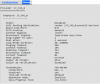
If this is what I think you mean - that the call maybe trying to access FXO_2 (or other interface on the Patton device when the line is disconnected) then I can confirm at least in the working trace that the call is going out of IF_FXO_1 on the Patton device.

Obviously a trace from the Patton of a non-working call would confirm this theory (if of course I have assumed your point correctly).
 
Ok I will create debug log when the issue happens again, mostly by today or tomorrow it will I'm sure :(
 
Hi I am able to capture 3cx capture please find the attached.
the issue happened : 9:30 am from the extension 101

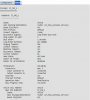
another strange thing noticed that in patton Fxo port all the port showing disabled except one, does it mean that only one line is working currently11007


Active FXO
11008
 
How to attach dump.pcap file here
 
In case forum doesn't offer to UL files directly , you can send your file on a shared space on line an paste the link in your next forum answer
 
another strange thing noticed that in patton Fxo port all the port showing disabled except one, does it mean that only one line is working currently
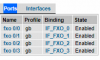
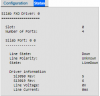
Looking at the original configuration file sent over it contains 4 x FXO ports all with enabled ports. Can you confirm if the configuration file is still uploaded or whether you have reset the device.

If it is I would login to the CLI and issue the "no shutdown" command on the FXO ports.

port fxo 0 0
no shutdown

Just to confirm if this GUI page changes or not, also to confirm if you switch the known working line into this port (the one that states disabled) do you get the same result.

Happy to look at the log, you can attach to a response on the forum or send via dropbox.
 
The main Fxo page it shows all enabled, but when click on link under Binding it shows previous image i send. just now I click link under name fxo 0/0 then the second image shown
11010

11011
 
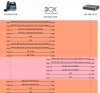
Please look at the attached for the flow diagram of what I assume is an incorrect call - please note however that the call timings don't match what you have stated - they are around 17.30.

You have a 503 Service unavailable coming back from the Patton gateway. In this response it is reporting the issue as: Reason: Q.850;cause=47;text="Resources unavailable, unspecified"

This could be the Patton gateway or the service itself, but I have found that the early media or early offer settings can make a difference with a similar related issue I had so worth checking this setting if you can:
https://www.3cx.com/community/threads/early-media.34472/#post-179641

You could be getting the hang up message due to an issue with the timing of the audio path.

This can be found under the VoIP Profile if I recall, but let me know if you have problems finding it, the other option is getting the logs from the Patton as advised previously, as the error is coming from the Patton this will tell us for sure.
 

Attachments

  • 4114.jpg
    4114.jpg
    91.4 KB · Views: 12
Last edited:
@eddv123 early media setting need to look into Patton or 3cx ?, I can see VOIP profile in patton. but can't find any setting for early media.

yes I am waiting shoot debug command from patton
 
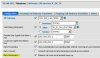
The setting is in the Patton and apologies, its called early-disconnect (see attached screen shot).

In the Patton The 'early-disconnect' option is on the SIP interfaces in the Patton config. Just un-tick the box, apply & test. You can also check the Patton template generated from 3CX for this setting also.

This setting is part of the SIP interface:

interface sip IF_SIP_TV
bind context sip-gateway GW_SIP_LAN_5060
route call dest-table In_to_Out_chkCaller
remote 192.168.203.1 5060
local 192.168.203.1 5060
early-disconnect

Its most prominent on the ISDN models, but the 4110 series manual seems to suggest it is supported on the FXO variants also.

Did you get a Patton trace of the issue also ? or just a PCAP from the PBX ?
 

Attachments

  • early_disconnect.jpg
    early_disconnect.jpg
    56.6 KB · Views: 10
please find the attached debug file from patton
 

Attachments

The logs simply show a 503 Service Unavailable message as with the Wireshark trace unfortunately but what I can see is the individual behaviour of each port.

The trace itself is polling through your FXO ports (0-3) and not getting a success from any port:
For example >> the call hits:

[EP IF_FXO_0/reject] Set call-leg property: Cause -> Destination out of order
[EP IF_FXO_0/reject] Set call-leg property: State -> RELEASED
EP IF_FXO_1] Rejecting offered call (User busy)
[EP IF_FXO_2] Rejecting offered call (Destination out of order)
[EP IF_FXO_3/reject] Set call-leg property: Cause -> Destination out of order
[EP IF_FXO_3/reject] Set call-leg property: State -> RELEASED

Then finally the 503 error. Have you traced a successful call from the Patton as of yet to confirm whether the FXO ports in question can indeed forward on calls.

I think possibly only one of your ports/lines is working FXO_1 and at times that this is busy the call is rejected with a 503 error. FXO_1 is the only line which does not state "Destination out of order" and the only line which is in an ACTIVE state on your Patton.

I would try doing the following:

  1. Testing and logging a working call (as mentioned above).
  2. Contact the provider to check the status of the lines.
  3. Resetting the Patton and re-provisioning as per: https://www.3cx.com/voip-gateways/patton-smartnode-sn4112/

I think chances are that the lines are at fault here, but with the above you never know - are you 100% sure they are providing the correct service on the lines ? a call to the provider will confirm (unless you have a telecoms bill from them).
 
Dear All,
Sorry for being late in reply. I was in touch with ISP to check the line. and they have confirmed it only one line is working and they rectified it. now the hang-up issue not comes again

Thanks a lot for your excellent help, one of the best community group I joined. You guys are awesome.
 
Status
Not open for further replies.

Latest Posts

Forum statistics

Threads
111,929
Messages
589,783
Members
164,802
Latest member
SpacetelSupport