


- Joined
- Jan 19, 2018
- Messages
- 3,465
- Reaction score
- 2,324
First time in v20 that I had to make a custom template (because Yealink insists on a DND button on a T57W and the client wants it gone) and I noticed a strange thing happening.
When viewing the Phones tab, the "Vendor" field is the name of the custom template (then bracket and the name again)
Any idea where/what is triggering that in the template? All I've done is change 1 softkey from stock. V18 has no issue with these changes.
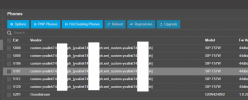
Also the FW version is the Mac address now as well....
When viewing the Phones tab, the "Vendor" field is the name of the custom template (then bracket and the name again)
Any idea where/what is triggering that in the template? All I've done is change 1 softkey from stock. V18 has no issue with these changes.
Also the FW version is the Mac address now as well....


