Phones voice connection issues

Status
Not open for further replies.

Darren Birnie

Customer
Joined
Apr 3, 2018
Messages
10
Reaction score
1
I have 5 Fanvil X5S handsets. Connected to 3cx in the cloud (google). They worked perfectly for two years no issues. This year every day or second day the loose voice connection. The phones show connected, they ring, but the person on the other end cant hear you. The quick fix is a login to 3cx and reset the services. It will then work for another day or two, and repeat.

I have checked the firewall and it passes all the tests.

I cant seem to find any obvious reason it just fails.

Any ideas?
 
Hi Darren,

Since the PBX is in the cloud, how are the phones provisioned (STUN/SBC/VPN) and have you taken care of the port assignments at the phones site? Sounds like a port issue from your description
 
Hi John,

Yeah im using the 3cx STUN server. Port are all open on the server side (3cx port test all green). At the phones site i have not opened any ports, as i assumed the phones connected out to the 3cx system. Also when i reset the services on 3cx it solves the problem.

Is it possible to script restarting all the services every day at 2 am?

Darren
 
Hi Darren,

If you do not take care of the ports at the phones site, things might work until one day they wont :)

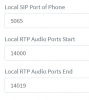
I suggest you set static port forwards for each and every phone at the site, using the SIP and RTP ports you will find under each extension as per the example below:

11084

Ensure of course that each STUN extension has its own SIP port, and its own RTP ports - they must be unique for each phone and they must be opened on the firewall. Also SIP-ALG must be disabled on the firewall.

The above will ensure that the ports for audio are never cut off and should improve eliminate the possibility that your audio ports are broken.

Notes when using Remote Extension with STUN
  1. Please make sure that your Remote Location has Static NAT implemented as well to the phones and that the SIP port and RTP port range for each phone as specified in Extension Settings >> Provisioning tab is correctly forwarded to the IP address of each phone
  2. If you have multiple IP Phones on the same remote network configured with the same SIP and RTP ports, you might have an audio problem caused by the way certain routers implement NAT. In this scenario, each phone must have a different SIP Port and a range of RTP ports must be configured per phone. To do this, click on the Provisioning tab, change the SIP and RTP ports and perform a re-provision of each phone from the Phones node.
  3. SIP ALG may interfere with the correct handling of audio and signaling. If you have audio issues, try to disable SIP ALG from the firewall. If you encounter such issues, you should check if your router has any known issues with SIP and VoIP. On most firewalls, SIP ALG needs to be turned off.
  4. If you are using 3CX Phone System as a Virtual PBX Server, you would need to allow access to the ports for the specific instance you are configuring. The default port list can be found in the Installing 3CX Phone System as a Virtual PBX Server admin guide.
  5. If you have a Thomson router, you MUST make sure that the SIP Port of the phone is NOT EQUAL to 5060. Read this post for more information https://www.3cx.com/docs/disable-sip-alg-on-thomson/.

Can you also tell me what Version you PBX is running? The audio ports range changed at some point in the past and you need to ensure you have opened ports as seen here https://www.3cx.com/community/threads/3cx-phone-system-audio-ports-increased.60235/
 
Im currently running 16.0.1.273, i see that there is a new beta out but i try and stay away from beta's while any bugs are worked out.

Ill set the ports on my end and report back on the results.

Thanks for the help,

Darren
 
  • Like
Reactions: JohnS_3CX
Status
Not open for further replies.

Forum statistics

Threads
111,928
Messages
589,778
Members
164,800
Latest member
JensVoss