PI3 dies when upgrading to v.18

Status
Not open for further replies.

alberto.azzini

Titanium Partner
Advanced Certified
Joined
Apr 11, 2020
Messages
33
Reaction score
4
Hello, i've tried to upgrade 2 different PI3 B+ to V.18 but they died during the activity.
Anybody is experiencing the same or have successed upgraded PI 3 B+ to V.18?
 
Hi @alberto.azzini,

When you say the Pi died during the upgrade, did it give you an error or did it just stop responding? It's known to be a rather lengthily process even for the Pi 4s.
 
Hi @alberto.azzini,

When you say the Pi died during the upgrade, did it give you an error or did it just stop responding? It's known to be a rather lengthily process even for the Pi 4s.
Hi, after 1 hour Pi 3 was still up but was saying "Server Error" when trying to log in via web management but SSH was still responding.
After 1 day, as it was clearly stuck, i decided to reboot and PI3 is no more booting (need to go on site to verify that but remotely stopped responding and no SSH). Tried on different site and has done exact the same.
Suggestions? :|
P.S. they had Raspbian stretch
 
A PI3 needs ruffly 2h to upgrade. They are not that powerful and the sd chards of the time write very Slow.
 
A PI3 needs ruffly 2h to upgrade. They are not that powerful and the sd chards of the time write very Slow.
As i wrote i waited 1 day...
 
@alberto.azzini can you please PM me the Public ip address what this PI used ?
 
I'd suggest flashing the SD card with the image provided in the guide which is based on Debian Buster: https://www.3cx.com/docs/installing-pbx-raspberry-pi/. You could follow the same guide we have for the Pi 4.

You also might want to consider slowly switching over to a Pi 4 in order to ensure that your Raspberry Pi configuration stays future proof as discussed here: https://www.3cx.com/community/threads/raspberry-pi-3b.76778/
Hi, i understand and latest images have been done in a USB stick and Raspian 10. But i have something like 150 implants that way (Raspbian 9 and Pi3+SD) and i’m trying a way out before they all update. Going one by one is not an option…
 
@alberto.azzini thanks for sharing the information.
As I can see during upgrade it tried to install a package and it failed, this is why upgrade failed.
About this one, there are not a lot we can do as this is something that is controlled form the OS.
Check below logs :

dpkg: error processing archive /tmp/apt-dpkg-install-Lwpr3N/131-linux-libc-dev_1%3a1.20210805-1_armhf.deb (--unpack):
unable to stat './usr/include/linux/tc_act/tc_bpf.h' (which I was about to install): Input/output error

Errors were encountered while processing:
/tmp/apt-dpkg-install-Lwpr3N/131-linux-libc-dev_1%3a1.20210805-1_armhf.deb
W: --force-yes is deprecated, use one of the options starting with --allow instead.
E: Sub-process /usr/bin/dpkg returned an error code (1)
> Upgrade failed (upgrade)
 
@alberto.azzini thanks for sharing the information.
As I can see during upgrade it tried to install a package and it failed, this is why upgrade failed.
About this one, there are not a lot we can do as this is something that is controlled form the OS.
Sorry but i don't understand. What did we do wrong?
 
@alberto.azzini you didn't do anything wrong, the main issue here comes from the OS itself and a package that tried to install and crashed.
Unfortunately, this is something we can not control. In this case the golden rule of taking a backup before, comes into the game. With this way you are safe 100%.
 
@alberto.azzini you didn't do anything wrong, the main issue here comes from the OS itself and a package that tried to install and crashed.
Unfortunately, this is something we can not control. In this case the golden rule of taking a backup before, comes into the game. With this way you are safe 100%.
Auto backup to ftp has been set for all pbx.
Should we expect this behaviour on all Pi3? Will OS update be executed automatically if "Automatically update 3CX" is flagged?
 
@alberto.azzini cant say for sure if this will happen to all Pi3.
Depends on a lot of things, the ones we have tested on our side ( multiple times ) didn't show this behavior.
For the "Automatically update 3CX" this applies only to Stable SPs on the PBX side, security updates and does not include the OS Upgrade.
 
@alberto.azzini cant say for sure if this will happen to all Pi3.
Depends on a lot of things, the ones we have tested on our side ( multiple times ) didn't show this behavior.
For the "Automatically update 3CX" this applies only to Stable SPs on the PBX side, security updates and does not include the OS Upgrade.
Ok, i'll try tomorrow on another install and update this ticket.
Today we are updating all AWS Lightsail installs
 
  • Like
Reactions: NikosT_3CX
An update on this topic.
Successfull upgrade on Pi3 B+ is quite random.
70% of them go straight, but a 30% has issues in upgrading that end to non-working PBX and so to an on-site activity.
My suggestion to anybody that need to upgrade is: do only if you'll be in that area that same day.
No issue at all on AWS Lightsail, VMware VMs, HyperV VMs and Intel based PCs.
 
Pi3 Is too underpowered, you need to get a Pi4
 
Pi3 Is too underpowered, you need to get a Pi4
Hello Nick, sorry but nope.
If you fresh reinstall it on the same RB it works correctly.
It's something in the upgrade procedure that blocks itself, forcing to go onsite to reinstall. As you can see before NikosT checked on failed upgrade and it was caused by a package that wasn't downloading.
If I have to change PI every time a new main build is out, what's the purpose to be able to install on Pi? An Intel Celeron would be better in that case. Or not?
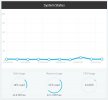
This is a screenshot of a Pi3 running V.18 and 6 extensions. It doesn't look like so "underpowered".
Screenshot_16.jpg
 
Another update:
On the last one not updating i connected in SSH.
Buster was installed but 3CX was not. Command "service 3CX* status" was not showing anything.
I've manually re-done the installation and 3CX started correctly, loading the old settings automatically.
PBX after that was running correctly, services were UP, extensions were UP, trunks were UP, but if i did a "service 3CX* status" 3CXFirewall.service was in error:
3CXFirewall.service - 3CX PhoneSystem Firewall
Loaded: loaded (/lib/systemd/system/3CXFirewall.service; enabled; vendor preset: enabled)
Active: failed (Result: exit-code) since Wed 2021-08-25 19:55:50 CEST; 5min ago
Main PID: 12040 (code=exited, status=3)
Aug 25 19:55:50 pbx.local systemd[1]: Starting 3CX PhoneSystem Firewall...
Aug 25 19:55:50 pbx.local nft[12040]: netlink.c:62: Unable to initialize Netlink socket: Protocol not supported
Aug 25 19:55:50 pbx.local systemd[1]: 3CXFirewall.service: Main process exited, code=exited, status=3/NOTIMPLEMENTED
Aug 25 19:55:50 pbx.local systemd[1]: 3CXFirewall.service: Failed with result 'exit-code'.
Aug 25 19:55:50 pbx.local systemd[1]: Failed to start 3CX PhoneSystem Firewall.
I restarted again PBX and it fixed that too.
GUI is reporting a correct OS upgrade, like nothing happened:
Your 3CX Debian OS was successfully updated
3CX Phone System Management Console ID: 10011 25/08/2021 19:56:52
So it seems a problem with 3CX reinstallation...

Any suggestion?
 
Last edited:
@alberto.azzini drop me a PM please with the Public ip of this one that had the issue with the 3CX PhoneSystem Firewall
 
Status
Not open for further replies.

Forum statistics

Threads
111,979
Messages
590,101
Members
164,908
Latest member
FarizQasimov