- Joined
- Jul 1, 2016
- Messages
- 6,603
- Reaction score
- 2,610
I found this as well: https://www.3cx.com/community/threads/new-windows-desktop-app-optimized-for-speed.85503/post-402161, quoted here:C:\Users\<username>\AppData\Local\Programs\3CXDesktopApp\app
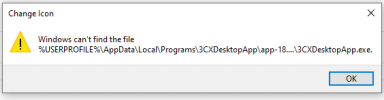
Issue is the icon path is set/changed to a version numbered folder "C:\Users\username\AppData\Local\Programs\3CXDesktopApp\app-18.5.28" and that directory doesn't exist after the update completes.We identified an issue with pinned taskbar icon during update process that will be addressed on the upcoming release of Desktop App.
First time might require unplin and pin, but for concecutive updates should be OK.
Oh, I see the icon path is:I found this as well: https://www.3cx.com/community/threads/new-windows-desktop-app-optimized-for-speed.85503/post-402161, quoted here:
Issue is the icon path is set/changed to a version numbered folder "C:\Users\username\AppData\Local\Programs\3CXDesktopApp\app-18.5.28" and that directory doesn't exist after the update completes.

Founded in 2005, when VoIP was an emerging technology, 3CX has gone on to establish itself as a global leader in business communications.