Play Announcement for Ring Group

Heath

Customer
Advanced Certified
Joined
Aug 12, 2017
Messages
287
Reaction score
3
I have 3 different ring groups which is based on the DID that is called on.. On each one of the ring groups, if the call is not answered within 20 seconds, they go to a digital receptionist. What I would like to do is prior to the calls ringing on the respective ring group to have a announcement that the call is being recorded and then have the call ring on the proper ring group based on the DID that was dialed. Now in the ring group setup I see a play announcement tab for call handling after house, break, and holiday. But don't see anything to play initially during office house.
 
The queues would be your best option. The ring groups are very basic in their functionality, but your queue would have an intro prompt, which would also provide the caller with the option to either opt in or out of the recording as well, should you wish to give them that option.
 
The queues would be your best option. The ring groups are very basic in their functionality, but your queue would have an intro prompt, which would also provide the caller with the option to either opt in or out of the recording as well, should you wish to give them that option.
Wouldn’t the queue require signing in and out of the phones daily
 
Wouldn’t the queue require signing in and out of the phones daily
You can leave them logged in if you want to.
 
Or you can automatically log them in/out of the queue based on office hours.

If you want to use a ring group, first forward the DID to an IVR that plays the desired prompt, then have the IVR forward the call to the ring group. That said, I agree with @NicholasP_3CX that there are very few situations where I would use a ring group rather than a queue.
 
You can leave them logged in if you want to.

I have 3 different ring groups based on the DID that’s dialed. Now prior to the call ringing I need a recording to state that the call is being recorded then ring on the proper and appropriate ring group. How would that work.. Do I need 3 queues also to have the recording and then on the ring groups
 
Or you can automatically log them in/out of the queue based on office hours.

If you want to use a ring group, first forward the DID to an IVR that plays the desired prompt, then have the IVR forward the call to the ring group. That said, I agree with @NicholasP_3CX that there are very few situations where I would use a ring group rather than a queue.
So if I forward to a. IVR I assume I will need 3 separate IVR since I have 3 different ring groups, but then how do I then set in the IVR to then automatically ring on the ring groups after the recording plays “This call is being recorded for compliance purposes”
 
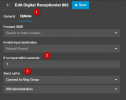
Define your destination after a second to go to the relevant Ring Group.
1733311827419.png
 
but I have 3 different ring groups. So does that mean I need 3 different digital receptionists IVR’s
 
Yes, you will need three different Digital Receptionists:

Digital Receptionist1 --> Ring group1
Digital Receptionist2 --> Ring group2
Digital Receptionist3 --> Ring group3
 
Define your destination after a second to go to the relevant Ring Group.
View attachment 45423
Ok now in the IVR for the after office hours and holidays. If I have the play announcement on both of those in the general tab is it going to play both the IVR prompt messsge and what ever we have for the play announcement…

Now the purpose of these IVR is announce that the call is being recorded before the call rings in the ring group. You mentioned prior that a caller can opted out to having the call recorded. If recording is turned on for that user and a caller doesn’t want the call recorded how does this get setup for that particular call not to be recorded or how to setup for the opt out
 
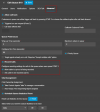
The opt out is done in the Queue settings. You would need to have this recorded into the prompt for the caller to press 3.

1733400134422.png

This is NOT available in the Ring Groups
 
The opt out is done in the Queue settings. You would need to have this recorded into the prompt for the caller to press 3.

View attachment 45442

This is NOT available in the Ring Groups
ok. My others question wasn’t answered. Can you answer that as well
 

Latest Posts

Forum statistics

Threads
111,962
Messages
589,980
Members
164,866
Latest member
swseabolt