'Play chat notification' setting

Status
Not open for further replies.

edfosho

Silver Partner
Advanced Certified
Joined
Apr 26, 2019
Messages
82
Reaction score
13
Under Settings > General > Chat Settings I find myself having to select 'Play chat notification' quite often. Is it reset after each 3CX server update or something?
 
As for what the browser extension needs access to is your webclient URL but that is irrelevant, don't let it throw your off because that setting does not limit the extension to specific ACCESS URLs, it actually limits the extension to only run on specific SITES period. But the extension needs to always run in the background, regardless of what sites you are visiting (it doesn't care about those sites, it only cares that it runs)

The short version is, allow it access to all sites otherwise Chrome stops the extension from working, not because it accesses other sites, but because Chrome stops it from running altogether. That is again something that is controller by how Chrome works and we cannot change its behavior from our end.
Ah I see, OK, thanks for that explanation - makes sense.

I'm not a Chrome Extension developer, though, I'm struggling to understand why the browser extension needs to read and change all site data in order to maintain it's connection for calls via the linked 3CX system. I was under the impression having your 3CX Web Client open at all times would be enough - but it sounds like that is not the case.

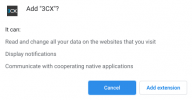
I should say though, the wording here is transparent and clear about what it can do:

1610982152966.png

(though I'm guessing that is automated Chrome webstore text given any declared permissions)

Please though, take it as user feedback that whilst installing the 3CX Chrome Browser Extension, it appears you can manage extension settings and proceed to restricting the site access, but you can't actually do so (as it'll stop it from working). User privacy is a hot topic nowadays (even for non-IT folk), so having the options to tweak things to your preference in front of you may be tempting and necessary to do so - some sort of warning or information about tweaking the settings may result in less users reporting problems.

I appreciate your comments on Enterprise policies, but that's not always appropriate in a non-Enterprise setting.
 
Ah I see, OK, thanks for that explanation - makes sense.

I'm not a Chrome Extension developer, though, I'm struggling to understand why the browser extension needs to read and change all site data in order to maintain it's connection for calls via the linked 3CX system. I was under the impression having your 3CX Web Client open at all times would be enough - but it sounds like that is not the case.

I should say though, the wording here is transparent and clear about what it can do:

View attachment 20182

(though I'm guessing that is automated Chrome webstore text given any declared permissions)

Please though, take it as user feedback that whilst installing the 3CX Chrome Browser Extension, it appears you can manage extension settings and proceed to restricting the site access, but you can't actually do so (as it'll stop it from working). User privacy is a hot topic nowadays (even for non-IT folk), so having the options to tweak things to your preference in front of you may be tempting and necessary to do so - some sort of warning or information about tweaking the settings may result in less users reporting problems.

I appreciate your comments on Enterprise policies, but that's not always appropriate in a non-Enterprise setting.
The permission is simply to allow the extension to create Click2Call links on webpages. Thus requiring the ability to read the pages.
 
The permission is simply to allow the extension to create Click2Call links on webpages. Thus requiring the ability to read the pages.
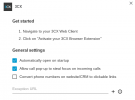
Thanks Frederick, though I was following on from my previous comments about not needing that requirement:

1610985437913.png

i.e. if you don't need/want click2call - there's the option to turn the feature off, but not amend the permissions to align with it. I now understand Chrome won't allow that with the extensions, fair enough.

Important to say: I do appreciate the setting in the screenshot above - I'm guessing it's primarily aimed at disabling the feature in case the user has a conflicting extension, not reducing permissions for 3CX extension.
 
Thanks Frederick, though I was following on from my previous comments about not needing that requirement:

View attachment 20186

i.e. if you don't need/want click2call - there's the option to turn the feature off, but not amend the permissions to align with it. I now understand Chrome won't allow that with the extensions, fair enough.

Important to say: I do appreciate the setting in the screenshot above - I'm guessing it's primarily aimed at disabling the feature in case the user has a conflicting extension, not reducing permissions for 3CX extension.
The setting is either if you don't want click2call or if it causes issues on websites you use.

There's no way to remove the permission, no. But, if the setting is disabled, the permission is simply not used.
 
So just to summarize:

On topic: the chat notification setting is stored in your local browser cache. The setting defaults to off when the cache is cleared

Off topic: do not change the permissions of the Chrome Extension if you do not know what they will do. Keep the defaults and it will work as intended
 
  • Like
Reactions: Evolute IT
Status
Not open for further replies.

Forum statistics

Threads
112,025
Messages
590,367
Members
164,978
Latest member
FringeIT-Eric