• We do not provide troubleshooting help for unsupported phones. Please try with a supported phone.
  • V20 Update 10 Alpha Learn more

Plug and Play provisioning on Polycom VVX 150

Status
Not open for further replies.

zenpire

Free User
Joined
Nov 19, 2015
Messages
3
Reaction score
0
The instructions seem so simple
I have Polycom VVX 150 , we had these around and we are trying to get them to be used by the 3cx.
We are using 3CX 16, new
We disabled the firewalls on our 3CX server. The phones were able to FTP into the 3CX server and download and install the 6.1 firmware from the server using FTP.

UC Software Version6.1.2.1127
Updater Version6.1.2.1123


I reset the phone. and followed instructions at the web page to enable plug and play
https://www.3cx.com/sip-phones/polycom-vvx/

But the phone never lists on the Web UI

It is getting a local DHCP address, are there DHCP parameters that need to be set using this phone?

How can I trouble shoot?

Can I moniter the multicasts?

Thanks
 
Hi @zenpire

The phones send a multicast message once they are set up as per our guide, and that makes them appear as a "New" phone in your Phones page.

If they do not appear there then there is probably a couple of things that need to be checked:

1. Multicast needs to be allowed on your network

2. The phone has not been setup quite right, and it did not send the multicast message


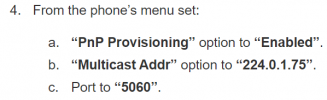
So first ensure that this step has been completed:
1612338283309.png

And then tell us where the phones are in relation to the PBX. The above methods only work when you have phones on the same LAN as the PBX (ie. Local) or if you are using an SBC.
 
I did a factory reset per instructions, again. The plug and play options were reset to disabled. I then got the menu you are listing by holding down the 1,2,3 and enabling plug and play. The desired ip address.and the port are the defaults.

The phone is on a Netgear POE 5 port switch and the Windows 10 Pro machine is on the same swtich. The server and the phone share the same three ip address tuples and differ in the last. .80 To .97.

Does the polycom/poly ZTP settings need to be set?

We are migrating from Ring Central, the phones are from them, but I reflashed them from the Polycom firmware using the FTP provision server method, which settings were removed in the factory default.

I guess I have to see if Windows 10 is blocking multicast or the switch.
 
You can also manually provision them or use DHCP option 66 if you just care about them working and not why PnP isn't working. The manual provisioning instructions are in the link you referenced below the PnP instructions. The basics for DHCP Option 66 are here:

How to auto-provision IP phones with DHCP "Option 66” (3cx.com)


But it could something as simple as following the instructions starting with Step 1 in that link. You mentioned upgrading the firmware to 6.1 but the 3CX supported firmware for the VVX 150 is 6.3
 
Thanks,. I have a bunch of these to provision, and I don't have access to the dhcp server like I want.

I originally updated to the 6.3 firmware and it didn't work, then I saw the docs which listed 6.1 (probably old) so reloaded 6.1. tried again, didn't work. I guess the answer is that it should work. I'll update to 6.3, and see if i can catch the multicast. Maybe this little switch is the issue. But it's new. I'll work wireshark the server looking for multicast broadcasts. See if it the switch.

We have about 30 of these users to get going. I am an asterisk guy, so I am used to manual setups. (Really manual)

I'll try the option 66 stuff as well, I have to get the outsourced people involved. Meh.

Thanks again.
 
Thanks,. I have a bunch of these to provision, and I don't have access to the dhcp server like I want.

I originally updated to the 6.3 firmware and it didn't work, then I saw the docs which listed 6.1 (probably old) so reloaded 6.1. tried again, didn't work. I guess the answer is that it should work. I'll update to 6.3, and see if i can catch the multicast. Maybe this little switch is the issue. But it's new. I'll work wireshark the server looking for multicast broadcasts. See if it the switch.

We have about 30 of these users to get going. I am an asterisk guy, so I am used to manual setups. (Really manual)

I'll try the option 66 stuff as well, I have to get the outsourced people involved. Meh.

Thanks again.
@zenpire We updated the guide to correct that ;)

Yes, if you can do so, check to see if the multicast message hits the server at least
 
T
We have about 30 of these users to get going. I am an asterisk guy, so I am used to manual setups. (Really manual)
Well if you are used to Asterisk then you could still go that route for these. Get them on the supported firmware, then just put the provisioning URL in manually.
 
Status
Not open for further replies.

Members Online Now

No members online now.

Forum statistics

Threads
111,831
Messages
589,277
Members
164,660
Latest member
RJenkinsROCK