• We do not provide troubleshooting help for unsupported phones. Please try with a supported phone.
  • V20 Update 10 Alpha 2 Learn more

PnP Provision from: Phones / Users->Phone Provisioning

Status
Not open for further replies.

AASRP

Forum User
Advanced Certified
Joined
Oct 28, 2021
Messages
4
Reaction score
1
Hello,

I have an on-premise infrastructure with 3cx and many SBCs. Using PnP provisioning in the Phones menu using multicast works perfectly.

I would like to know, if in the Users->Extension->Phone Provisioning menu, choosing the model and configuring the MAC, choosing the provisioning Method via 3CX SBC (remote), SBC IP and port, and applying the configuration the provisioning will be automatic too , sending the provisioning configuration to the phone. When I do it this way, the phone is not provisioned.

I will not use the Phones menu to provision via multicast, the provisioning would be done in Users->Extension->Phone Provisioning.

My question is if in Users->Extension->Phone Provisioning the process can be automatic via SBC or need the manual process of inserting the generated URL and configuring it directly on the phone.
 
Why are you using SBC when you have on-premise 3CX server , are the SBC at remote locations ?

If you enter the phone details into the 3CX management console, you would need to setup DHCP option 66, so the phone knowns the provisioning url - https://www.3cx.com/sip-phones/dhcp-option-66/

If you setup option 66, PnP will not work - you will not see the phones in the list to be assigned
 
Yes, yes we have several remote units, each with its own SBC.

option 66, is a per-extension provisioning URL, will not work as we would have to generate the provisioning url dynamically to be automatic.

within the extension properties, on the Phone Provisioning tab. The provisioning that takes place through this location, choosing the SBC method, the provisioning will only be manual? entering the URL directly on the device or linking in option 66 each extension with its URL
 
Option 66 only works if you have the same make of phones - The provision url is the same for each phone,

If you create a couple of phones, you will see the provisioning url is the same - it is a link to the 3cx server , as part of the provioning the Mac code of the phone is dynamic added to the link so the phone gets the correct config
 
  • Like
Reactions: JohnS_3CX
Hi @AASRP

option 66, is a per-extension provisioning URL, will not work as we would have to generate the provisioning url dynamically to be automatic.

Not quite. Option 66 will feed the phone a URL, and the phone will know how to autocomplete the rest.

As @Saqqara mentioned, your only challenge may arise if you use mixed phone brands that cannot make use of the same URL format.

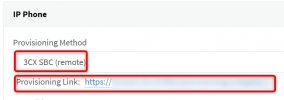
Other than that, Option 66 is exactly the type of solution you need so go ahead and try it by using this URL (Provisioning Link) and see how it goes
1635491021867.png
 
Thanks @JohnS_3CX and @Saqqara, yes I noticed after @Saqqara mentioned that the URL is always the same.
We have several yealink models, but I believe they all support.
All our DHCP scope is on linux servers, with isc-dhcp-server. I'll add the boot-server option to do some tests.
The 3cx documentation only exemplifies option 66 on windows. Is there any example scope for linux?
 
Hello,

That was more of an example to get the idea across rather than an endorsement, so no we have no equivalent guide for isc-dhcp-server.

Ultimately the idea is to get that option to serve that URL, so depending on what type of software or hardware DHCP server you use, you have to figure out its specifics using the equivalent documentation. Option 66 is also known as a TFTP server (this will help your search)
 
Last edited:
  • Like
Reactions: JohnS_3CX
Status
Not open for further replies.

Forum statistics

Threads
112,149
Messages
590,965
Members
165,171
Latest member
Mahlon