• We do not provide troubleshooting help for unsupported phones. Please try with a supported phone.
  • V20 Update 10 Alpha 2 Learn more

Solved Poly VVX201 Provisioning, Firmware, and Transfers

Status
Not open for further replies.

adnenyak

Customer
Joined
Jun 4, 2021
Messages
8
Reaction score
1
Hello 3CX People,
When I try to configure my VVX 201 with the recommended firmware I'm always facing the same error message :
not supported 6.4.1.2280
the phone get the extension and I can make call but when I want forward a call from local or external to another extension it's pass directly without allowing me to inform the persons who I want forward the call for him.

3CX Poly.png

I followed this method :
https://www.3cx.com/sip-phones/polycom-vvx/
for the firmware I found this :
https://www.3cx.com/support/phone-firmwares/

Regards.
 
What version of 3CX are you running ?

The firmware on the list is for the latest version (18), if you are running a previous version you are probably running a firmware not supported on your version of 3CX - reason for warning


Under the phone provisioning, have you set 'Select transfer method used (Blind or Attended) when you press a DSS key' to 'Attended / Consultative Transfer'
 
What version of 3CX are you running ?

The firmware on the list is for the latest version (18), if you are running a previous version you are probably running a firmware not supported on your version of 3CX - reason for warning


Under the phone provisioning, have you set 'Select transfer method used (Blind or Attended) when you press a DSS key' to 'Attended / Consultative Transfer'
For the 3CX server I'm using version 16 ! How I can go for 18 version
the firmware version is the last one mention in the 3CX manual


Under the phone provisioning, have you set 'Select transfer method used (Blind or Attended) when you press a DSS key' to 'Attended / Consultative Transfer'

Where I can found this?
Regards.
 
If you are running 3cx windows version - not out yet,

If debian / pi version - click on updates in the management console - making sure you have a back first stored locally on your pc just in case you have to reinstall

Setting is under Extensions -> Double click the extension - Phone Provisioning (Tab) - Scroll down to options
After you have made the change, under Phones - Select the phone and click on Reprovision (tab) , this will push out the change
 
Last edited:
If you are running 3cx windows version - not out yet,

If debian / pi version - click on updates in the management console - making sure you have a back first stored locally on your pc just in case you have to reinstall

Setting is under Extensions -> Double click the extension - Phone Provisioning (Tab) - Scroll down to options
After you have made the change, under Phones - Select the phone and click on Reprovision (tab) , this will push out the change
yes I'm running windows
for the rest really i didn't find what you mean
under extension and in the tab phone provisioning I look on option and found just three item : phone display language, time zone, and phone web page passwprd.
 
Hi Community,
I back for you to said I resolve a part of the problem,
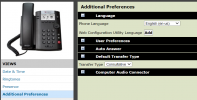
the forward method can be managed on the phone, by entering on the additional Preferences and modify the Default Transfer Type. Consultative that the way that I want, Blind that will forward the call directly without promting the user.
the integration between VVX201 and 3CX work good but the message still red and always show not supported 6.4.1.2280

thanks

1630927009343.png
 
@adnenyak

Regarding the firmware: The message you see is normal. In V16 only firmware version 6.3.0.14929 is supported so if you want the message to go away you need to downgrade the phone. On our website you always see the latest firmware versions supported by latest 3CX System. This is currently V18 (not V16). We will be releasing V18 for Windows fairly soon, so I don't think you will have any problems if you leave your firmware as-is for now. Just keep using your phones normally.

Regarding the transfer method: Polycom is a bit different from other brands. You can pre-select what mode you want to use from the extension provisioning tab, but the user can change modes whenever they want, directly from the phone. Follow these instructions and you can't go wrong:

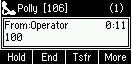
1. Press Trsf during a call
1630930419553.png

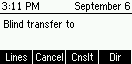
2. By default it says it will blind transfer but if you press the Cnslt button below..
1630930401953.png

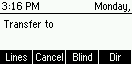
3. ..you will see the prompt change into plain "Transfer to"
1630930650565.png

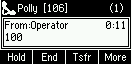
4. Dial your destination, and when they answer, you can finally press Trsf to complete the attended transfer
1630930768569.png
 
  • Like
Reactions: adnenyak
@adnenyak

Regarding the firmware: The message you see is normal. In V16 only firmware version 6.3.0.14929 is supported so if you want the message to go away you need to downgrade the phone. On our website you always see the latest firmware versions supported by latest 3CX System. This is currently V18 (not V16). We will be releasing V18 for Windows fairly soon, so I don't think you will have any problems if you leave your firmware as-is for now. Just keep using your phones normally.

Regarding the transfer method: Polycom is a bit different from other brands. You can pre-select what mode you want to use from the extension provisioning tab, but the user can change modes whenever they want, directly from the phone. Follow these instructions and you can't go wrong:

1. Press Trsf during a call
View attachment 24211

2. By default it says it will blind transfer but if you press the Cnslt button below..
View attachment 24210

3. ..you will see the prompt change into plain "Transfer to"
View attachment 24212

4. Dial your destination, and when they answer, you can finally press Trsf to complete the attended transfer
View attachment 24213
thank's man :)
 
  • Like
Reactions: JohnS_3CX
Glad to help! Gonna mark this one as solved then
 
Status
Not open for further replies.

Forum statistics

Threads
112,147
Messages
590,959
Members
165,167
Latest member
Finatra.us