• We do not provide troubleshooting help for unsupported phones. Please try with a supported phone.
  • V20 Update 10 Alpha Learn more

Polycom VVX 411

Anthony R

Silver Partner
Advanced Certified
Joined
Sep 18, 2024
Messages
66
Reaction score
16
Hi team,

I'm trying to add a Polycom VVX 411 IP phone to an extension, nevertheless, I'm having some issues with it. I've followed these steps: https://www.3cx.com/sip-phones/polycom-vvx/ but the phone is not coming up.
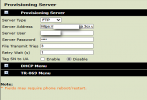
1737747547878.png

I've pasted the server address with the provisioning link I've obtained by 3CX and rebooted the phone but it didn't work, is there something else I should edit on it?

Should I move Server type to https?, server user and password should be changed too?, if so, which should I use, the router device user name and pass or extension id and pass?

I'm really new with 3CX, any assistance will be much appreciated.

Thanks
 
  • Like
Reactions: GregG_3CX
Thanks John. I changed it to https and paste the provisioning link, I rebooted the phone but it is still not working (I'm using a Yealink T46U phone as a router phone, this is already up and perfectly running). Could this be a firmware version issue?

I've also tried to update directly from the phone admin console the firmware to their latest version and it is also not working, any idea why this could be happening?

Thanks in advance.
 
Since you have a router phone, you can try PnP provisioning if both phones are on the same LAN.

1. Factory reset the VVX phone, and upgrade the firmware from within the phone (it will let you pick from a list of available firmware). Delete the phone from your 3CX user so we can add it later.

2. When the phone is idle on the main screen, press keys “1”, “2” and “3” simultaneously for 3-4 seconds to enter the PnP menu.
Enter the admin password when prompted. The default is “456” (unless you have already typed your own).

3. Set “PnP Provisioning” option to “Enabled”. “Multicast Addr” option to “224.0.1.75”. Port to “5060”. Press “Save” to save your settings and reboot the phone.

When it reboots it will send a PnP message which will appear in the 3CX admin console under Phones > PnP. Select it and assign it to your desired extension.
 
  • Like
Reactions: GregG_3CX
Hi team,

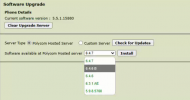
Well, I don´t know what´s going on but I´m unable to update the Polycom phone software, I see multiple options but once I select one of them nothing happens, the phone keeps the current version (5.5.1.15880).

1738952746613.png

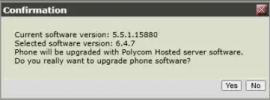
I've already tried all versions on that list, see bellow.

1738952816036.png

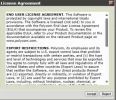
I accepted license agreement but the phone isn´t rebooting nor installing any update.

1738952875092.png

Is there something else I could try?

Thanks for all your kind support.

Sincerely.
 
You could try Polycom support
 

Members Online Now

No members online now.

Forum statistics

Threads
111,831
Messages
589,277
Members
164,660
Latest member
RJenkinsROCK