Possible Bug - Holidays

BruceA

Silver Partner
Joined
Jan 17, 2024
Messages
4
Reaction score
0
As with many people on the forums lately, ran into an issue with the usage of the new way of handling holidays in v20. Have had other instances work just fine, add the script, go to departments, add the holiday and the audio file, test and works.

Until last week, set it up for a customer, 5 departments/locations, holiday setup on all 5, but it only got triggered on one of the departments (not the default). Cue the confusion and panic calls from the customer when it wasn't working. Found a "workaround" to at least get them going for the holiday until it could be searched more.

Long story short, worked out in the troubleshooting that you HAVE to set Office Hours on the department, even if you end up removing them, the need to be set at least once. Of the 5 departments, one had them long ago and then removed them, the others didn't have any, so that one department worked while the others failed. Tested this on two separate instances to confirm it was the issue and solution.

If this isn't a bug, then it should at least be made clear on the instructions when setting everything up, I rechecked the guide online and it mentions nothing about setting the hours in any way.
 
When a department is setup on 3CX office hours are created by default, albeit they are always in office so from 00:00 to 00:00 Monday to sunday.
 
  • Like
Reactions: fxbastler
When a department is setup on 3CX office hours are created by default, albeit they are always in office so from 00:00 to 00:00 Monday to sunday.
When creating a new department in v20, yes it does, but not if the departments were migrated from v18

https://www.3cx.com/blog/releases/v20-upgrade-checklist-faq/
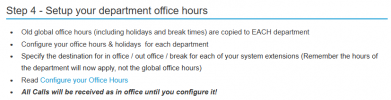
"Old global office hours (including holidays and break times) are copied to EACH department
Configure your office hours & holidays for each department"
;)
Yes, saw this as well, and the usual function was if there were no office hours, it was treated as all day allow calls. The link you provided even says that all calls will be treated as in office until configured, which is what was wanted and it did work, until needing to use the holiday function. If it isn't a bug, that is perfectly fine, it just needs to be more clear that some things will not function correctly or at all unless the hours are set.
 
one had them long ago and then removed them, the others didn't have any, so that one department worked
I went to test this by adding a holiday to a client that has no hours set, but it worked. Then reread this sentence. They may indeed have had office hours set at one point. I vaguely remember removing them. That would likely have been on v18, back when we first set it up though.

I am pretty sure the rest of ours have hours set.

For some reason I was thinking you were talking about upgrading from 18 to 20, but maybe not? There have been a lot of upgrade threads recently...

Have you tried creating a new department?
 
I went to test this by adding a holiday to a client that has no hours set, but it worked. Then reread this sentence. They may indeed have had office hours set at one point. I vaguely remember removing them. That would likely have been on v18, back when we first set it up though.

I am pretty sure the rest of ours have hours set.

For some reason I was thinking you were talking about upgrading from 18 to 20, but maybe not? There have been a lot of upgrade threads recently...

Have you tried creating a new department?
Yes, creating a new department auto add's office hours, as Nicholas mentioned above.

As for the upgrade, we upgraded this customer about 2 months ago, but they haven't had a need for the holiday function after the upgrade until now and I had already done the same process for other customers, though they only had the default department and they worked fine, but they also had office hours set because they wanted specific out of hours messages played. Whereas the current customer doesn't have that requirement, it is the same message no matter what time you ring.
 
  • Like
Reactions: Evolute IT
Actually.....

https://www.3cx.com/blog/releases/v20-upgrade-checklist-faq/

View attachment 47609

Any configured Global hours will be copied over to each of the departments, if you didn't configure the office hours under the departments from the Version 18 Admin Console.
Yes, if there were global hours set they do get copied over, this company did not have global hours set, they didn't want them set, they just had all calls come through as if they were open.

So the assumption was, no hours set, everything will still just flow as it did previously (like the last bullet point above) and the calls did, except for when it came to the holiday script. Had to set office hours of some kind for each department (even if it gets removed immediately after) for it to start to work, once that was done for each department, everything worked as expected.
 

Latest Posts

Forum statistics

Threads
111,884
Messages
589,542
Members
164,741
Latest member
Carsonix