Preparing for v20 upgrade

Status
Not open for further replies.

Alphabetic

3CX MVP
Silver Partner
Advanced Certified
Joined
Jul 1, 2016
Messages
6,571
Reaction score
2,582
hi all

im following https://www.3cx.com/blog/releases/v20-upgrade-checklist-faq/ to prepare for the move to departments.

i've got 2 companies on the 3CX, got a tonne of DIDs for both companies, seperate offices, sites etc.

Step 2 says to move the queues etc to the correct dpt.

So, I thought I could just "send to group" and then configure the routing from the web client but apparently not as i'm only able to assign 1 routing to the department.

I seem to be unable to assign different DIDs to destinations under the one dpt - is this correct?

Am I going to have to create a new dpt for each destination pre v20 move?
 
Thats irrelevant from departments
 
Thats irrelevant from departments
Than i dont understand what you are trying to do.

In v20 thats the way to use department and ringgroups.
 
Youre saying forward numbers from the department. I can only assigned hours and extensions to the departments, I cannot specify where a did goes from the department tab.

So when I import from v18, where I have this GROUP:

1707922080865.png

1707921980950.png


Restored to v20 gives me:

1707922136283.png

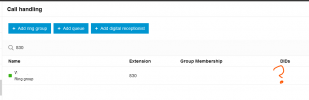
The number ive specified to go to RG 830 in v18 is now assigned to the DEPARTMENT.

Call Handling doesnt show anything for the RG.

Assigning the DID to the RG removes it from the department.
 
v18 routing

1707922337375.png

1707922365784.png

This is like the behaviour of when you set up a SIP trunk, specify the destination but theres no inbound rule for it.
 
Youre saying forward numbers from the department. I can only assigned hours and extensions to the departments, I cannot specify where a did goes from the department tab.

So when I import from v18, where I have this GROUP:

View attachment 39714

View attachment 39713


Restored to v20 gives me:

View attachment 39715

The number ive specified to go to RG 830 in v18 is now assigned to the DEPARTMENT.

Call Handling doesnt show anything for the RG.

Assigning the DID to the RG removes it from the department.
Yes i know what you are talking about.

in v18 you used the inbound rule to assign the did to a group.

Groups in v20 are departments.

To get the same features and more you need to assign the did to the apartment, go to call forwarding and choose the department und there you need to assign the ringgroup with all the members of the department.
 
So i've unassigned the number and it shows as this:

1707922854055.png

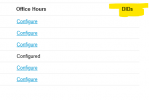
Because it isnt assigned to the department (i dont know how do to that? Only got assigned to the DID part when I did a restore from v18) my department admin cannot see the number. So, I guess my question is - What is the point of the DID column in the department tab If it cannot be configured?

1707922940652.png
 
If you assign the DID to a department (you do that via Call Handling > Select dept > Assigned DID numbers), you can specify what you want to do with calls to that DID during office hours, breaks and such.
You can there select the queue to forward to. You can also play a (intro)prompt.

In the queue itself, you can also specify what the queue needs to do when it's office hourse, breaks and such. Since you already set this up on the department-level, you best leave them at 'accept anyway'.

I suppose this only really makes a difference if someone were to call a queue on it's internal number (eg. 800) instead of the real E164 number. But that doesn't happen that much in SMB's, if at all.
 
Yes i know what you are talking about.

in v18 you used the inbound rule to assign the did to a group.

Groups in v20 are departments.

To get the same features and more you need to assign the did to the apartment, go to call forwarding and choose the department und there you need to assign the ringgroup with all the members of the department.
Im assigning the DID to the RG and the RG to the department.

If I was assigning the DID to the department then it would show here, it isnt.

1707923761467.png
 
ffs...

I see it now. Why are departments labelled as "Live Chat - Text - Calls Menu"
 
  • Like
Reactions: bitn2
ffs...

I see it now. Why are departments labelled as "Live Chat - Text - Calls Menu"
There is a lot of stuff that is not logical... The worst is the translation. In office hours "Holidays" in German is "Urlaub" but it is translated to "Feiertage".. That is a big difference. And in departments its again "Urlaub" but that should be "Feiertage".
 
Ok so next question..

Whats the point/benefit of assigning a DID this way as opposed to assigning it directly to the RG?

so now its DPT > Call Handling > DPT > RG

When I can just go Call Handing > RG

The disadvantaged of assigning the DID via the department is now I cant see that the DID is assigned to the RG when looking at the RG lol :D
 
Ok so next question..

Whats the point/benefit of assigning a DID this way as opposed to assigning it directly to the RG?

so now its DPT > Call Handling > DPT > RG

When I can just go Call Handing > RG

The disadvantaged of assigning the DID via the department is now I cant see that the DID is assigned to the RG when looking at the RG lol :D
You can use office hours for the department und different user rights.. If you assign the did directly to the ring group you can only use the office hours of the users directly thats a lot of work to do if you have more than 2-3 users.
 
What do you mean? The RG is in the department so surely it just follows the office hours of the department?
 
You can use office hours for the department und different user rights.. If you assign the did directly to the ring group you can only use the office hours of the users directly thats a lot of work to do if you have more than 2-3 users.
The only other way would be to assign the did to the rg and assign the rg to the department to use the office hours of the department. but i am not sure that it is working this way.
 
I have specified the department within the RG, surely thats enough for it to inherit the office hours of the dpt?
 
I have specified the department within the RG, surely thats enough for it to inherit the office hours of the dpt?
Yes thats works... i tested it just in this moment. So you can assign the did to the rg and the rg to the department to use the office hours of the department.
 
yeah exactly.. so Im saying why use call handing to assign the DID to the DEPT when I can assign it directly to the RG?
 
yeah exactly.. so Im saying why use call handing to assign the DID to the DEPT when I can assign it directly to the RG?
Dammit it doesnt work.... if the user is still avaiable the office hours doesnt work. I need to test further.
 
I give up for today. The office hours doesnt work as aspected for me.

If i assign office hours to the department, the ring group to the department and the user and the did to the ring group, i am getting the call doesnt matter if in or out of office hours.
 
  • Like
Reactions: Plains_JosephW
Status
Not open for further replies.

Forum statistics

Threads
111,973
Messages
590,079
Members
164,899
Latest member
mazet