Prioritized Hunt skipping first two users

Status
Not open for further replies.

kjuzs

SMB User
Joined
Aug 24, 2022
Messages
26
Reaction score
3
We are using 3CX StartUp Pro hosted by 3CX on our desktop PCs and mobile phones (no desktop phones). Incoming calls are answered by a digital receptionist set up to route calls to a ring group if caller dials 5. That ring group consists of 5 users and it is a prioritized hunt. Calls that go to that ring group always skip the first two users and start with the third one, then fourth etc. This happens even though first two users are available. These first two users are also Owners of the system while the remaining three are not - although that should not make any difference?
 
This happens even though first two users are available
Are they also available in Status? Make sure all agents are set to Available and do not have any custom status override in place.
No, it should not matter that they are System Owners.
 
Yes, Available in Status and no custom override. I'm one of the two whose been skipped. My status is Available and I see a call coming in to the general pickup (that has the prioritized hunt) and it rings on the third user's line without ever ringing mine
 
Do a quick test and see if that works. Set the Ring Group in "Ring all" mode and see if your extension rings that way. That will give us an indication of where the issue might be.
 
OK, I did as you suggested, set Ring Group to Ring All and tested it I did get that ringing for me (and also the other extensions at the same time as well).
 
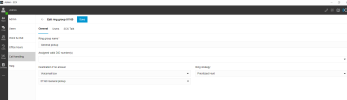
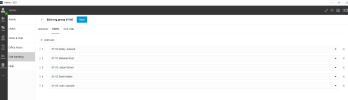
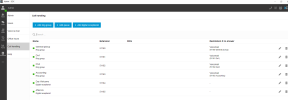
That seems very odd. Can you send us a few screenshots of the Ring Group configuration and the call handling section?
Are these 2 extensions members of another Ring group that might make them busy at the same time?
Do you have Ring my mobile simultaneously enabled on any of the extensions?
 
The two extensions are also part of the Accounting ring group. However, I literally could see the third user's extension ringing for General Pickup and the first two extensions with Available Status while that third extension rang. I do see that the first two extensions do have Also ring my mobile enabled and the other three don't. Is that the problem?? If we cannot have that enabled, how will we know there is a call if we are out somewhere and only have our mobile phone with us?
 
...how will we know there is a call if we are out somewhere and only have our mobile phone with us?
Use the 3CX app
 
Also ring my mobile enabled and the other three don't. Is that the problem??
That shouldn't be a problem. Have you had a look at the 3CX Activity log, in Verbose, after a call attempt, to see if there is some reason shown, as to why it is not ringing?
 
we have StartUp Pro and I dont see where you can access the Activity log?
 
yes, I do have the 3CX app on the mobile phone.
You don't need the box checked then - the mobile app rings regardless of that box (it would be the box for push notifications instead) - that box has to do with making an outbound pstn call and calling whatever number is set under mobile when someone calls the 3CX extension.
 
I do see that the first two extensions do have Also ring my mobile enabled and the other three don't. Is that the problem??
It should not be an issue either way but disable it so we can test. It could be that the call is also forwarded to your mobile number and your provider does not like the call and cancels it. Just disable it for a test and let me know.

Also change the order of the extensions and make another test. Put your user to the bottom and try again.

For the record I tried your scenario and it works fine for me so we are missing something obvious in the configuration.
 
It should not be an issue either way but disable it so we can test. It could be that the call is also forwarded to your mobile number and your provider does not like the call and cancels it. Just disable it for a test and let me know.

Also change the order of the extensions and make another test. Put your user to the bottom and try again.

For the record I tried your scenario and it works fine for me so we are missing something obvious in the configuration.
I wonder if the 3CX app also installed on the same device sees the GSM call come in and sends a cancel or if the reverse happens and that's why it's not ringing, although I wouldn't suspect it would be that fast.
 
OK, so disabling the "Also ring on my mobile" option for the first two users worked! Our provider is Voxtelesys, if that is any help with figuring out why disabling that option would work. Thanks for your help!

Also, for the record, changing the order of the extensions (without disabling the ring my mobile option) didn't make any difference.

For my future ref, is there an activity log somewhere that i can view? We use StartUp Pro
 
If you leave the ring my mobile option, on that extension, and call the extension directly, does it ring both the mobile and the set? If you change the mobile destination, to some other number, a landline or different mobile number, does it work either directly, or for a ring group call?

It is odd that the call is not being ended, as if the mobile is answering, but simply not ringing that extension at all.

Do you have other extensons that use the ring my mobile option, are they in a ring group?
 
OK, so disabling the "Also ring on my mobile" option for the first two users worked! Our provider is Voxtelesys, if that is any help with figuring out why disabling that option would work. Thanks for your help!
Leejor is right, if you call the extension directly and the ring mu mobile option is enabled does it work? Does your mobile ring along with your extension?
Also how is your mobile number formatted? Do you have 10 digit format, 11 digit format or any dashed added to the number?
 
I set "ring my mobile" option to ON and had another user call my extension directly. Both desktop and mobile phone rang. I then set that option OFF and had the user call my extension again and both desktop and mobile phone rang also. Didnt try changing mobile extension yet. All the mobile numbers are formatted as 10 digits with dashes eg 999-999-9999
 
You put dashes in the numbers? I've not seen that done before. Maybe that is the problem. These numbers are not normally seen and should not require formatting for visual clarity. Perhaps try removing the dashes before doing other testing.

If you do that and it still fails...

Have another internal user call the ring group, when the Ring my mobile was enabled in your extension? Does that work, rather than failing when it is an outside caller?

If that also fails, then...

Turn off the ring my mobile on your extension, have the same person call the RG again...does it still fail?

If not, then turn the option back on but change your mobile number to a landline number. Have the internal caller try it again.

You are trying to find out if there is some condition that your mobile provider, or the way the call is being routed out that is having an affect.

Did you look at the 3CX Activity Log (Verbose), for a failed call. in particular where it is attempting to "reach" your extension?
 
Last edited:
  • Like
Reactions: YiannisH_3CX
Status
Not open for further replies.

Members Online Now

Forum statistics

Threads
111,831
Messages
589,277
Members
164,660
Latest member
RJenkinsROCK