- Joined
- Feb 3, 2019
- Messages
- 6
- Reaction score
- 3
Hello everyone,
I have 3cx installed on an instance on amazon aws.
Operating system --> Debian
License --> 3cx business NFR
PAbx 3cx is in version 16 (last update)
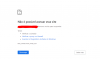
The PBX functioned normally until Friday, September 11, when the server was turned off and on Monday, the 14th, it was turned on again, since the 14th it has not been possible to access the management console, connect the Android app, webclient. When I try to access the browser, according to the browser message, it is not possible to access the site because the address took too long to respond.
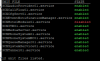
Acessing the ssh server, the services are running, only 3cxHotelModule01 is disable.
Doing a test, when I call the phone I am answered by the IVR loaded in the 3CX.
Best Regards.
I have 3cx installed on an instance on amazon aws.
Operating system --> Debian
License --> 3cx business NFR
PAbx 3cx is in version 16 (last update)
The PBX functioned normally until Friday, September 11, when the server was turned off and on Monday, the 14th, it was turned on again, since the 14th it has not been possible to access the management console, connect the Android app, webclient. When I try to access the browser, according to the browser message, it is not possible to access the site because the address took too long to respond.
Acessing the ssh server, the services are running, only 3cxHotelModule01 is disable.
Doing a test, when I call the phone I am answered by the IVR loaded in the 3CX.
Best Regards.