


- Joined
- Jan 22, 2016
- Messages
- 4
- Reaction score
- 0
Since upgrading from v14 to the latest 3cx version we have experienced a number of problems with our phone system.
Firewall checker failing
cisco spa502g hard phones not provisioning
The first thing I noticed the file wall checker is responding with a number of errors. Please see below...
Please note we did not have these errors with v14.
We also have SIP Alg disabled on our Draytek Vigor 2830n v2
Turned off windows firewall
turned of webroot secure anywhere
Then attempted to re run the firewall checker but with the same result.Please see below...
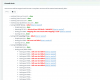
From the error mapping is showing as using 1239 how do I change this to 5060 on the phone system?
The phone system is running on windows server 2012 using Hyper V.
We have two network cards on the server. One network card is used to route inbound calls and the other is the local lan IP of the phone system.
One thing I did find is windows soft phone app phones provision and work inbound and outbound when we are connected to our wireless network. when we are wired using ethernet the phones will not work inbound or outbound.
Any advise would be greatly appreciated.
Firewall checker failing
cisco spa502g hard phones not provisioning
The first thing I noticed the file wall checker is responding with a number of errors. Please see below...
Please note we did not have these errors with v14.
We also have SIP Alg disabled on our Draytek Vigor 2830n v2
Turned off windows firewall
turned of webroot secure anywhere
Then attempted to re run the firewall checker but with the same result.Please see below...
From the error mapping is showing as using 1239 how do I change this to 5060 on the phone system?
The phone system is running on windows server 2012 using Hyper V.
We have two network cards on the server. One network card is used to route inbound calls and the other is the local lan IP of the phone system.
One thing I did find is windows soft phone app phones provision and work inbound and outbound when we are connected to our wireless network. when we are wired using ethernet the phones will not work inbound or outbound.
Any advise would be greatly appreciated.


