Problem in Voice Between Head Office PBX and Remote Locations-Saudi Arabia

Status
Not open for further replies.

Jawad Altaf

Free User
Joined
May 6, 2021
Messages
20
Reaction score
4
Greetings Support Team and Forum Members,
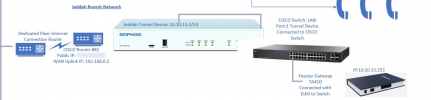
I am Facing a Sudden Issue in my 3CX PBX. I have On Premises 3CX Server installed in my Head office. I have a configured all the Remote Ethernet Devices with my Sophos Main Head office Firewall Sophos XG125. I made the Settings All by Self and they were Working fine since yesterday.
Today When i made a Call from my Local IP 10.10.10.92 from my Fanvil Telephone to the Remote Ethernet Device Subnet 10.10.13.1, 10.10.12.1 and VPN Subnet Made through the Sophos XG125 to Sophos XG 125 Firewall. Voice from Both Sides are not Coming.
Then i selected the PBX Delivers the option in my PBX interface afterwards the Voice is Clear. However, I am Being Informed that PBX Delivers the Audio is not Best Practice. Everything was working Fine till yesterday.
All the Remote Ethernet Devices have Their Separate Internet Connected with the WAN Port of my RED Sophos Device.
Attached is the Picture for Review for Jeddah Factory.
Please Advise me On this Issue. Will Appreciate the Response from the Support Team of 3CX.
1646663597756.png
 
Last edited by a moderator:
Any response
 
Hi!

First to explain what happens when "PBX Delivers audio" is NOT enabled.
In this setup, Phone Local Endpoint A calls Local Endpoint B, the 3CX Server will act as a "proxy" for the SIP messages, but the 2 endpoints will attempt to exchange audio directly between the 2 devices, not via the 3CX Server.

That means that if Endpoint A is on 10.10.10.xx and Endpoint B is on 10.10.13.xx, then there needs to be routing between these 2 subnets, otherwise audio will not flow back and forth.

When you ENABLE "PBX Delivers Audio", the 3CX Server also acts as a "proxy" for the Audio packets as well as the SIP packets.
This means that in the same scenario as above, the 2 subnets don't need to have routing between them, all that you need is that they can both "talk" to the 3CX Server freely.

So, I am going to guess that the reason that without the "PBX Delivers Audio" option you have no audio is because for some reason, the subnet of endpoint A can't send audio/RTP packets to the subnet of Endpoint B.
Why, I have no clue, but this is what I would investigate.

Having "PBX Delivers Audio" enabled is not "bad practise", but because all RTP traffic flows via the 3CX Server, if it can be avoided it is better. If it can't though, I wouldn't worry much, it's just a shame that 2 IP Phones on the same subnet will have to have their audio "proxy'd" via the 3CX Server that may cause more traffic on the network than is really required.
 
Greeting Mr. Nick, thank you for your Response. Today, I have Checked my all Subnets and there is Problem in all the Subnets connected with my Local Firewall Subnet of 10.10.10.X to (VPN) 10.10.11.X, Remote Ethernet Devices Subnet in ( 10.10,12.X and 10.10.13.X).I didn't made any Specific Changes in my Firewall Rules for the Traffic of VOIP. If I contact from my IP Phone Subnet 10.10.10.X to Extension Running mobile Application of 3CX i don't face problem of Voice issue Kindly inform me what settings i should check in the PBX which can solve my problem. I am Running all my Remote Subnets with PBX delivers Audio Option. I am New to 3CX with Basic knowledge of 3CX. I also Contacted my Partner for this Issue from whom I got my license renewal but they informed to run the PBX deliver audio Option check in. Note: I using 3CX this 3CX version.
ReleaseV16 Update 8A FINALOut Of Date16.0.8.9
 
Note: I using 3CX this 3CX version.
ReleaseV16 Update 8A FINALOut Of Date16.0.8.9
Starting from the end, you should talk to your Partner and ask them to upgrade your system to the latest update of V18!

To your next question, as I explained in my previous reply, there are no 3CX Settings that can help the Endpoints communicate directly between each other, this is something that needs to be done on the Network.

BUT

Having "PBX Delivers Audio" enabled is a completely valid option here. We have actually built this option many years ago for exactly scenarios like yours, when endpoints of one VLAN cannot "speak" directly to another VLAN.

The only thing I commented on is that IF it can be avoided, then even better, if you can't avoid it, then there is no problem at all.
 
Status
Not open for further replies.

Forum statistics

Threads
111,974
Messages
590,083
Members
164,901
Latest member
Silent_Guru