- Joined
- Nov 25, 2024
- Messages
- 5
- Reaction score
- 1
Hi all! Hope you find well,
We have updated a 3cx On-Premise solution from v18 update9 (31) to v20, important also that the previous version was configured on 5000 and 5001 ports.
So first, we tried to upgrade through the promt that appeared on 3cx panel, but that took too long (+1h) and we can't afford to keep the service down so long.
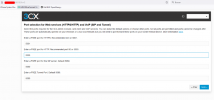
So we created a new instance, using the latest Debian ISO restored from a backup (license included). Here we run into the main problem. By default the new configuration works with ports 80 and 443, and when installing from a backup, we are not prompted to update the configuration file to change those ports.
We have tried, from the firewall, to redirect all incoming traffic pointing to FQDN:443 to the 3cx machine, but that configuration is not applicable in this case due to other configurations in the infrastructure.
We have to go back to ports 5000, and we see that the only recommended way is to reinstall, but again, on installation, while loading the backup and license, this option mentioned in other threads to load the edited config file is not available.
What can we do in this situation ?
We have updated a 3cx On-Premise solution from v18 update9 (31) to v20, important also that the previous version was configured on 5000 and 5001 ports.
So first, we tried to upgrade through the promt that appeared on 3cx panel, but that took too long (+1h) and we can't afford to keep the service down so long.
So we created a new instance, using the latest Debian ISO restored from a backup (license included). Here we run into the main problem. By default the new configuration works with ports 80 and 443, and when installing from a backup, we are not prompted to update the configuration file to change those ports.
We have tried, from the firewall, to redirect all incoming traffic pointing to FQDN:443 to the 3cx machine, but that configuration is not applicable in this case due to other configurations in the infrastructure.
We have to go back to ports 5000, and we see that the only recommended way is to reinstall, but again, on installation, while loading the backup and license, this option mentioned in other threads to load the edited config file is not available.
What can we do in this situation ?