Problem with establishing calls

Status
Not open for further replies.

KrzysztofComarch

Customer
Advanced Certified
Joined
Oct 2, 2020
Messages
10
Reaction score
1
Hi all,
When my customer is using 3CX App for Windows he has got problems with establishing call. When he call someone a call starts after a delay (more than 15 seconds).
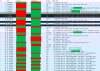
I'm adding screenshot from Wireshark, you can see the delay and TCP Retransmissions :
1602070425450.png
Could it be a bug in Windows 3CX App or only a problem with the network?
After the establishment everything works properly.
 
We had make new tests and after allowing any comunnication it works correctly.
In the log I can see communication on UDP 8093, 8092, 8100 and 8106, according to the documentation it should only be from 9000 to 10999. Why there is a communication on these ports (~8000)?
 
JohnS_3CX
could you support me in this topic please?
 
  • Like
Reactions: JohnS_3CX
Yes,

1. please provide full info as per the post above
2. advise whether other means work ok from same location (webclient, mobile app)
3. advise whether other users of the PBX have the same issue
 
As i said in the previous message we have find the solution:
We had make new tests and after allowing any comunnication it works correctly.
In the log I can see communication on UDP 8093, 8092, 8100 and 8106, according to the documentation it should only be from 9000 to 10999. Why there is a communication on these ports (~8000)?
 
  • Like
Reactions: JohnS_3CX
As for the documentation, it is indeed correct.

The reason I asked about 8000 was in case you ran a capture on all interfaces, you will also see traffic on the internal ports of the PBX using IP 127.0.0.1

You can ignore this safely, it is only used for troubleshooting purposes and those ports below 9000 do not need to be open on your firewall (it's internal PBX traffic)
 
Currently we have opened on our firewall ports 7000-8999, without them there is a delay ~15s in establishing connections.
 
Ah that is interesting. This would indicate that the clients are trying to connect via their local IP (local ports range is 7000-8499) yet for some reason, you needed to open ports on a firewall which doesn't add up.

I think the network setup you have may be able to tell us why this is happening. Care to share some details about the network layout you use? Is there a site to site VPN or some type of unusual routing being used? Where are the 3CX Windows clients located with regards to the PBX location for example?
 
Status
Not open for further replies.

Latest Posts

Forum statistics

Threads
111,964
Messages
590,008
Members
164,870
Latest member
nizammoktar