Problem with the Outlook 3xc Integration.

Status
Not open for further replies.

digitalosaurus

Free User
Joined
Jan 27, 2021
Messages
5
Reaction score
0
  • 3CX Version, e.g. Standard Annual 16.0.1078
  • Server OS, Debian
  • Is the 3CX Server Hosted and where? Yes on Azure
  • Trunk Provider or Gateway Make/Model Telematica (Austrian SIP Trunk) for out and incoming calls
  • Has the Firewall Checker passed: YES
  • Are custom Phone Templates being used: NO

Hi guys I hope you can help. I encountered following strange error after I have succesful installed the plugin for Outlook;

Every time I click on the call button within outlook I get no response not even an errormessage from outlook. It seems that outlook cant connect to 3cx. I also had the idea that that button is for ms teams, which seems to be false, because teams, although open, doesnt open or shows a call.

I am running out of ideas :/ Please help.
 
The Outlook integration works with the 3CX client for Windows. Do you have it running in your machine? Is it configured as a softphone or in CTI mode?
 
The Outlook integration works with the 3CX client for Windows. Do you have it running in your machine? Is it configured as a softphone or in CTI mode?
Hi,
I am using the client for Windwows, Its running. Its configured as softphone, as i have no physical telefon.
 
Then you should do the following:
1) Close 3CXPhone for Windows.
2) Delete the log files from "%AppData%\3CXPhone for Windows\Logs".
3) Start 3CXPhone for Windows.
4) Open the log file "%AppData%\3CXPhone for Windows\Logs\3CXPhoneForWindows.log".
5) You should see the following:
[27.01.2021 17:01:19.139][1] Pro added MicrosoftOutlookPlugin, Version=15.0.945.640, Culture=neutral, PublicKeyToken=bac47dd19dc4098a
[27.01.2021 17:01:19.139][1] Standard added MicrosoftOutlookPlugin, Version=15.0.945.640, Culture=neutral, PublicKeyToken=bac47dd19dc4098a
[27.01.2021 17:01:19.139][1] Targets override Standard, Pro MicrosoftOutlookPlugin, Version=15.0.945.640, Culture=neutral, PublicKeyToken=bac47dd19dc4098a

That means that the plugin has been loaded. If you don't see that, then it means there is an issue loading the plugin. You can send me your 3CXPhoneForWindows.log in a private message so I take a look, please do not post it here.
 
Thanks for sending me the logs, I can see that the plugin is properly loaded by the 3CX client:
[28.01.2021 07:03:23.519][1] Targets override Standard, Pro MicrosoftOutlookPlugin, Version=15.0.945.640, Culture=neutral, PublicKeyToken=bac47dd19dc4098a
[28.01.2021 07:03:23.519][1] Pro added MicrosoftOutlookPlugin, Version=15.0.945.640, Culture=neutral, PublicKeyToken=bac47dd19dc4098a
[28.01.2021 07:03:23.519][1] Standard added MicrosoftOutlookPlugin, Version=15.0.945.640, Culture=neutral, PublicKeyToken=bac47dd19dc4098a
[28.01.2021 07:03:23.520][1] Targets override Standard, Pro MicrosoftOutlookPlugin, Version=15.0.945.640, Culture=neutral, PublicKeyToken=bac47dd19dc4098a
[28.01.2021 07:03:23.520][1] Pro added MicrosoftOutlookPlugin, Version=15.0.945.640, Culture=neutral, PublicKeyToken=bac47dd19dc4098a
[28.01.2021 07:03:23.520][1] Standard added MicrosoftOutlookPlugin, Version=15.0.945.640, Culture=neutral, PublicKeyToken=bac47dd19dc4098a

Can you send me the other files you have in the folder "%AppData%\3CXPhone for Windows\Logs\"?

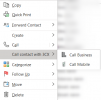
In Outlook, can you confirm that the add-in is properly added? You can check this from File > Options > Addins. Also, you should see a context menu "Call with 3CX". The standard "Call" menu provided by Outlook uses TAPI, you must not use that, you need to call with the 3CX menu option.
 
Thanks for sending me the logs, I can see that the plugin is properly loaded by the 3CX client:


Can you send me the other files you have in the folder "%AppData%\3CXPhone for Windows\Logs\"?

In Outlook, can you confirm that the add-in is properly added? You can check this from File > Options > Addins. Also, you should see a context menu "Call with 3CX". The standard "Call" menu provided by Outlook uses TAPI, you must not use that, you need to call with the 3CX menu option.
Hi, I can see the plugin installed in add ons, but i cant see the call with 3cx option. I will send you the other logs asap
 
What version of Outlook are you using?
 
Hi, I can see the plugin installed in add ons, but i cant see the call with 3cx option. I will send you the other logs asap
You will see this option when you right click on a contact, and the contact has phone numbers configured.
1611848933619.png
 
From the logs I can see that both the Outlook add-in (running inside Outlook) and the Outlook plugin (running inside the 3CX client for Windows) are properly running. So you just need to find this menu when you right click a contact in order to start calling them.
 
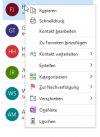
Can you share a screenshot of what you see when you right click a contact?
 
Can you show me a screenshot of what you see when you go to File > Options > Addins?
 
Status
Not open for further replies.

Latest Posts

Forum statistics

Threads
112,324
Messages
591,897
Members
165,475
Latest member
lastshadow