- Joined
- Mar 11, 2013
- Messages
- 4
- Reaction score
- 0
Hello,
I have a problem when configuring the Away profile for an extension in 3CX Phone System Management Console.
I have done some research on this issue over the past weeks but I couldn't find a solution.
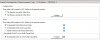
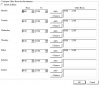
I configured on a dummy extension a set of Specific Office Hours (for example 01:00 to 05:00 Monday to Friday): This Extension has Specific Office Hours
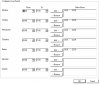
I then configured Automatically Switch To Away Profile During Break (between 02:00 to 03:00 Monday to Friday)
I checked the option Automatically Switch to Away Profile During Break
After applying the hours above, if the extension was already online, the system will accept the settings and switch to away profile and then to Out of Office as it should.
The problem is that when Office hours come the following day, the system will not switch the profile to Available. It will stay offline forever.
If I manually set it online and apply the settings, it will work but when it goes again to Out of Office it will not become Available again.
I tried this concept without having it switching to Away profile during break and its working fine.
Please help. Thank you!
I have a problem when configuring the Away profile for an extension in 3CX Phone System Management Console.
I have done some research on this issue over the past weeks but I couldn't find a solution.
I configured on a dummy extension a set of Specific Office Hours (for example 01:00 to 05:00 Monday to Friday): This Extension has Specific Office Hours
I then configured Automatically Switch To Away Profile During Break (between 02:00 to 03:00 Monday to Friday)
I checked the option Automatically Switch to Away Profile During Break
After applying the hours above, if the extension was already online, the system will accept the settings and switch to away profile and then to Out of Office as it should.
The problem is that when Office hours come the following day, the system will not switch the profile to Available. It will stay offline forever.
If I manually set it online and apply the settings, it will work but when it goes again to Out of Office it will not become Available again.
I tried this concept without having it switching to Away profile during break and its working fine.
Please help. Thank you!