Problems Transferring Outgoing Calls

Status
Not open for further replies.

bferreiraIT

SOHO User
Joined
Jun 20, 2024
Messages
7
Reaction score
0
Hi People,

I need your help to see if there is any way of overcoming this ‘problem’.

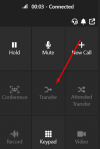
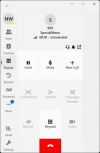
My users have the version ‘3CX Windows Softphone V20, 20.0.546.0’, and it happens that the operator / receptionist colleagues have to make calls to the outside and then pass it on to the user who requested it. In this version, the ‘transfer’ button is deactivated.

If we carry out the same operation with the previous version, the button appears without any problems.

Is there a solution?

If there is no solution, what do you suggest?

Old Version:
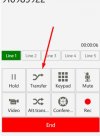
OLDVersion.jpg

NEW Version:
NEWVersion.png
 
through the admin console, select the user and click on view, make sure they have operations selected. This should allow them to do this such as pick up calls and make transfers
 
What is the version of your 3CX PBX ?
 
through the admin console, select the user and click on view, make sure they have operations selected. This should allow them to do this such as pick up calls and make transfers
I don't think it makes sense for it to be permissions. If the previous version worked fine.
I'm an OWNER and I have all the permissions and the new version doesn't show them either.
 
The only way I can replicate what youre seeing is by calling my voicemail. With the new version screenshot you are not showing where you are dialling.

1724760989471.png
 
The only way I can replicate what youre seeing is by calling my voicemail. With the new version screenshot you are not showing where you are dialling.

View attachment 43477
The test is identical (OLD VS NEW) : I'm calling from my 3cx switchboard to my mobile phone, and once the call is established, I want to pass it on to a user of the switchboard (extension of the 3cx switchboard).

In practice, the company secretary has to make calls requested by colleagues and once the call has been made, it is passed on to the person who requested it! I think this is normal. This worked in the previous version and not in the new one.

Thanks
 
The call destination matters, some destinations will not complete the call setup (aka. 183 Session Progress). The button will not activate until the call is fully established. Examples are the voicemail of your mobile provider, certain IVRs you dial out to, certain provider messages.

You shouldn't be using the new call button though if your intent is to transfer. Either click transfer or attended transfer in your current already established call with the first caller.
 
This is undoubtedly a limitation of the new version. This has always worked in all versions.

In previous versions it works without problems!!!

It would be important for it to work in the new version...

I wish I could overcome this limitation of the version, my administration is already talking about buying another PBX!

This is a basic option that every organisation needs and only doesn't work in the client version available through the Microsoft Store.

Please help...
 
Status
Not open for further replies.

Latest Posts

Members Online Now

Forum statistics

Threads
111,831
Messages
589,276
Members
164,660
Latest member
RJenkinsROCK