Problems with EPOS Connect & 3CX Webclient

Status
Not open for further replies.

eagle37

New User
Joined
Jul 2, 2020
Messages
52
Reaction score
5
I am using 3CX with a EPOS MB Pro 1 UC ML headset. When I first installed this headset 2-3 days ago, it was working fine, and in the softphone configuration of EPOS connect, 3CX Webclient was configured as the default device. Now the default softphone configuration is blank in EPOS connect, 3CX webclient is no longer a selection, and the headset is working inconsistently. I've tried uninstalling and reinstalling EPOS connect, the EPOS 3cx plugin, the chrome browser plugin, and reconfiguring the EPOS integration in the 3CX web-client. No luck with any of these.

EPOS Connect 4.2.2.1053
BTD 800 2.15.8
MB Pro 1 2.6.16
3CX 16.0.1078

Any help is appreciated. Thank you
 
Hi! I think there is some confusion here.

You are talking about 2 different clients here:

Web Client / Browser Extension
  • Web-based client that does not require anything to be installed on the 3CX Server (apart from the browser of course)
  • Does NOT require the EPOS 3CX plugin
  • Does not require you to select the default Softphone option in the EPOS Connect software.

Windows App
  • Is installed on a Windows PC
  • DOES require the EPOS 3CX plugin
  • Does not require you to select the default Softphone option in the EPOS Connect software.

Which of the 2 are you using?
Note that using both at the same time on the same PC with the same headset could cause issues of course. If this is the case, choose one, close the other, then see if the issue remains.
 
  • Like
Reactions: SuperTima
That does help - thank you. I am using the web client/extension and will remove the EPOS 3CX Plugin. I notice that, when I make a call, the 3CX webclient is populated in the EPOS default softphone config. When I hang up, it disappears. When a call comes in, if I answer via the web client, sometimes, sporadically, I cannot hear the caller. The answer button on the headset ear also does not work. Any help is appreciated. TY
 
Ok, so not only does the integration not work sporadically, but when this happens, you don't even have audio.
Could it be that the BT dongle loses connection with the headset or the battery has started dying on the headset?

Without disclosing any names, I had a similar issue with another manufacturer a few years ago, and since then, while BT is fantastic, for work purposes I always make sure to have either a wired headset, or one that can operate over BT or wire.

Would you happen to have another headset, even the same model, just a different one with a new BT dongle and try it?
 
I'm using the headset myself to try and pinpoint the problem and I'm starting to suspect it's blue tooth, as well. We ordered 4 of these headsets and I've given one to another person to demo and they are experiencing the same issues with a different desktop, but they are using the MB Pro 2 version of the headset (2 ear vs 1 ear). Our Yealink desk phones with Plantronics headsets work flawlessly with 3CX. If I don't find any new information soon, I'll try plugging the dongle into our desk phones and see if the same behavior transfers. I'll report back. TY
 
  • Like
Reactions: NickD_3CX
It appears that the no audio problem happens when a call comes in and the headset is on the base. When I pick up the headset, the call answers automatically, but I never hear any sound. If I click the answer button on the headset, it hangs up the call. If it can hang up the call, then it's communicating with the dongle. I believe the last variable in play, here, is that the headset is on the stand for a period long enough for it to power itself off. I understand they recently changed this timeout and it's not able to be changed, so I need to confirm some info to test this. I will update if I find anything further.
 
In the last two years we've had a bunch of issues with the EPOS/Headsetup software like:
https://www.3cx.com/community/threa...dows-client-wont-open-as-standard-user.70151/
https://www.3cx.com/community/threads/some-users-cant-answer-calls-from-digital-receptionist.71384/

In the second, back in March 2020 we had concluded that the web client had problems answering calls arriving via a ring group via the digital receptionist with our headsets and came up with two paths that did work:
1) set headset integration to None, and answer call with web client
2) set headset integration to Sennheiser, and answer call with headset button
...and don't mix those up.

Now, it's been a year, so EPOS/Sennheiser may well have updated their software (also 3CX did of course), and we haven't tested further. I just got into the habit of clicking the answer button in the client to answer, and when I started working from home last year I just never bothered installing the headset software...meaning it's basically just a mic and speakers. That works fine in either client. We have SD Pro2 which is DECT not Bluetooth as we wanted the range to walk to our lab room.

Edit: to clarify, AFAIK without the EPOS software the only thing missing is using the button on the headset to hang up or answer. And it's used for firmware updates for the headset and base.
 
Last edited:
Steve, Thanks for the reply. I seems to be experiencing a different, although possibly related, issue and I'm experiencing it as I am typing this. A call is coming in and I can answer with the web client, but hear nothing on the headset. Clicking the ear of headset does nothing. The BTD 800 device in device manager shows operating normally. EPOS connect is recognizing the BTD 800 and the MB Pro 1 UC ML as connected and active. I tried disabling the headset integration in 3CX and there is no change. The headset is also now configured as the default speaker on the computer, so I tried playing normal sounds through windows, and there is also no response from the headset. I also did a full reset of the MB Pro and repaired it with the dongle. Now windows sounds work, but the MB Pro is still unresponsive to the 3CX Webclient. EPOS support had me disable "Enforce deprecation of legacy TLS versions" in chrome, but his has not changed anything. EPOS has escalated my case to engineering with all the data I just provided here.
 
2) set headset integration to Sennheiser, and answer call with headset button
...and don't mix those up.
Just a small comment, this indeed was an issue some time ago, but we worked with EPOS and it should be fixed since Update 7 if I remember correctly.

but the MB Pro is still unresponsive to the 3CX Webclient
With this, do you mean "no sound" or that "the buttons don't work", or both?
Also could you check in the Web Client, in audio drop-down, if you have the "BT800" as an option AND the "MB Pro 1 UC ML"?
If you have both, could you try selecting the BT800 dongle?

Also one more thing, after the timeout elapses, after which if you would answer a call in the Web Client you would have no audio, if instead of answering a call, you opened a youtube video, do you hear audio?
 
this indeed was an issue some time ago, but we worked with EPOS
Ah, thanks, I'll let my team know. Didn't see it in the EPOS or 3CX release notes. :)
 
  • Like
Reactions: NickD_3CX
Just a small comment, this indeed was an issue some time ago, but we worked with EPOS and it should be fixed since Update 7 if I remember correctly.


With this, do you mean "no sound" or that "the buttons don't work", or both?
Also could you check in the Web Client, in audio drop-down, if you have the "BT800" as an option AND the "MB Pro 1 UC ML"?
If you have both, could you try selecting the BT800 dongle?

Also one more thing, after the timeout elapses, after which if you would answer a call in the Web Client you would have no audio, if instead of answering a call, you opened a youtube video, do you hear audio?

Nick,

I am running 16.0.1078.

BT800 is the only option in the 3cx webclient headset integration.

The button on the headset earpiece does nothing.

At the time of my last post, I could not hear sounds from the operating system or 3CX. At the instruction of EPOS support, I reset the MB Pro and repaired it to the BT800. Now I can hear sounds from Windows, but still nothing from 3CX.
 
Under settings > Personalize > audio/video, the headset integration in the website is set to none even though the headset integration in the dialer is set to Seinnheiser. I cannot change this setting in the website... any ideas?
 
By "dialer" do you mean the browser extension?
Stretching my memory, is the EPOS and browser running in the same context? (not one as admin and other as standard user)
On my PC (without EPOS installed) if in the web client I change the active device from 3CX Client for Windows (which I'm using) to Web Client then Sennheiser is listed and I can pick it, however it shows "Error connecting to HeadSetup Pro" since I don't have the software installed.
 
I set up a Sennheiser/EPOS headset we have for testing, although not the same model you're using, and the configuration to have it work is this:
1616077929022.png

This way:
- Audio works both ways in the WebClient
- Controls work on the headset

Obviously if you want the controls to work, you need the EPOS Connect software to be installed.

If you don't hear audio, check the Audio Devices, also maybe check that browser settings, in case there is some setting that blocks audio for this specific site (or you have blocked it accidentally).
Also one more thing if there is still no audio, try and find the most plain and simple headset you can, connect it to the PC, and try with that, just to make sure the "no audio" problem is not something else.
 
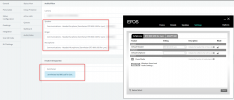
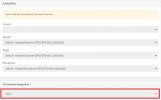
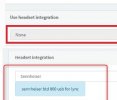
The issue seems to be the "headset integration" setting. EPOS connect is installed. The headset integration is configured in the Chrome 3CX browser extension, but it is not acknowledging this configuration in the 3CX web client. The 3CX web client says "none" for headset integration. Speaker, ringer, and microphone are set correctly. This issue exists on multiple desktops for the same headset model.3cx epos1.jpg3cx epos2.jpg3cx epos3.jpg
 
Last edited:
No it looks correct because you are using the Browser Extension, so you opened the Browser Extension and the audio devices and the integration are there.

I think you should do my last suggestion, connect just any old headset you may have, no integration or anything and see if it works.
 
Nick, How is it correct? Your headset integration in the web client says Seinnheiser and mine says none?
 
Nick, How is it correct? Your headset integration in the web client says Seinnheiser and mine says none?
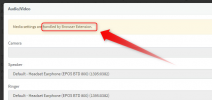
Because have activated the Browser Extension, I had not. The message even tells you that....
1616082963427.png
 
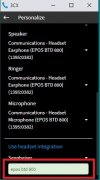
We are clearly having a disconnect here. Look at my setting below vs yours. The browser extension says it is handling the configuration, but it is not. I disabled your disabling of the headset integration field in the browser and forced my headset integration to Sennheiser (to match yours) and now it works. The browser extension is not properly setting this field. Are you using a different 3cx version than I am? Your screenshot header language is "Headset Integration" and mine is "Use Headset Integration". TY

3cx epos.jpg
 
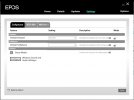
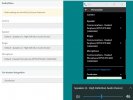
In addition, if I change the default speakers in windows, the web client updates to this configuration, as well, even though the web extension is not configured to use the system default and I am specifying the headset. The web extension settings are being ignored.3cx epos4.jpg
 
Status
Not open for further replies.