- Joined
- Oct 25, 2021
- Messages
- 17
- Reaction score
- 3
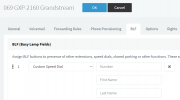
I’m unable to program BLF dialcodes for the physical butons as the 3cx daily provisioning wipes out codes entered directly on the handset. I’ve copied the Grandstream 3CX template and want to program two BLF buttons in the template for the IN/OUT of office codes (ie *641 and *642).
I’m not familiar with the code required to edit the template to achieve this and would appreciate some guidance please!
I’m not familiar with the code required to edit the template to achieve this and would appreciate some guidance please!
- 3CX Version, Professional 16.0.8.9
- Server OS, Debian
- Is the 3CX Server Hosted and where? Hosted by 3CX Reseller
- IP Phone Make/Model/Firmware version, Grandstream GXP2160
- Provisioning Method: SBC
- Trunk Provider or VoIP Gateway Make/Model, NetVault SIP Trunk
- Has the Firewall Checker passed: YES
- Are custom Phone Templates being used: YES