


- Joined
- May 17, 2018
- Messages
- 2
- Reaction score
- 0
Hi there,
I have a phone setup for my extension:
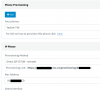
But when I try and auto provision my Yealink T46G, it just fails, with the log noting:
<134>May 17 16:39:42 LIBD[1184]: HTTP<6+info > Request Line: GET /provisioning/bXXXXXX/0XXXXXXd.cfg HTTP/1.1
<134>May 17 16:39:42 LIBD[1184]: HTTP<6+info > Host: XXXXXX.3cx.us
<134>May 17 16:39:42 LIBD[1184]: HTTP<6+info > User-Agent: Yealink SIP-T46G 28.82.0.20 00:XXXXXX:ed
<134>May 17 16:39:42 LIBD[1184]: HTTP<6+info > process response
<133>May 17 16:39:42 LIBD[1184]: HTTP<5+notice> response code: 404
<134>May 17 16:39:42 LIBD[1184]: HTTP<6+info > Chunked Encoding
<133>May 17 16:39:42 LIBD[1184]: HTTP<5+notice> response process finish!
<131>May 17 16:39:42 LIBD[1184]: HTTP<3+error > Client error, ret = 404
<131>May 17 16:39:42 ATP [1184]: ATP <3+error > https to file failed, code = 404, msg = Unknown Error, retry = 1
<132>May 17 16:39:42 ATP [1184]: ATP <4+warnin> Download mac.cfg fail
<134>May 17 16:39:42 ATP [1184]: ATP <6+info > Param err!
<134>May 17 16:39:42 ATP [1184]: ATP <6+info > send end provision!!
Furthermore, when I go to the URL https://XXXXXXX.3cx.us/provisioning/bXXXXXXXa/0XXXXXXXD.cfg directly in Chrome I get a 404.
I'm told in 3CX 15.x the files are generated on the fly. Further, I have removed and re-added the phone and have:
3CX Phone System Management Console ID: 10018
RPS request for Yealink T46 IP Phone of XXXXX (XX) delivered successfully
in my activity log. Is there something I'm missing/doing wrong?
I have a phone setup for my extension:
But when I try and auto provision my Yealink T46G, it just fails, with the log noting:
<134>May 17 16:39:42 LIBD[1184]: HTTP<6+info > Request Line: GET /provisioning/bXXXXXX/0XXXXXXd.cfg HTTP/1.1
<134>May 17 16:39:42 LIBD[1184]: HTTP<6+info > Host: XXXXXX.3cx.us
<134>May 17 16:39:42 LIBD[1184]: HTTP<6+info > User-Agent: Yealink SIP-T46G 28.82.0.20 00:XXXXXX:ed
<134>May 17 16:39:42 LIBD[1184]: HTTP<6+info > process response
<133>May 17 16:39:42 LIBD[1184]: HTTP<5+notice> response code: 404
<134>May 17 16:39:42 LIBD[1184]: HTTP<6+info > Chunked Encoding
<133>May 17 16:39:42 LIBD[1184]: HTTP<5+notice> response process finish!
<131>May 17 16:39:42 LIBD[1184]: HTTP<3+error > Client error, ret = 404
<131>May 17 16:39:42 ATP [1184]: ATP <3+error > https to file failed, code = 404, msg = Unknown Error, retry = 1
<132>May 17 16:39:42 ATP [1184]: ATP <4+warnin> Download mac.cfg fail
<134>May 17 16:39:42 ATP [1184]: ATP <6+info > Param err!
<134>May 17 16:39:42 ATP [1184]: ATP <6+info > send end provision!!
Furthermore, when I go to the URL https://XXXXXXX.3cx.us/provisioning/bXXXXXXXa/0XXXXXXXD.cfg directly in Chrome I get a 404.
I'm told in 3CX 15.x the files are generated on the fly. Further, I have removed and re-added the phone and have:
3CX Phone System Management Console ID: 10018
RPS request for Yealink T46 IP Phone of XXXXX (XX) delivered successfully
in my activity log. Is there something I'm missing/doing wrong?


